

Creating HVAC drawings is only one part of the design process. Engineering teams, contractors, consultants, and facility managers rely on properly plotted drawings that can be reviewed, approved, issued, and used during installation. Plotting layout and drawing output setup determine whether technical information remains clear when transferred from the design environment to printed or digital deliverables.
Many learners understand drafting commands but struggle when preparing drawings for issues. Before evaluating how training addresses this skill, it helps to understand how HVAC drawings move from design files to issued documentation, as explained in this guide on:
How Are AutoCAD HVAC Drawings Printed and Plotted for Issue?
Professionals evaluating structured learning pathways often compare self-learning with specialised programmes such as the:
Does Imperial’s HVAC Programme Teach Professional Drawing Plotting Techniques? discussion because plotting standards directly affect drawing quality, project coordination, and document control.
The AutoCAD HVAC and Plumbing Design Training Course addresses these practical requirements by teaching the processes that transform technical drawings into professional project documentation.
How important is plotting layout and drawing output setup in HVAC design projects?
Plotting layout and drawing output setup ensure HVAC drawings remain readable, scalable, and compliant throughout the project lifecycle. These processes control sheet presentation, line weights, text visibility, viewport configuration, and output standards that influence communication between designers, contractors, consultants, and project stakeholders.
HVAC projects involve large volumes of technical information. Air distribution layouts, duct routing, equipment schedules, piping arrangements, and coordination drawings must all be presented in a format that supports decision-making.
A drawing that appears correct in model space can become unusable if output settings are configured incorrectly. Text can become unreadable. Line weights can disappear. Symbols can overlap. Dimensions can lose clarity.
Plotting setup creates consistency across drawing packages. This consistency allows project teams to review multiple sheets efficiently.
In commercial projects, document control departments often establish plotting standards that every designer must follow. Training therefore focuses not only on drawing creation but also on preparing outputs that align with organisational standards.
For HR departments assessing technical development programmes, plotting competency represents a measurable workplace skill. Employees who understand drawing output procedures require less supervision during project documentation stages.
Key business outcomes linked to plotting skills
- Reduced drawing revision cycles
- Improved document consistency
- Faster drawing issuance
- Better contractor communication
- Lower risk of construction errors
- Enhanced quality assurance processes
What plotting layout concepts are typically covered during AutoCAD HVAC training?
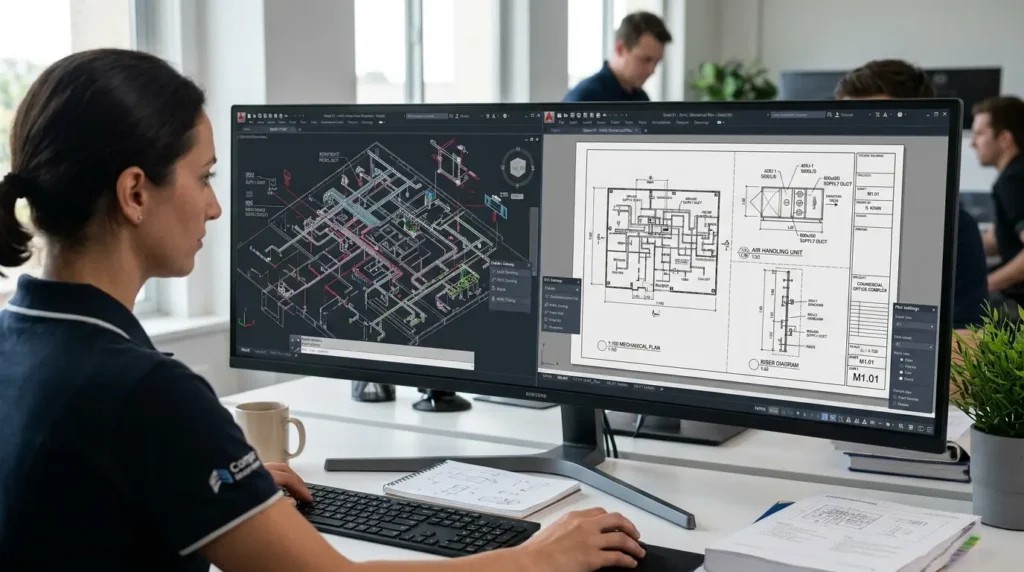
AutoCAD HVAC training generally covers sheet configuration, paper space management, viewport creation, annotation scaling, title block integration, plotting styles, and output settings. These competencies create the foundation required to produce professional HVAC documentation suitable for project review and construction activities.
Plotting begins with understanding the relationship between model space and paper space.
Model space contains the actual HVAC design. Paper space controls how that design appears on printed sheets.
Training commonly introduces learners to:
Layout creation
Participants learn how to establish drawing sheets for different project requirements.
Typical sheet sizes include:
- A4
- A3
- A2
- A1
- A0
Each format serves different documentation needs.
Viewport management
Viewports allow users to display portions of the HVAC model at specific scales.
Training focuses on:
- Creating viewports
- Locking scales
- Adjusting display settings
- Managing multiple views
This process becomes critical when presenting large HVAC systems on a single sheet.
Annotation scaling
Text and dimensions must remain readable regardless of drawing scale.
Participants learn how annotation scales maintain consistency across various plotting formats.
Without proper scaling methods, drawing documentation becomes difficult to interpret.
How does training address drawing standards and professional presentation requirements?
Professional HVAC training incorporates recognised drafting standards that govern drawing appearance, layer organisation, annotation methods, and plotting conventions. These standards ensure outputs remain consistent across multidisciplinary project environments and support effective collaboration between technical teams and stakeholders.
Modern construction projects involve multiple disciplines.
HVAC drawings interact with:
- Architectural drawings
- Structural drawings
- Electrical drawings
- Plumbing drawings
- Fire protection drawings
Consistency becomes essential.
Training therefore covers document presentation principles that support multidisciplinary coordination.
Layer management standards
Layer organisation influences plotting quality.
Participants learn how layers control:
- Visibility
- Line thickness
- Colour assignments
- Plot behaviour
Well-structured layers improve drawing management and simplify revisions.
Title block implementation
Title blocks contain critical project information.
Training often includes:
- Drawing numbers
- Revision details
- Project references
- Approval records
- Issue status indicators
These elements support document tracking throughout the project lifecycle.
Graphic hierarchy
Not every drawing element requires equal visual emphasis.
Professional plotting standards use varying line weights to establish hierarchy.
Examples include:
- Major ductwork
- Secondary ductwork
- Equipment outlines
- Annotation elements
- Reference information
This approach improves drawing readability.
How are plotting styles and output configurations taught within HVAC-focused programmes?
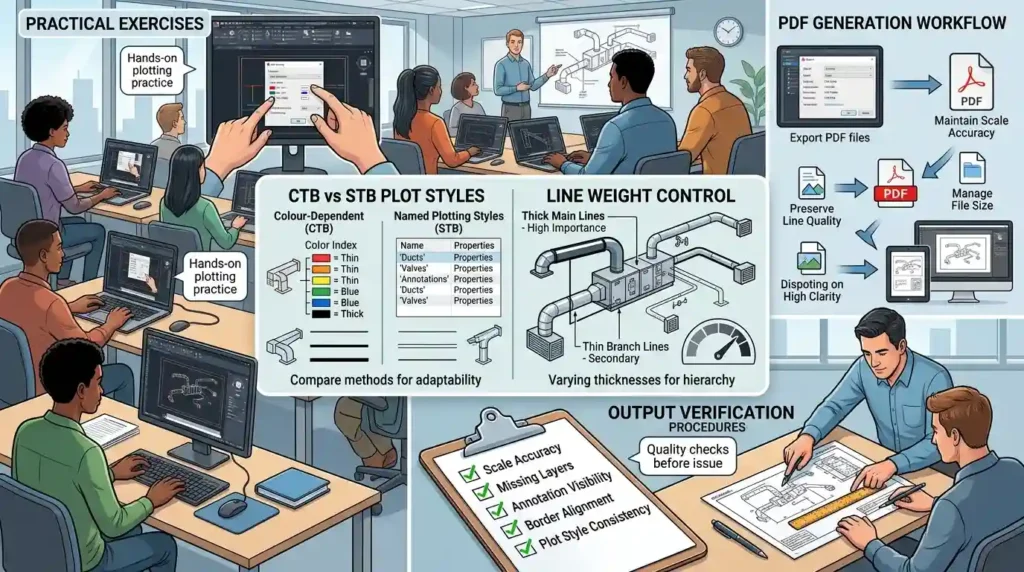
Training teaches plotting styles through practical exercises that demonstrate how colours, line weights, transparency settings, and print configurations influence final outputs. Learners evaluate different plotting methods and understand how output settings affect drawing clarity and project communication.
Plot styles represent one of the most misunderstood areas of AutoCAD documentation.
Many new users create technically accurate drawings but struggle to produce professional outputs.
Training commonly addresses:
CTB and STB plot styles
Participants learn the differences between:
- Colour-dependent plotting
- Named plotting styles
Understanding both methods improves adaptability across organisations.
Line weight control
Line weight settings influence visual clarity.
Training explores how different thicknesses communicate varying levels of importance within HVAC drawings.
PDF generation workflows
Digital documentation has become standard across the construction industry.
Learners typically practise:
- Exporting PDF files
- Maintaining scale accuracy
- Preserving line quality
- Managing file sizes
These capabilities support modern project delivery processes.
Output verification procedures
Before issue, drawings require quality checks.
Training often includes review procedures covering:
- Scale accuracy
- Missing layers
- Annotation visibility
- Border alignment
- Plot style consistency
These checks reduce documentation errors.
How does plotting training support workplace performance and project delivery?
Plotting competency improves documentation efficiency, reduces communication errors, and strengthens project coordination. Organisations benefit when technical personnel can independently prepare compliant drawing packages that meet internal standards and external project requirements without extensive supervisory intervention.
Technical skills must ultimately create business value.
Plotting knowledge contributes directly to project outcomes.
A poorly plotted drawing can create delays during:
- Design reviews
- Client approvals
- Construction planning
- Procurement activities
Training helps reduce these risks.
Impact on project timelines
Efficient plotting procedures reduce administrative delays.
When documentation teams understand output workflows, drawing packages move through approval processes faster.
Impact on quality assurance
Quality assurance departments depend on consistent outputs.
Standardised plotting procedures support:
- Internal audits
- Design reviews
- Compliance checks
- Revision management
Impact on workforce capability
HR teams increasingly measure technical development through practical performance indicators.
Plotting competency provides measurable evidence of skill application because employees can demonstrate improvements through completed project deliverables.
What learning approaches are most effective for mastering HVAC plotting and drawing output setup?
The most effective learning approaches combine technical instruction, guided practice, project-based exercises, and real-world documentation workflows. Learners develop stronger plotting competency when they apply output settings to realistic HVAC projects rather than relying solely on theoretical explanations.
Several training methods exist.
Their effectiveness varies significantly.
| Learning Approach | Plotting Knowledge | Practical Application | Workplace Readiness |
|---|---|---|---|
| Self-study tutorials | Moderate | Limited | Low |
| Video-only learning | Moderate | Moderate | Moderate |
| Classroom demonstration | High | Moderate | High |
| Project-based training | High | High | High |
| Structured HVAC design programmes | Very High | Very High | Very High |
Project-based learning consistently delivers stronger outcomes.
Participants gain experience handling:
- Multiple sheet sets
- Complex layouts
- Scaled viewports
- Plot style management
- Construction documentation standards
This practical exposure mirrors workplace expectations.
Why contextual learning matters
Plotting techniques become more meaningful when integrated into actual HVAC workflows.
Rather than learning isolated commands, participants understand how output configuration supports engineering documentation.
This contextual approach improves retention and application.
How can organisations evaluate whether an AutoCAD HVAC training programme adequately covers plotting skills?
Organisations should evaluate curriculum depth, practical exercises, assessment methods, project-based learning components, and alignment with industry documentation standards. Effective programmes demonstrate how plotting supports complete HVAC design workflows rather than treating output setup as an isolated software feature.
Training evaluation requires objective criteria.
Decision-makers should review whether programmes include:
Technical coverage
The curriculum should address:
- Layout creation
- Viewport configuration
- Annotation scaling
- Plot style management
- PDF output generation
- Quality control procedures
Practical assessment
Competency develops through application.
Assessment activities should require participants to create complete drawing packages rather than answer theoretical questions.
Workplace relevance
The strongest programmes align learning outcomes with real project requirements.
Examples include:
- Construction documentation
- Design review submissions
- Consultant coordination packages
- Client issue drawings
Decision framework for training evaluation
| Evaluation Area | Questions to Assess |
| Curriculum Scope | Does the programme cover complete plotting workflows? |
| Practical Exercises | Are learners producing actual HVAC drawing outputs? |
| Documentation Standards | Are industry plotting conventions included? |
| Quality Control | Are review procedures taught? |
| Business Application | Can skills transfer directly to workplace projects? |
When these elements are present, learners gain skills that extend beyond software operation and support broader project delivery objectives.
Discover More from Our Guide Library:
How Does AutoCAD HVAC Training Distinguish Between Schematic and Working Drawings?
How Are Sections and Construction Details Produced in AutoCAD HVAC Training?
The AutoCAD HVAC and Plumbing Design Training Course is often evaluated against these criteria because plotting layout and drawing output setup form an essential component of professional HVAC documentation workflows. Organisations seeking measurable technical capability development increasingly assess how programmes connect plotting procedures with real project outcomes, document quality standards, and operational efficiency objectives.
Frequently Asked Questions
What skills are taught in the AutoCAD HVAC and Plumbing Design Training Course?
The AutoCAD HVAC and Plumbing Design Training Course covers HVAC drafting, plumbing layouts, ductwork design, piping systems, drawing annotation, and plotting techniques. Imperial Corporate Training Institute focuses on practical design workflows used in building services projects.
Is the AutoCAD HVAC and Plumbing Design Training Course suitable for beginners?
Yes, the AutoCAD HVAC and Plumbing Design Training Course introduces core AutoCAD tools before progressing to HVAC and plumbing design applications. Imperial Corporate Training Institute structures the training to help learners build technical drafting and design skills step by step.
Does the course include HVAC drawing plotting and printing procedures?
Yes, the AutoCAD HVAC and Plumbing Design Training Course includes plotting layouts, viewport configuration, scale management, and drawing output setup. Imperial Corporate Training Institute teaches how to prepare professional HVAC drawings for review, approval, and project issue.
Why is AutoCAD important for HVAC and plumbing design projects?
AutoCAD helps engineers and designers create accurate HVAC and plumbing drawings that support installation, coordination, and documentation processes. The AutoCAD HVAC and Plumbing Design Training Course explains how digital drafting improves project efficiency and design accuracy.