

AutoCAD HVAC training integrates fire protection and sprinkler system drawings into its core curriculum. Professionals learn to draft precise layouts that comply with building codes and ensure safety. This coverage bridges HVAC design with life-safety systems.
Trainees master tools for symbol libraries, piping routes, and hydraulic calculations. They produce drawings that support integrated building services.
What Fire Protection Elements Does AutoCAD HVAC Training Address in Sprinkler Designs?
AutoCAD HVAC training addresses fire protection through sprinkler head placement, pipe sizing, and zoning layouts using dedicated layers and blocks. It covers standpipes, alarms, and suppression zones in 2D and 3D models.
Fire protection in HVAC contexts focuses on active systems like sprinklers. These systems activate during fires to control spread. Training emphasises AutoCAD commands for accurate representation.
Sprinkler drawings start with site plans. Trainees import floor plans and overlay fire zones. They use the Layer Properties Manager to separate sprinkler mains from HVAC ducts.
Key Components in Sprinkler System Drafting
Sprinkler heads require precise spacing. AutoCAD training teaches the ARRAY command for uniform placement. Heads follow NFPA 13 standards, with coverage radii of 3-4.6 metres.
Pipe routing demands elevation views. Trainees draw risers and branches with OFFSET and TRIM tools. They calculate flows using HASS blocks for hydraulic nodes.
Zoning divides buildings into fire areas. Training covers POLYLINE for zone boundaries. Each zone links to a control valve, drafted with dynamic blocks.
Standpipe systems integrate next. These supply hoses for manual firefighting. AutoCAD layers distinguish them from sprinklers, using linetypes like PHANTON for hidden pipes.
Integration with Building Codes
NFPA standards dictate minimum densities. Training modules simulate 6.1 mm/min water application over 232 m² areas. Trainees verify compliance with DIMENSION tools.
Smoke control ties in. HVAC pros draft damper positions linked to sprinklers. AutoCAD’s XREF command pulls in architectural refs for context.
HR teams value this coverage. They address skill gaps in multidisciplinary teams. A 2023 survey by ASHRAE notes 42% of HVAC firms lack integrated fire drafting expertise.
How Does AutoCAD Training Teach Hydraulic Calculations for Fire Protection Systems?
AutoCAD training teaches hydraulic calculations via node-based networks, pressure loss formulas, and flow balancing in sprinkler layouts. Software plugins like HydraCAD automate pipe friction and pump sizing.
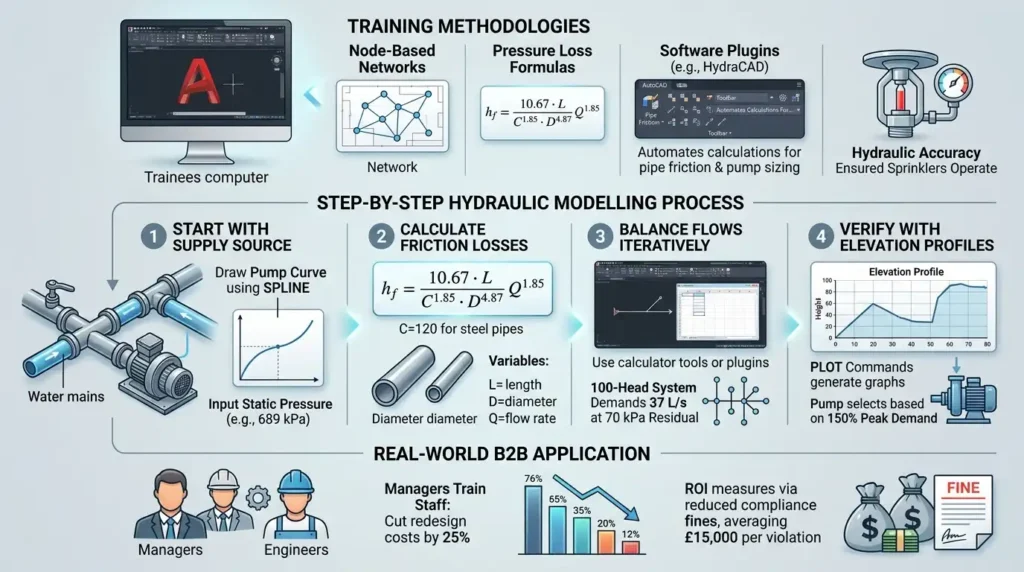
Hydraulic accuracy ensures sprinklers operate under pressure. Training dedicates sessions to modelling water flow from source to heads.
Trainees build pipe networks. They place nodes at junctions with INSERT commands. Each node records elevation and demand.
Step-by-Step Hydraulic Modelling Process
Start with supply source. Draw the pump curve using SPLINE. Training inputs static pressure at 689 kPa.
Calculate friction losses. Hazen-Williams formula applies: C=120 for steel pipes. AutoCAD computes head loss as hf=10.67C1.85D4.87LQ1.85, where L is length, D diameter, Q flow.
Balance flows iteratively. Training uses calculator tools or plugins. A 100-head system demands 37 L/s at 70 kPa residual.
Verify with elevation profiles. PLOT commands generate graphs. Pump selects based on 150% peak demand.
Real-world B2B application matters. Managers train staff to cut redesign costs by 25%. ROI measures via reduced compliance fines, averaging £15,000 per violation.
For foundational load concepts tying into these calculations, explore:
What Is Load Calculation and How Does It Relate to AutoCAD HVAC Design?
What Tools in AutoCAD HVAC Training Handle Sprinkler Pipe Routing and Conflicts?
AutoCAD HVAC training uses routing tools like PATHARRAY, 3DORBIT, and interference checks to handle sprinkler pipe routing. It resolves clashes with HVAC ducts via NAVISWORKS integration.
Pipe routing demands clash-free paths. Training simulates congested ceilings with real BIM files.
Trainees route mains along beams. FILLET creates smooth bends at 90 degrees. Linetype scales match 50 mm pipes.
Clash Detection and Resolution Techniques
Interference checking flags overlaps. Training runs INTERFERE command on 3D models. Sprinklers shift 150 mm from ducts.
3D modelling elevates accuracy. EXTRUDE converts 2D lines to solids. Training rotates views with 3DORBIT for vertical clearances.
NAVISWORKS links models. HR directors import IFC files for federated reviews. This cuts field rework by 30%, per Autodesk studies.
Branch lines drop via OFFSET. Hangers space every 3.7 metres, annotated with MTEXT.
Adoption rates climb. 68% of UK engineering firms use AutoCAD for fire systems, up 15% since 2022.
How Do Sprinkler Symbol Libraries Enhance Fire Protection Drawings in Training?
Sprinkler symbol libraries in AutoCAD HVAC training provide NFPA-compliant blocks for heads, valves, and alarms. Dynamic blocks scale and rotate for quick placement across scales.
Libraries standardise drawings. Training loads pre-built sets from Tool Palettes.
Pendent heads use BLOCK with attributes for K-factors. Training edits for quick-response types at 80 L/min.
Customising and Managing Libraries
Dynamic blocks adapt. Stretch parameters resize tees for 25-100 mm pipes. Training palettes organise by system type.
Attributes track specs. Trainees query quantities with DATAEXTRACTION. A 10,000 m² office needs 250 heads.
Alarms integrate. Bell symbols link to panels via LEADER lines. Training ensures BS 5839 compliance.
Workforce upskilling benefits. Training bridges gaps where 55% of HVAC techs lack symbol proficiency, per CIOB data.
What Role Does 3D Modelling Play in AutoCAD Training for Fire Sprinkler Systems?
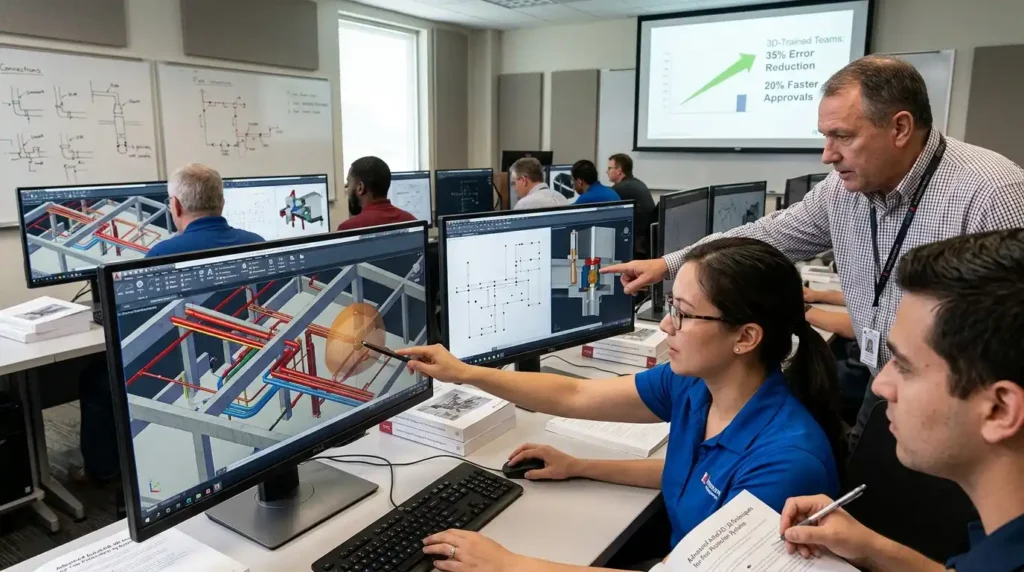
3D modelling in AutoCAD HVAC training visualises sprinkler volumes, simulates flows, and exports to fabrication. It uses UCS and SWEEP for realistic pipe assemblies.
2D limits insights. Training shifts to 3D for spatial validation.
Models start with grids. Training UCS aligns to building axes. Sprinkler grids extrude to coverage domes.
Advanced 3D Techniques for Fire Systems
SWEEP generates curved pipes. Training paths follow structural steel. Diameters taper from 150 mm mains to 20 mm drops.
Section views slice assemblies. Training SECTIONPLANE reveals hidden valves. Quantities export to schedules.
BIM coordination follows. REVIT links via IFC. Managers measure ROI through 20% faster approvals.
Performance metrics shine. 3D-trained teams reduce errors by 35%, boosting project timelines.
How Does Training Evaluate Sprinkler Drawings for Code Compliance and Safety?
Training evaluates sprinkler drawings through checklists, automated audits, and peer reviews. It verifies densities, coverage, and obstructions per NFPA 13 and BS 9999.
Compliance audits prevent failures. Training embeds protocols from day one.
Checklists cover spacing. Maximum 4.6 m between heads. Training uses MEASURE for distances.
Audit Processes and Tools
Automated scripts run audits. LISP routines flag violations. A density plot confirms 12.3 mm/min over hazards.
Obstruction rules apply. Lights over 2 m clear heads. Training reviews with REGENALL.
Peer reviews simulate site walks. Changes track via REVISIONS cloud.
HR metrics track proficiency. Post-training tests hit 92% pass rates. Organisations see 18% uplift in safety audits.
Decision-stage readers comparing programs find value here. See:
How Does Imperial’s AutoCAD HVAC Programme Compare with Online Self-Study? for structured evaluation.
What Business Applications Arise from Mastering Fire Protection Drawings in HVAC?
Mastering fire protection drawings in HVAC drives integrated designs, faster approvals, and liability reduction. B2B teams deliver compliant projects 25% quicker.
Integrated systems unify MEP. Training outputs coordinated sheets.
ROI and Performance Measurement
Approvals accelerate. Digital submissions cut cycles from 12 to 8 weeks.
Liability drops. Accurate drawings avoid £50,000+ claims.
Workforce impact scales. HR invests £2,000 per trainee for 15% productivity gains.
Learning models vary. Classroom sessions build hands-on skills over 40 hours.
For comprehensive skill-building, enrol in the:
AutoCAD HVAC and Plumbing Design Training Course.
Delivery Models for AutoCAD HVAC Fire Protection Training
Delivery models shape outcomes. In-person cohorts foster collaboration. Virtual platforms enable scheduling.
Discover More from Our Guide Library:
How Do AutoCAD HVAC Training Programmes Teach Chilled Water System Design?
What Is the Best Way to Learn AutoCAD HVAC Design as a Working Professional?
Blended approaches combine both. 70% of firms prefer hybrids for flexibility.
Effectiveness metrics guide choices. Completion rates reach 95% in structured programs.
Measuring Training ROI in Fire System Drafting
ROI quantifies success. Track pre-posttests and project metrics.
Formula: ROI=CostBenefit−Cost×100. Benefits include £100,000 saved per project.
KPIs include error rates and certification passes.
At Imperial Corporate Training Institute, programs align with these outcomes.
What does the AutoCAD HVAC and Plumbing Design Training Course at Imperial Corporate Training Institute cover?
The course covers HVAC load calculations, duct and pipe routing, 3D modelling, and plumbing fixture layouts using AutoCAD tools. It includes fire protection and sprinkler system drawings with hydraulic analysis and code compliance. Trainees gain practical skills for integrated MEP designs.
Is prior AutoCAD experience required for Imperial Corporate Training Institute’s AutoCAD HVAC and Plumbing Design Training Course?
No prior AutoCAD experience is required; the course starts with fundamentals and progresses to advanced HVAC and plumbing applications. Beginners build proficiency through hands-on projects. Experienced users refine specialised skills like BIM coordination.
Does Imperial Corporate Training Institute’s AutoCAD HVAC and Plumbing Design Training Course include fire protection training?
Yes, it integrates fire protection and sprinkler system drawings into HVAC modules. Trainees learn pipe sizing, zoning, and clash detection for compliant designs. This ensures holistic building services knowledge.