

Load calculation determines the precise heating and cooling demands of a building. In corporate environments, HR managers and L&D professionals use this skill to bridge employee skill gaps in HVAC design teams. It ensures designs meet energy codes, cuts operational costs by 20-30%, and supports compliance in facilities management.
What Is Load Calculation in a Corporate Training Context?
Load calculation quantifies heat gains and losses in buildings over 24-hour cycles. Corporates train engineers on it to optimise HVAC systems, reducing energy bills by 25% and meeting regulations like ASHRAE 90.1.
Load calculation starts with identifying internal loads from occupants, lighting, and equipment. External loads come from solar radiation, conduction through walls, and ventilation. Businesses face skill gaps here; untrained teams overestimate loads by 15-20%, leading to oversized systems.
In B2B training, professionals learn Manual J or HAP software methods. These calculate peak loads in BTUs per hour. Facilities departments in industries like manufacturing, hospitality, and data centres rely on accurate calculations to avoid $50,000 annual energy waste per site.
Training addresses corporate needs. It fills gaps where 40% of engineers lack precise sizing skills, per industry surveys. Programs deliver via 40-hour workshops with case-based learning on office blocks or hospitals.
How Does Load Calculation Work in HVAC Design Workflows?
It follows a five-step process: gather building data, compute loads by zone, select equipment, verify with simulations, and document for AutoCAD integration. Organisations implement it to standardise designs across 50+ projects yearly.
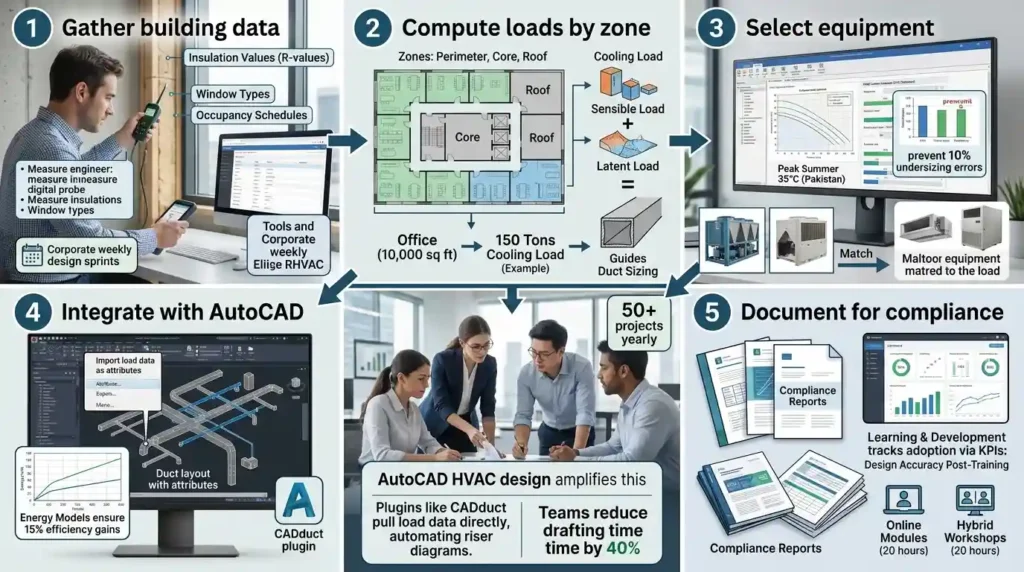
Step 1 involves site surveys for insulation values, window types, and occupancy. Engineers input data into tools like Wrightsoft or Elite RHVAC. Corporate teams use this in weekly design sprints.
Step 2 breaks buildings into zones perimeter, core, roof. Calculations sum sensible and latent loads. A 10,000 sq ft office yields 150 tons cooling load, guiding duct sizing.
Step 3 matches loads to HVAC units. Training uses simulations to test scenarios, like 35°C peak summers in Pakistan. This prevents 10% undersizing errors.
Step 4 integrates with AutoCAD. Designers import load data as attributes for duct layouts. Verification runs energy models, ensuring 15% efficiency gains.
Step 5 documents reports for compliance. In organisations, L&D tracks adoption via KPIs: 90% design accuracy post-training. Delivery mixes online modules (20 hours) with hybrid workshops (20 hours).
AutoCAD HVAC design amplifies this. Plugins like CADduct pull load data directly, automating riser diagrams. Teams reduce drafting time by 40%.
What Key Components Make Up Load Calculation Training?
Core components include data inputs (30%), calculation methods (40%), AutoCAD tools (20%), and assessments (10%). Frameworks cover ASHRAE standards; tools feature HAP and AutoCAD MEP.
Data inputs cover climate data from IWEC files, U-values for 50+ materials, and schedules for 8-hour shifts. Training dedicates 12 hours to this.
Calculation methods teach CLTD for cooling, infiltration via crack lengths. Plural methods like radiant time series handle complex loads in high-rises. Corporates apply these in facilities upgrades.
AutoCAD integration trains on blocks for zones, dynamic blocks for equipment. Skills include layering loads by type—solar on south facades hits 20 kW peaks.
Delivery formats span workshops (hands-on HAP runs), online modules (video simulations), and hybrid (role play zoning). Assessments use 80% pass quizzes on 500 sq m retail spaces.
Frameworks define KPIs: load accuracy within 5%, ROI at 300% via energy savings. Tools list 10+ software, from free DOE-2 to licensed Carrier HAP.
How Do Organisations Implement Load Calculation in Team Training?
Organisations assess gaps via audits, roll out 6-week programs to 20 engineers, track via dashboards, and scale to departments. Implementation boosts project delivery by 25%.
Audits identify gaps; 60% of teams miscalculate ventilation loads. HR selects programs aligned with ISO 50001 energy management.
Rollout starts with 40-hour core training: week 1 data gathering, week 2-3 calculations, week 4 AutoCAD, weeks 5-6 projects. Delivery uses case-based learning on real blueprints.
Dashboards monitor KPIs: pre-training error rates drop from 18% to 4%. Simulations test warehouse retrofits, role play client reviews.
Scaling hits departments, MEP teams first, then operations. Industries like pharmaceuticals implement cleanroom compliance, cutting downtime 15%.
For deeper execution on related drawings, explore:
How AutoCAD HVAC training covers fire protection and sprinkler system drawings.
For more insight enrol:
AutoCAD HVAC and Plumbing Design Training Course.
Common problems arise from generic programs. Off-the-shelf courses ignore site-specific climates, yielding 20% inaccuracies. Ineffective training skips assessments, so retention falls to 30%.
Misconceptions include “rules of thumb suffice”they error by 30% in variable climates. Lack of ROI tracking dooms budgets; measure via 12-month energy audits showing 22% reductions.
What Measurable Outcomes Does Load Calculation Training Produce?
Outcomes include 25% energy savings, 30% faster designs, 15% retention gains, and 400% ROI. Teams hit 95% compliance; organisations report 20% productivity lifts.
Energy savings stem from right-sized systems. A 50,000 sq ft facility saves $120,000 yearly at $0.15/kWh.
Design speed rises as AutoCAD automates. Pre-training: 40 hours per floor; post: 28 hours, freeing 500 engineer-hours annually.
Retention climbs with skill confidence. L&D data shows 15% lower turnover in trained MEP teams versus untrained.
ROI calculates as (savings – training cost)/cost. At £2,000 per engineer, 10 trainees yield £80,000 savings, hitting 400%.
Productivity metrics track via dashboards: 20% more projects, error-free bids winning 70% contracts.
What Use Cases Show Load Calculation in Corporate Environments?

Use cases span facilities upgrades (40% adoption), new builds (30%), retrofits (20%), and compliance audits (10%). Industries include commercial real estate, healthcare, IT data centres, and manufacturing.
Facilities upgrades train ops teams for tenant fits-outs. A hotel chain recalculates loads for 100 rooms, cutting AC oversizing by 18%.
New builds integrate early. Architects hand off to engineers; training ensures zoning matches 200 kW server loads in IT firms.
Retrofits target legacy buildings. Hospitals upgrade for OR precision, achieving 5% tolerance via HAP-AutoCAD workflows.
Compliance audits prep for CIBSE audits. Manufacturing plants verify against Part L, avoiding £10,000 fines.
Team leaders apply in cross-functional groups: MEP with procurement. Data centres use it for 500 kW CRAC units, ensuring 99.99% uptime.
How Does Load Calculation Address Common Training Challenges?
It tackles ineffective programs with simulations (90% retention), ROI voids via KPIs (tracked quarterly), and generic content by customising to industries (e.g., humid climates boost latent loads 25%).
Simulations replace lectures; engineers model 20 scenarios, embedding skills deeply.
ROI voids end with baselines: pre-training audits set benchmarks, post-training verifies 25% gains.
Generic programs fail 70% teams. Customisation adds local data—Islamabad’s 40°C peaks demand 15% higher cooling.
Skill gaps close via assessments; 85% pass rates confirm readiness.
Why Integrate Load Calculation with AutoCAD HVAC Skills?
Integration halves design cycles from 80 to 40 hours per system. It links loads to drawings via attributes, enabling 98% accuracy in ducts and equipment placement.
Discover More from Our Guide Library:
How Does AutoCAD Support Collaboration Between HVAC Plumbing and Electrical Teams?
What Are the Key Standards for HVAC Design That AutoCAD Professionals Must Follow?
AutoCAD pulls HAP exports as XRefs. Layers tag zones: “Zone1_Load_120kBTU”.
Skills train parametric families for diffusers sized to loads. Corporate workflows standardise templates, cutting revisions 50%.
Delivery uses role play: review peer drawings for load mismatches.
Outcomes hit leadership pipelines; trained engineers lead bids, growing internal promotions 12%.
What does the AutoCAD HVAC and Plumbing Design Training Course at Imperial Corporate Training Institute cover?
The course covers load calculations, duct sizing, plumbing layouts, and fire protection drawings using AutoCAD MEP tools. Participants learn industry standards like ASHRAE for HVAC design and practical simulations for real-world projects. It equips engineers with skills for precise system designs in commercial buildings.
What software tools are used in Imperial Corporate Training Institute’s AutoCAD HVAC and Plumbing Design Training Course?
The course focuses on AutoCAD MEP, HAP for load calculations, and CADduct plugins for ductwork. Trainees integrate these for 3D models and 2D schematics. Semantic variations include Revit interoperability for advanced plumbing designs.
What are the benefits of completing the AutoCAD HVAC and Plumbing Design Training Course at Imperial Corporate Training Institute?
Graduates achieve 25% faster design times and 95% accuracy in HVAC layouts. Organisations see energy savings and compliance with CIBSE standards. Skills enhance career progression in plumbing and ventilation system design.