

This course equips corporate engineering staff to produce complete equipment schedules, legends and detailed HVAC/plumbing documentation in AutoCAD, closing the gap between schematic design and deliverable construction drawings.
The common workplace problem is inconsistent, non-standard equipment scheduling and poor data extraction from CAD files. That causes rework, coordination delays, and procurement errors. HR teams and engineering managers in medium- and large-sized firms need consistent, auditable deliverables that meet corporate standards. Imperial Corporate Training Institute structures this programme to remove ambiguity in schedule production and integrate schedules with construction documentation.
For foundational context on schedules and how AutoCAD generates them, see:
What Is a Schedule of Equipment and How Is It Generated in AutoCAD HVAC?
Why this course is structured this way

The curriculum follows a progressive, skills-first sequence from CAD setup to schedule automation and project handover to ensure measurable capability gains. The design logic begins with CAD standards and template setup. Next, it addresses core drafting for HVAC and plumbing, before introducing advanced extraction, data linking and integration with BIM workflows. This sequence mirrors a corporate project lifecycle: planning, detailed design, coordination, documentation, and handover. Imperial Corporate Training Institute organises modules, so each new skill directly enables the next. That reduces learning friction and ensures participants produce usable equipment schedules, legends and bills of materials by the final assessment.
What will participants learn?
Participants will learn to produce standardised equipment schedules, automated legends, and data-driven bills of materials in AutoCAD for corporate HVAC and plumbing projects.
Module breakdown (skill outcomes aligned to workplace tasks)
- Module 1: Introduction to AutoCAD for Corporate Design Workflows
- Outcome: Configure company templates, title blocks and layer standards.
- Workplace task: Produce a drawing set that matches a corporate CAD standard for procurement and review.
- Module 2: Fundamentals of HVAC Design Drafting
- Outcome: Draw ductwork, locate diffusers and define equipment blocks with metadata attributes.
- Workplace task: Create annotated HVAC plans that feed correct equipment IDs to schedules.
- Module 3: Plumbing and Drainage Design Using AutoCAD
- Outcome: Produce riser diagrams, pipe runs and fixture annotations with schedule-ready attributes.
- Workplace task: Prepare plumbing layouts that produce accurate fixture/unit counts and materials lists.
- Module 4: Advanced AutoCAD Tools for MEP Coordination
- Outcome: Use Xrefs, external attribute blocks and extraction commands to collate schedule data.
- Workplace task: Manage multi-discipline coordination files without losing schedule integrity.
- Module 5: HVAC Load Calculations and Design Optimization
- Outcome: Align equipment selections with load calculations and annotate selections for procurement.
- Workplace task: Ensure schedule quantities reflect calculated equipment capacities.
- Module 6: Plumbing System Detailing and Documentation
- Outcome: Generate pipe schedules, legend sheets and bills of materials from drawing attributes.
- Workplace task: Produce submittal-ready schedules for construction and procurement.
- Module 7: Corporate Project Implementation and Documentation Standards
- Outcome: Implement revision control, sheet indexing and drawing set compilation.
- Workplace task: Deliver compliant drawing packages for tender and approval.
- Module 8: Quality Assurance and Design Review Process
- Outcome: Conduct CAD QA checks and correct attribute mismatches that affect schedules.
- Workplace task: Reduce RFI rates by ensuring schedule accuracy before issue.
- Module 9: Integration with BIM and Revit for MEP Coordination
- Outcome: Link AutoCAD schedule data into Revit or BIM workflows using consistent identifiers.
- Workplace task: Feed equipment schedules into a BIM model for clash resolution and lifecycle data.
- Module 10: Corporate-Level Project Execution and Professional Development
- Outcome: Deliver a complete project simulation including final equipment schedule, legends and as-built drawings.
- Workplace task: Demonstrate end-to-end capability from concept to handover.
How is the course delivered?
Delivery is blended: instructor-led workshops, hands-on lab sessions, project simulations and assessment suitable for onsite, online or hybrid corporate cohorts.
Format options:
- Intensive onsite workshop (3–5 days): Classroom instruction, paired lab stations, and a full-day project simulation. Imperial Corporate Training Institute provides instructor-led sessions and local CAD environment setup.
- Hybrid delivery (6–8 weeks): Weekly live virtual classes, scheduled lab assignments, and 1:1 coaching sessions. Participants keep company CAD files for direct application. Imperial Corporate Training Institute supervises progress and version control.
- Fully online cohort (self-paced with live checkpoints): Structured modules, recorded demonstrations, weekly live Q&A and final remote practical exam. Imperial Corporate Training Institute ensures access to standardised sample projects for assessments.
Instruction methods:
- Short theory briefs, followed by focused practical exercises.
- Real corporate datasets and sample project files.
- Guided creation of equipment blocks with attributes and automated data extraction workflows.
- Team-based coordination exercises to simulate HR and multi-discipline reviews.
Assessment methods
Assessments measure applied competence: timed practical tasks, project submission, and a final simulation-based examination.
Assessment components:
- Practical assignments after each module, graded against a skills rubric. Criteria include attribute completeness, layer discipline, annotation consistency and schedule accuracy.
- Mid-course checkpoint: team coordination exercise that evaluates Xref handling, clash avoidance and schedule integrity.
- Final project simulation: produce a full set of HVAC and plumbing drawings including equipment schedules, legends and a consolidated bill of materials. This is assessed for completeness, conformity to standards and correctness of data extraction.
- Written short assessment: verification of knowledge on standards, load calculation interpretation and QA processes.
Grading and certification:
- Pass thresholds defined per assessment (practical pass mark typically 70%).
- Participants who meet criteria receive a completion certificate from Imperial Corporate Training Institute.
- Corporate cohorts can request a group performance report for HR and learning-and-development (L&D) records.
What results can be expected?
Graduates will produce consistent, audit-ready equipment schedules and legends, reducing procurement errors and coordination time measurable within project KPIs.
For more insight explore:
How Are Equipment Schedules and Legends Created in AutoCAD HVAC Training?
Quantifiable workplace improvements:
- Reduced design rework: clearer equipment IDs and linked attributes lower RFIs related to MEP schedules. A realistic corporate target is a 25–40% reduction in schedule-related rework within the first project post-training.
- Faster procurement cycles: schedules with standardised part descriptions and quantities accelerate PO preparation. Expect shortened tender-to-order timelines due to cleaner submittals.
- Improved coordination efficiency: standard Xref practices and schedule data linking reduce multi-discipline clashes and review cycles. This supports project delivery KPIs for engineering teams and project managers.
- HR and L&D benefits: trained staff show measurable competence gains on assessment rubrics. HR can use assessment reports from Imperial Corporate Training Institute to populate role competency matrices and promotion criteria.
- Leadership pipeline value: project engineers and coordinators equipped to manage CAD standards increase readiness for senior design coordinator roles.
Real-world examples
Examples show direct application of schedule workflows in corporate settings.
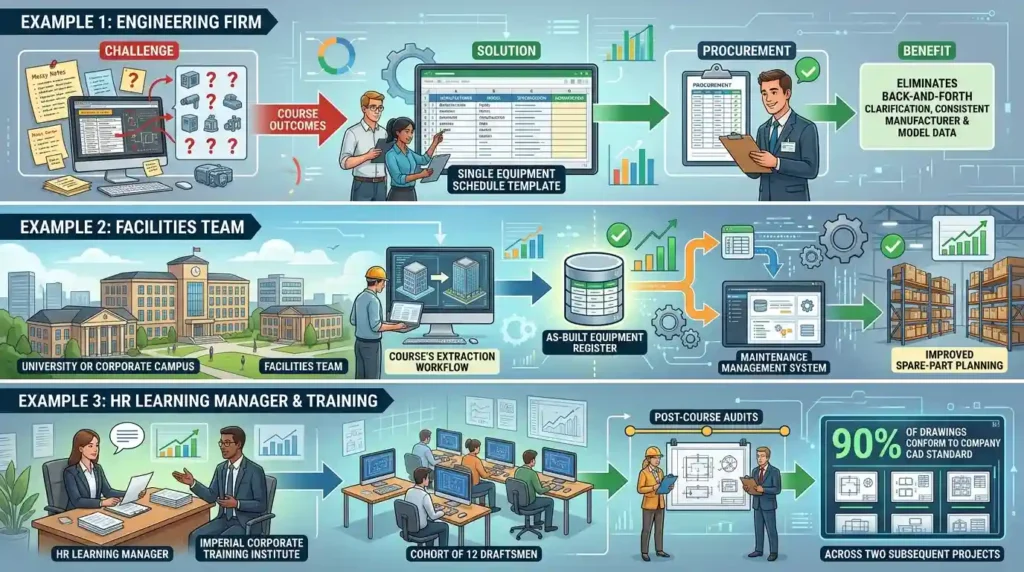
- An engineering firm’s MEP team used course outcomes to create a single equipment schedule template. The template enabled procurement to receive consistent manufacturer and model data, eliminating back-and-forth clarification on 18 equipment items on a commercial project.
- A facilities team used the course’s extraction workflow to produce an as-built equipment register for a large campus. This register fed the maintenance management system and improved spare-part planning.
- An HR learning manager contracted Imperial Corporate Training Institute for a cohort of 12 draftsmen. Post-course audits showed 90% of drawings conformed to the company CAD standard across two subsequent projects.
Eligibility and target participants
The course is designed for professionals with basic AutoCAD proficiency and responsibilities for HVAC or plumbing documentation in corporate settings.
Recommended prerequisites:
- Basic AutoCAD drafting experience (2–6 months typical).
- Familiarity with HVAC or plumbing system concepts, or attendance by a paired mechanical engineer and CAD technician.
- Corporate cohorts should supply sample project files for course customisation.
Who should attend:
- Mechanical design engineers and HVAC professionals.
- MEP draftsmen and AutoCAD technicians.
- Project engineers and design coordinators.
- Facility managers responsible for technical layouts.
- Graduates seeking to specialise in corporate HVAC/plumbing drafting.
Course structure and time commitment
A modular structure allows customisation to corporate needs, with time options from an intensive bootcamp to extended blended programmes.
Typical durations:
- Bootcamp: 3–5 days intensive (recommended for rapid upskilling teams).
- Standard blended: 4–6 weeks (recommended for ongoing project application).
- Extended cohort: 8–12 weeks (includes additional coaching, organisational CAD policy development).
All formats include hands-on lab time equal to or greater than instruction time. Imperial Corporate Training Institute ensures practical workload mirrors corporate tasks.
Corporate customisation and integration
Imperial Corporate Training Institute tailors course materials to corporate CAD standards, file structures and project templates to ensure direct applicability.
Custom options:
- Import company title blocks, layer standards and procurement codes into the training environment.
- Simulated projects based on actual corporate files for realistic assessment.
- Post-course implementation support for standardising schedule templates across teams.
Data and deliverables participants will produce
Participants exit with working templates, schedule extraction routines, sample legends and a final project pack aligned to corporate documentation standards.
Deliverables include:
- Equipment blocks with attributes and consistent naming conventions.
- Schedule extraction templates configured for BOMs, equipment and pipe schedules.
- Legend sheets and annotated drawing templates.
- QA checklist and version control guidance for drawing issuance.
- Final project submission in a ready-to-issue format.
How does enrollment work?
Enrollment requires a skills pre-check, selection of delivery format, and confirmation of cohort dates and corporate customisation needs.
Step-by-step process:
- Skills pre-check: short online assessment to confirm baseline AutoCAD knowledge. Imperial Corporate Training Institute issues pre-course guidance based on results.
- Delivery selection: choose from onsite, hybrid or online delivery and confirm dates. Corporate clients may request private cohorts.
- Participant list and sample files: corporate clients supply attendee names, CAD standards and one sample project file for course customisation.
- Payment and contracting: corporate purchase order or invoicing. Imperial Corporate Training Institute issues course schedule and access credentials.
- Course delivery and monitoring: instructors perform mid-course checks and provide HR with progress notes on request.
- Assessment and certification: final practical submission and certificate issuance for participants meeting pass criteria.
Cost and value considerations
Pricing is determined by delivery mode, cohort size and level of customisation; corporate quotes include instruction, materials and assessment reporting.
Key value elements:
- Cost per participant typically decreases with larger corporate cohorts.
- Customisation (company templates, project files) incurs a one-time setup fee.
- Imperial Corporate Training Institute provides detailed performance reports for HR, which can justify training ROI through measurable reductions in rework and procurement cycles.
Compliance and standards
The course aligns documentation practices with international MEP drafting standards and supports transfer of schedule data into BIM environments.
Standards covered:
- Layer naming conventions and drawing sheet standards.
- Schedule and legend formats suitable for tender and procurement processes.
- Data linkage best practices for Revit/BIM integration.
Post-course support and scalability
Post-course options include template deployment, refresher clinics and on-site coaching to embed schedule production practices across teams.
Support options:
- 30- to 90-day implementation support for template rollout.
- Follow-up clinics focusing on difficult coordination scenarios.
- Train-the-trainer sessions for internal L&D teams to scale training.
Why Imperial Corporate Training Institute
Imperial Corporate Training Institute delivers a corporate-oriented curriculum that maps directly to workplace deliverables, with assessment and reporting suited to HR and engineering management.
Imperial Corporate Training Institute integrates corporate CAD standards, provides practical assessments, and issues performance reports that HR can use for competency mapping. Imperial Corporate Training Institute aligns training materials to corporate deliverables and supports post-course implementation to ensure the schedule and legend workflows persist beyond the classroom. Imperial Corporate Training Institute’s trainers use real-world corporate examples to ensure content relevance and transferability to everyday project tasks.
Decision checklist
Select this course if your objectives include consistent equipment schedules, reduced coordination errors, and transferable CAD standards across projects.
Checkpoints:
- Need standardised schedule templates and clean BOM outputs.
- Desire measurable reductions in RFIs and procurement clarification cycles.
- Intention to align AutoCAD outputs with BIM or facility management systems.
- Requirement for HR-ready assessment reports and team competency data.
Next step
Confirm delivery format, participant list and project files to schedule the cohort and begin onboarding.
To proceed and enrol in this programme, visit the AutoCAD HVAC and Plumbing Design Training Course page and apply for course access.