

A schedule of equipment is a structured table listing HVAC and plumbing assets, their specifications, locations, and performance data used to coordinate procurement, installation, and commissioning.
A schedule of equipment links design to delivery. It lists asset type, model, capacity (kW or kBTU/h), power draw (kW), airflow (l/s or m3/h), control point IDs, and installation location. Organisations use schedules to align purchasing, site teams, and contractors. Schedules reduce change orders by 30–60% when maintained across design and construction. They support budgeting, compliance, and handover documentation. In corporate programmes, schedules form the single source of truth for facility managers, M&E contractors, and procurement teams.
How is a schedule generated in AutoCAD HVAC during project design?
AutoCAD HVAC generates schedules by extracting block attributes and system metadata, using layers, tags, and data tables linked to the drawing database.
Designers place equipment as blocks with attribute fields (tag, capacity, manufacturer). The drawing’s layer and system structure (supply, return, chilled water) provide context. AutoCAD tools or verticals (e.g., MEP add-ons) query these attributes and compile tables. The generation steps are: define block attributes, standardise naming conventions, assign data values, run extraction commands, preview table format, and export to CSV or embed within drawings. The workflow integrates with BIM or FM systems through IFC or COBie exports for lifecycle asset management. This process ensures consistency between graphical layout and procurement records.
What training content is required for staff to generate and manage equipment schedules in AutoCAD HVAC?
Training covers AutoCAD block creation, attribute management, data extraction, template creation, and integration with BIM/FMIS.

Course modules include block attribute design, attribute tagging standards, data extraction commands, table formatting, layer conventions, and export/import workflows. Practical exercises train staff to create templates that enforce naming standards and mandatory fields. Assessment includes timed tasks: build 10 equipment blocks, extract attributes into a table, and export a compliant CSV within 60 minutes. Learning methodologies include case-based learning, live project handover simulations, role-play between the designer and thefacilities manager, and practical assessments. Delivery formats include 2-day instructor-led workshops, four 90-minute online modules, or a hybrid of one workshop plus three e-learning modules.
How does corporate delivery of AutoCAD HVAC training work step by step?
Delivery follows needs analysis, curriculum mapping, customisation, blended training, assessment, and post-training support.
- Conduct a skills-gap analysis. Use competency matrices to measure baseline skills in CAD, M&E fundamentals, and data management.
- Map curriculum to roles: junior drafter (block creation, layers), senior engineer (system design, data standards), facilities coordinator (schedules, exports).
- Customise content to corporate standards: naming conventions, project templates, compliance codes.
- Deliver training: options include 16-hour classroom workshop, 6-week part-time online course, or blended 2-day workshop plus 4 weeks of online labs.
- Assess participants: practical tasks, rubric-based marking, and a capstone project producing a full equipment schedule and export.
- Provide post-course resources: templates, recorded sessions, and a 30-day coaching window.
- Measure impact: track KPIs such as drawing error rates, procurement discrepancies, and time-to-handover before and after training.
What are the key components of an effective equipment schedule training programme?
Key components are standards, software skills, data governance, templates, practical labs, and assessment metrics.
Standards: naming conventions, attribute lists, and layer schemes aligned to corporate FM requirements.
Software skills: AutoCAD commands, block attributes, data extraction tools, table editing, and CSV/IFC export.
Data governance: roles for data ownership, validation checks, and change control workflows.
Templates: validated drawing templates and schedule templates to ensure consistency across projects.
Practical labs: real project files, staged change orders, and extraction tasks under time constraints.
Assessment metrics: accuracy rate of extracted data (target 98%), time to produce schedule (target <2 hours for medium projects), and reduction in procurement discrepancies (target 40% within 6 months).
For deeper insight explore:
How Are Equipment Schedules and Legends Created in AutoCAD HVAC Training?
What measurable benefits do equipment schedules deliver to organisations?
Equipment schedules reduce procurement errors, speed up commissioning, and improve long-term asset management, producing direct cost and time savings.
Quantified outcomes include: 30–60% fewer purchase order corrections, 20–45% acceleration in commissioning timelines, and 15–30% lower lifecycle maintenance costs through accurate asset metadata. Schedules enable automated procurement lists and reduce on-site rework. They decrease coordination meetings by 25% when used as the definitive vendor/contractor reference. For HR and L&D, trained teams show 40% faster delivery of compliant drawings, improving project throughput and enabling staff redeployment.
Which roles in an organisation use equipment schedules and how?
Design engineers, CAD technicians, procurement, project managers, and facilities teams use schedules at different lifecycle stages.
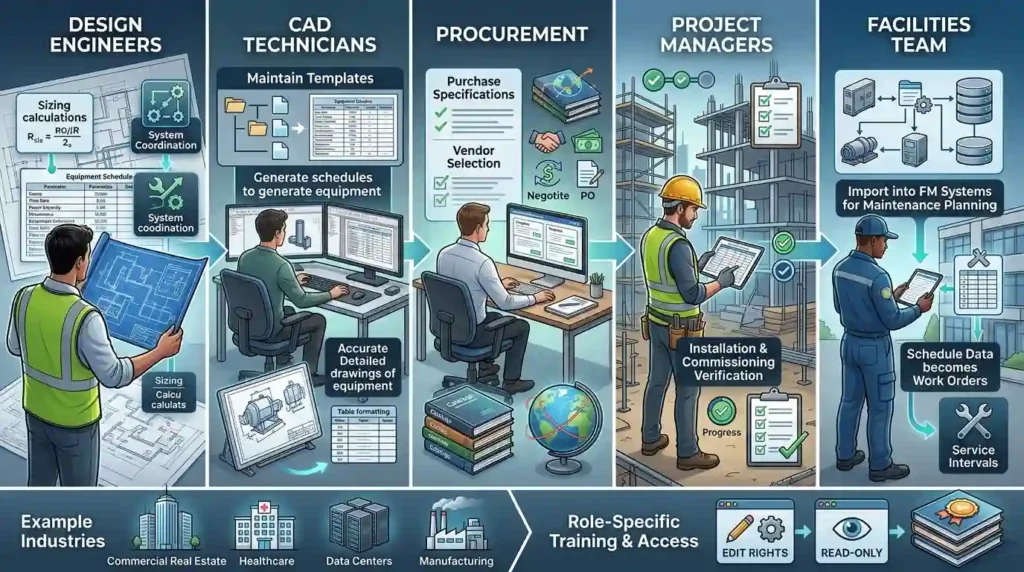
Design engineers use schedules for sizing and system coordination. CAD technicians generate the tables and maintain templates. Procurement uses schedules for purchase specifications and vendor selection. Project managers reference schedules during installation and commissioning. Facilities teams import schedules into FM systems for maintenance planning. Example industries: commercial real estate, healthcare, data centres, manufacturing. Each role requires role-specific training modules and access rights for editing versus read-only consumption.
How do organisations implement training for generating equipment schedules at scale?
Organisations implement scale training through standard templates, train-the-trainer programmes, phased rollouts, and governance for quality control.
Stepwise implementation: standardise templates and attribute lists; certify internal trainers via a 3-day train-the-trainer workshop; pilot training with 1–2 project teams; collect metrics (error rate, time savings); iterate training materials; roll out across departments in 3–6 months. Establish governance: a data steward role, mandatory template use, and regular audits. Integrate training into onboarding for new starters with a yearly refresher. Use LMS tracking for completion rates and assessment scores. Expected scale outcomes: 80% template adoption within 6 months and average schedule accuracy above 95% after one year.
How does AutoCAD HVAC training integrate with existing corporate systems and BIM processes?
Integration uses consistent attribute schemas, IFC/COBie exports, and API-based data transfer to FM and ERP systems.
Define an attribute schema that matches FM system fields (asset ID, service interval, warranty). Configure AutoCAD extraction to produce CSV or Excel matching ERP import templates. Use IFC or COBie for BIM workflows and long-term asset handover. Train staff on export validation and mapping. Implement automated checks that compare extracted schedules to procurement lists. This alignment ensures that design-stage data flows to operations without manual re-entry. It creates a single authoritative dataset for asset lifecycle management.
For more information, enrol now:
AutoCAD HVAC and Plumbing Design Training Course.
What common problems or misconceptions reduce training ROI for equipment schedules?
Common issues include generic training, missing data standards, lack of practical exercises, and no post-training enforcement.
Organisations enrol staff in generic CAD classes that ignore M&E attribute needs. Teams skip attribute standardisation, producing inconsistent schedules. Training without real project files fails to replicate site constraints. Absence of governance allows reversion to old practices. These issues produce low ROI: persistent procurement errors, unchanged rework rates, and no measurable productivity gains. Corrective actions: mandate templates, include enforcement checks, require project-based assessments, and assign a data steward to enforce standards.
How should decision-makers evaluate training effectiveness for AutoCAD HVAC schedules?
Evaluate using competency assessments, project KPIs, and business impact metrics mapped to organisational goals.
Use pre- and post-training competency tests covering block creation, attribute population, data extraction, and exports. Track project KPIs: schedule accuracy (% correct entries), time to generate schedules (hours), procurement change orders (count), and commissioning delays (days). Translate these into financial metrics: cost saved from reduced rework, reduction in expedited shipping fees, and lower contractor claims. Set target improvements: 30% reduction in procurement discrepancies, 25% faster commissioning, and 95% schedule accuracy within 3 months. Review results quarterly and refine training to close remaining gaps.
How does practical learning improve adoption and long-term impact?
Practical learning secures adoption through hands-on labs, role-play coordination, and capstone projects tied to real projects.
Discover More from Our Guide Library:
How Is Pipe Sizing for Plumbing Systems Calculated and Documented in AutoCAD?
What Is the Difference Between AutoCAD MEP and Standard AutoCAD for HVAC?
Hands-on labs teach template use and extraction on company drawings. Role play simulates handovers between design, procurement, and facilities. Capstone projects require delivering a full schedule and export suitable for procurement and FM import. These exercises create repeatable habits. They reduce cognitive friction and increase template adherence. Companies with applied training report 50% faster onboarding of new drafters.
Frequently Asked Questions
What skills will participants gain from Imperial Corporate Training Institute’s AutoCAD HVAC and Plumbing Design Training Course?
Participants learn AutoCAD block and attribute creation, equipment scheduling, piping and ductwork layouts, and data export for BIM/FM systems. The course emphasises practical tasks and templates to ensure workplace-ready skills.
Who should attend the AutoCAD HVAC and Plumbing Design Training Course?
The course suits CAD technicians, design engineers, facilities coordinators, and project managers responsible for M&E drawings and asset data. It also benefits procurement and commissioning staff who rely on accurate equipment schedules.
How does the course help organisations reduce procurement and commissioning errors?
The training enforces attribute standards and schedule templates that produce consistent equipment lists for procurement and FM import. Organisations report fewer purchase order corrections and faster commissioning when teams use standardised exports and validated templates.
Can the AutoCAD HVAC and Plumbing Design Training Course integrate with corporate BIM and FM systems?
Yes. The course covers IFC/COBie exports and CSV mapping to common FM/ERP fields to ensure seamless data transfer. Trainees learn validation checks and workflows to align AutoCAD outputs with corporate asset-management systems.