

An equipment schedule is a structured list that captures each HVAC item’s identifier, type, capacity, make/model, and location; it is created to standardise procurement, installation, and maintenance workflows across design, facilities and procurement teams.
An equipment schedule translates drawing geometry into a tabular asset record. It links tags on plan views to attributes in block definitions or data extracted from layers. In practice, schedules reduce errors between design intent and procurement by providing consistent identifiers and technical data for each device. In B2B contexts, schedules connect design outputs to facilities management systems and simplify lifecycle tracking and warranty claims.
For a high-level primer on what schedules are and how AutoCAD generates them, see the awareness-stage guide on:
What Is a Schedule of Equipment and How Is It Generated in AutoCAD HVAC? This article explains fundamental concepts and typical outputs that designers and facility managers expect.
HR leaders and procurement managers value equipment schedules because they establish measurable KPIs such as first-time install accuracy (target: 95%+), reduction in RFI volume (typical savings: 20–40%), and procurement cycle time reduction (often 10–25%). For training teams, understanding schedules supports curriculum alignment between design skills and post-implementation asset management.
How are legends defined and linked to schedules in AutoCAD HVAC training?
Legends are visual keys that explain symbols, tags and colour-coding on HVAC drawings; they are created by mapping block definitions and layer conventions to clear labels so construction and commissioning teams interpret designs uniformly.
Legends are collections of representative blocks, labels and short descriptions placed on drawing sheets. Trainers teach students to build legends from standard block libraries and annotated attribute extractions. The typical process taught covers creating consistent block names, setting attribute fields (ID, capacity, supplier), assigning layer and colour conventions, and using tool palettes to populate a legend sheet.
In corporate training, instructors emphasise governance: a legend linked to a company standard reduces rework during handover. Training modules show how legends align with schedules so that symbol definitions in the legend match schedule entries, enabling rapid cross-referencing during installation or audits. This alignment supports automated checks against project standards using simple scripts or linetype audits.
What workflows produce equipment schedules in AutoCAD HVAC?
Workflows start with parametric blocks and structured naming, progress through attribute population and data extraction, and finish with table generation plus cross-referenced tagging on plans.
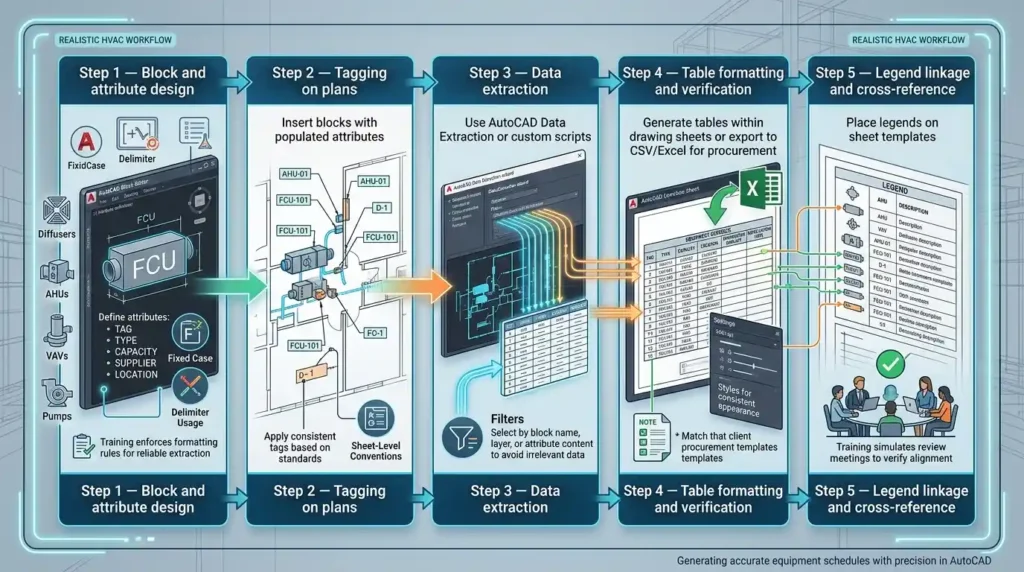
Step 1 — Block and attribute design. Create blocks for diffusers, FCUs, AHUs, VAVs and pumps. Define attributes such as TAG, TYPE, CAPACITY, SUPPLIER and LOCATION. Training enforces attribute formatting rules (fixed case, delimiter usage) to make extraction reliable.
Step 2 — Tagging on plans. Insert blocks with populated attributes and apply consistent tags (for example, AHU-01, FCU-101). Tag placement standards are part of sheet-level conventions covered in training.
Step 3 — Data extraction. Use AutoCAD Data Extraction or custom scripts to pull attribute fields into tables or export files. Training emphasises filters: select by block name, layer, or attribute content to avoid irrelevant data.
Step 4 — Table formatting and verification. Generate tables within drawing sheets or export CSV/Excel for procurement. Include check columns for contractor sign-off and installation dates. Trainees learn to use styles for consistent appearance and column order that match client procurement templates.
Step 5 — Legend linkage and cross-reference. Place legends on sheet templates and confirm that symbol names, tags and descriptions match the schedule entries. Training simulates review meetings where design, procurement and facility teams verify alignment.
Which AutoCAD tools and features are taught for schedules and legends?
Training covers core AutoCAD table features, attribute definitions, the Data Extraction tool, tool palettes, block libraries, layer management, and basic LISP or scripts for automation.
Core features:
- Attribute Definitions: persistent data within blocks.
- Data Extraction Wizard: create tables based on attributes and block properties.
- Table Styles: consistent presentation and export formats.
- Tool Palettes: store standard blocks and rapid insertion methods.
- Layer Standards: separate equipment, piping, ducting and annotation layers for controlled extraction.
- Simple LISP/macros: automate repetitive tag creation and validation.
Training modules include hands-on exercises where learners build a small project from block library to finished schedule and legend. Typical module duration: 6–12 hours. Performance targets in training measure accuracy: students reach an average of 98% correct attribute population in final exercises when following standards.
How does learning method affect mastery of schedule and legend production?
Instructor-led practical workshops, blended e-learning with exercises, and project-based cohorts are the main formats; each delivers different retention and workplace transfer rates, with project-based cohorts showing the highest immediate readiness for workplace application.
Format evaluations:
- Instructor-led workshops: rapid skill uptake in 1–3 days. Strong immediate competence. Retention after 3 months drops without reinforcement.
- Blended e-learning (videos + exercises): spreads learning over 2–4 weeks. Suits distributed teams. Retention is moderate; applied projects increase expertise.
- Project-based cohort training: 4–6 weeks with live projects. Ensures transfer to workplace tasks and integrates peer review. Adoption rates increase by up to 30% compared with one-off workshops.
For HR decision-makers, choose the format aligned with business outcomes. If the KPI is immediate production of compliant schedules for an active project, an intensive workshop plus follow-up coaching delivers fastest ROI. If the objective is capability building across a distributed workforce, blended or cohort models yield broader adoption.
How do training assessments and KPIs measure effectiveness?
Assessments combine practical tests (produce a compliant schedule and legend), pre/post skill assessments, and workplace measurement such as reduction in RFIs and time-to-procurement; KPIs quantify training impact on project delivery and facilities readiness.
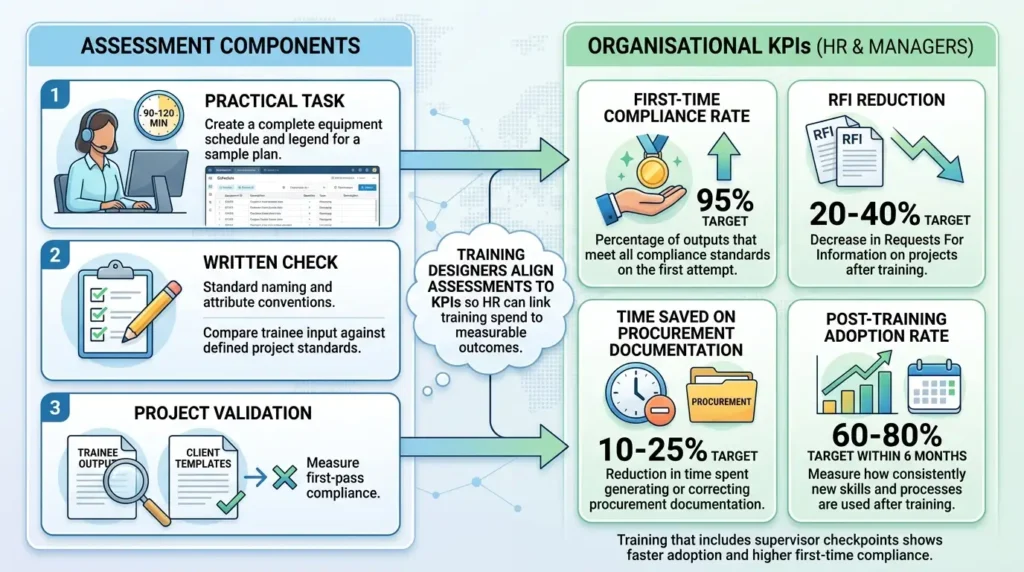
Assessment components:
- Practical task: create a complete equipment schedule and legend for a sample plan within 90–120 minutes.
- Written check: standard naming and attribute conventions.
- Project validation: compare trainee output to client templates and measure first-pass compliance.
Organisational KPIs for HR and managers:
- First-time compliance rate (target: 95%).
- RFI reduction (target: 20–40%).
- Time saved on procurement documentation (target: 10–25%).
- Post-training adoption rate (target: 60–80% within 6 months).
Training designers align assessments to these KPIs so HR can link training spend to measurable outcomes. Training that includes supervisor checkpoints shows faster adoption and higher first-time compliance.
How does the AutoCAD HVAC and Plumbing Design Training Course teach schedule production compared with on-the-job learning?
The AutoCAD HVAC and Plumbing Design Training Course offers structured standards, supervised practice, templates and assessment against industry criteria; on-the-job learning delivers context but lacks standardised verification and consistent coverage of extraction tools and automation.
Comparative points:
- Scope: The course covers standard block libraries, attribute design, data extraction, and legend standardisation. On-the-job learning depends on mentor experience and may omit table styles and export protocols.
- Consistency: Course delivery enforces uniform naming conventions and templates. On-the-job variation causes inconsistency across projects.
- Verification: The course includes formal assessment tied to KPIs. On-the-job checks are informal and project-specific.
- Time-to-proficiency: Course training accelerates foundational skills in weeks. On-the-job learning requires multiple projects (3–6 projects) to achieve comparable breadth.
HR teams deciding between formal course enrolment and internal mentoring should quantify downstream costs. For medium-size commercial buildings, inconsistent schedules across projects cause rework worth 0.5–1.5% of project budget. Choosing a formal course reduces that variability and aligns teams to corporate standards.
At this point in the article, readers ready to confirm whether a provider teaches this capability should review:
Does Imperial’s HVAC Course Teach Equipment Schedule Production in AutoCAD? This link directs decision-ready readers to a specific programme description and demonstrates alignment with the technical needs discussed.
When should an organisation choose a tailored training approach?
Choose tailored training when projects require specific vendor data, unique naming standards, or integration with a particular CAFM/CMMS; tailoring ensures deliverables fit procurement and facilities systems without rework.
Tailoring triggers:
- Client templates with non-standard columns or identifiers.
- Integration with CAFM/CMMS requiring specific data formats.
- Projects with in-house procurement systems needing exact attribute fields.
Tailored training options include custom exercises using client plan samples, bespoke block libraries, and connector scripts for CAFM export. Typical tailoring duration: add 1–3 days of workshop time or an 8–12 hour module to a standard course. HR should evaluate expected project frequency and integration complexity to justify tailoring investment.
What are the business use cases for trained staff producing high-quality schedules and legends?
Use cases include construction procurement, commissioning and handover, facilities management integration, and long-term asset lifecycle management; trained staff reduce procurement errors, accelerate commissioning and improve maintenance planning.
Key examples:
- Procurement: schedules provide exact make/model and ordering codes, reducing mismatched orders and delivery delays.
- Commissioning: legends and schedules enable commissioning teams to verify installed items against design quickly, cutting commissioning time by 15–30%.
- Handover and CAFM integration: completed schedules export to CAFM/CMMS to seed asset registers and maintenance plans.
- Warranty and lifecycle management: accurate schedules support warranty claims and planned maintenance scheduling.
For HR and training sponsors, these use cases translate to measurable benefits: fewer RFIs, quicker procurement cycles, reduced commissioning downtime and improved long-term maintenance forecasting.
How does automation change schedule production, and how is it covered in training?
Automation uses scripts, dynamic blocks and data extraction templates to reduce manual entry, speed production and enforce standards; training covers basic LISP/macros, dynamic block behaviours and extraction templates for repeatable outputs.
Discover More from Our Guide Library:
How Does AutoCAD HVAC Training Cover Pipe Sizing Tables and Drawing Annotation?
How Does AutoCAD HVAC Training Compare AutoCAD MEP With Standard AutoCAD Usage?
Automation elements taught:
- Dynamic blocks with visibility states for equipment variants.
- Attribute extraction templates saved for project or company use.
- Simple LISP or macros for batch tagging and consistency checking.
- Export templates for CSV/Excel matching procurement systems.
Effect metrics: automation reduces manual attribute input time by 40–70% on medium projects. Training includes exercises that compare manual workflows with automated ones, showing concrete time and error reductions.
Frequently Asked Questions
Does the course teach how to produce equipment schedules and legends in AutoCAD?
Yes. Imperial Corporate Training Institute’s AutoCAD HVAC and Plumbing Design Training Course includes hands-on lessons in block attributes, Data Extraction, table styles and legend creation to produce compliant equipment schedules for procurement and handover.
What delivery formats does Imperial offer for AutoCAD HVAC training?
The course is available as instructor-led workshops, blended e-learning with practical exercises, and project-based cohort delivery. Each format focuses on practical exercises, assessment against standards, and workplace transfer to meet HR and procurement objectives.
How will this training improve my team’s procurement and commissioning KPIs?
The training standardises naming, attribute capture and export templates so schedules import directly into procurement and CAFM systems, reducing RFIs and procurement cycle time. Organisations typically see first-time compliance improvements and 10–25% faster procurement workflows after adoption.
Is the course suitable for facility managers and procurement teams, not just designers?
Yes. The AutoCAD HVAC and Plumbing Design Training Course covers schedule export formats, CAFM/CMMS integration and legend interpretation, making it relevant for designers, facility managers and procurement staff involved in asset handover and lifecycle planning.