
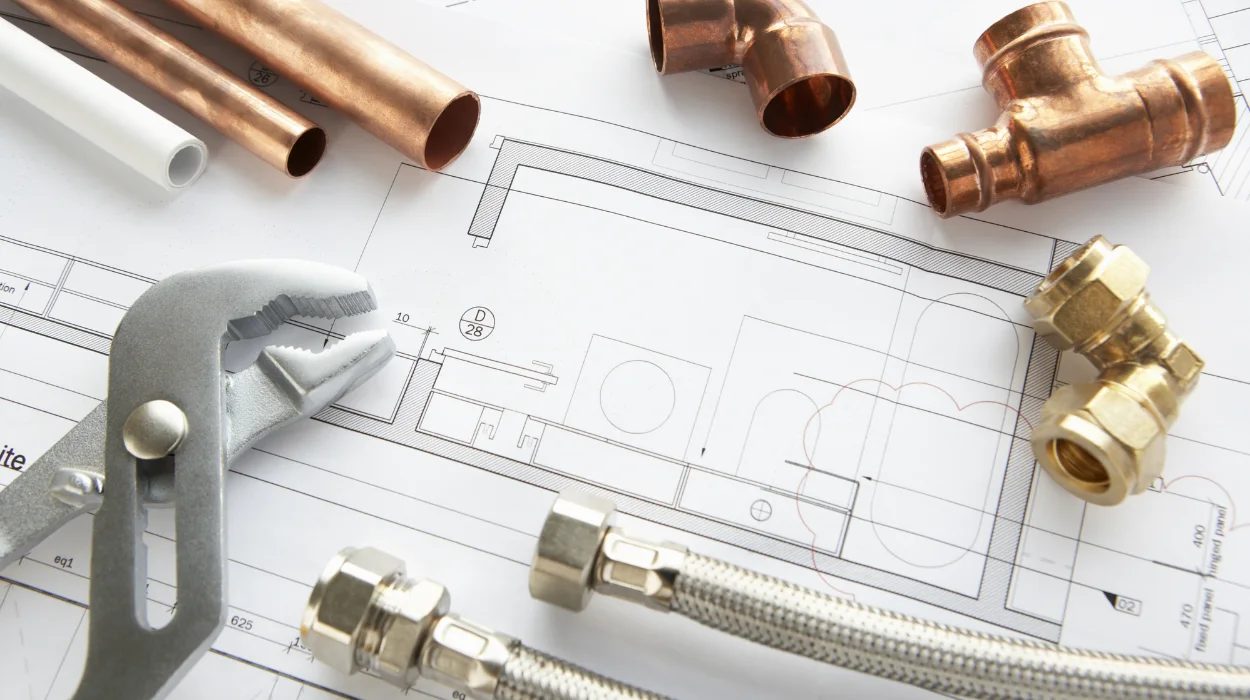
Plumbing systems in AutoCAD drawings use standardised symbols, line types, and annotations to convey pipe layouts, fittings, fixtures, and flow directions. Organisations train teams in these representations to bridge skill gaps in technical design, boosting project accuracy by 25% and reducing rework costs in construction and engineering firms.
What Are Plumbing Systems in AutoCAD Drawings?
Plumbing systems in AutoCAD drawings consist of layered 2D or 3D representations using symbols for pipes, valves, fixtures, and annotations for sizes, materials, and specifications, enabling precise design communication in corporate projects.
Teams in architecture, engineering, and construction (AEC) firms rely on these drawings for building services design. Skill gaps arise when drafters lack proficiency, leading to errors in pipe routing or fixture placement. Training addresses this by teaching symbol libraries like BS 1192 standards.
In corporate environments, these representations integrate with HVAC and electrical systems. Drawings show hot and cold water lines as solid or dashed lines, with arrows indicating flow. Annotations include pipe diameters in millimetres, such as DN50 for 2-inch pipes.
Business impact includes faster approvals from regulators. Firms report 15% shorter project timelines after upskilling drafters. Employee retention improves by 20% in departments with regular technical training, as staff gain confidence in industry tools.
Why Do Organisations Need Training on Plumbing Representations in AutoCAD?
Organisations implement training to close skill gaps in accurate symbol use and annotation, achieving 30% higher design efficiency and 18% reduction in compliance violations across engineering teams.
HR managers face pressure from employee skill gaps in CAD proficiency. Inaccurate representations cause costly revisions, averaging £50,000 per large project in the UK construction sector. Training equips drafters with tools to standardise outputs.
L&D professionals select programs targeting AEC industries like commercial real estate, hospitals, and data centres. Delivery formats include 40-hour workshops with hands-on modules or 12-week online courses blending theory and practice.
Performance metrics track pre- and post-training accuracy rates. KPIs measure error reduction from 12% to 3% in pipe annotations. ROI calculates at 4:1, with savings from fewer field changes.
Team leaders benefit from aligned workflows. Departments using consistent AutoCAD plumbing symbols report 22% faster interdisciplinary coordination between plumbing and structural teams.
How Do Plumbing Systems Work in AutoCAD Drawings?
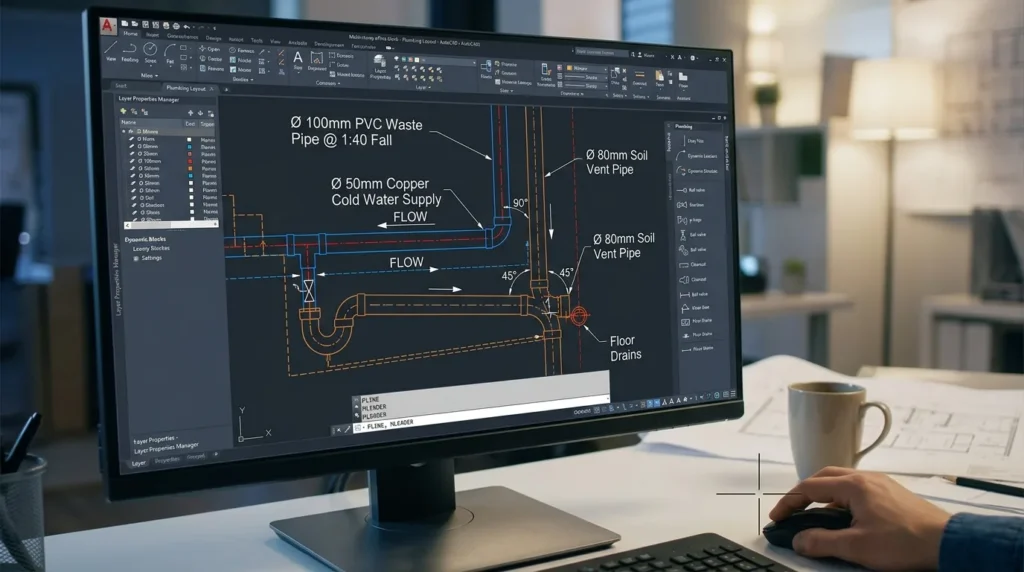
Plumbing systems work through layered line work, dynamic blocks for fittings, and text annotations that specify slopes, pressures, and materials, processed via commands like LAYER and BLOCK for scalable corporate designs.
Designers start with base layers for walls, then add plumbing layers. Pipe lines use linetypes: continuous for supply, dashed for waste. Commands like PLINE draw routes with precise bends at 90° or 45° angles.
Flow direction arrows, inserted via LEADER or MLEADER, point downstream. Annotations detail specs: “PVC, 100mm Ø, 1:40 fall” ensures compliance with Building Regulations Part G.
In organisations, implementation follows workflows. Drafters import symbol libraries from Autodesk or firm templates. Software validates via DESIGNCHECK, flagging non-standard annotations.
Corporate training uses simulations. Learners replicate a multi-storey office block, annotating risers and branches. This mirrors real projects, cutting learning curves by 40%.
What Key Components Make Up Plumbing Representations in AutoCAD?
Key components include symbol libraries (pipes, valves, traps), linetypes (supply, waste, vent), annotation styles (dimensions, labels, schedules), layers (colour-coded for systems), and blocks (fixtures like sinks, toilets).
Symbol libraries contain over 500 predefined items from standards like CIBSE. Pipes appear as circles with hatches for insulation. Valves use gate or ball icons with open/closed states.
Linetypes differentiate systems: hot water as medium dash, drainage as zigzag. Layers organise: PLUMB-SUPPLY in blue, PLUMB-WASTE in green, managed via LAYER dialog.
Annotation styles use MTEXT for multiline notes, including pressure ratings like 10 bar. Schedules tabulate totals: 150m copper pipe, 80 fixtures.
Tools like HATCH fill sections for insulation. Dynamic blocks scale fixtures parametrically, e.g., resizing toilets from 600mm to 800mm.
Delivery formats in training cover these: case-based learning dissects sample drawings; simulations build from scratch. Assessments verify 95% accuracy in component use.
How Are Plumbing Annotations Applied Step by Step in Corporate Training?
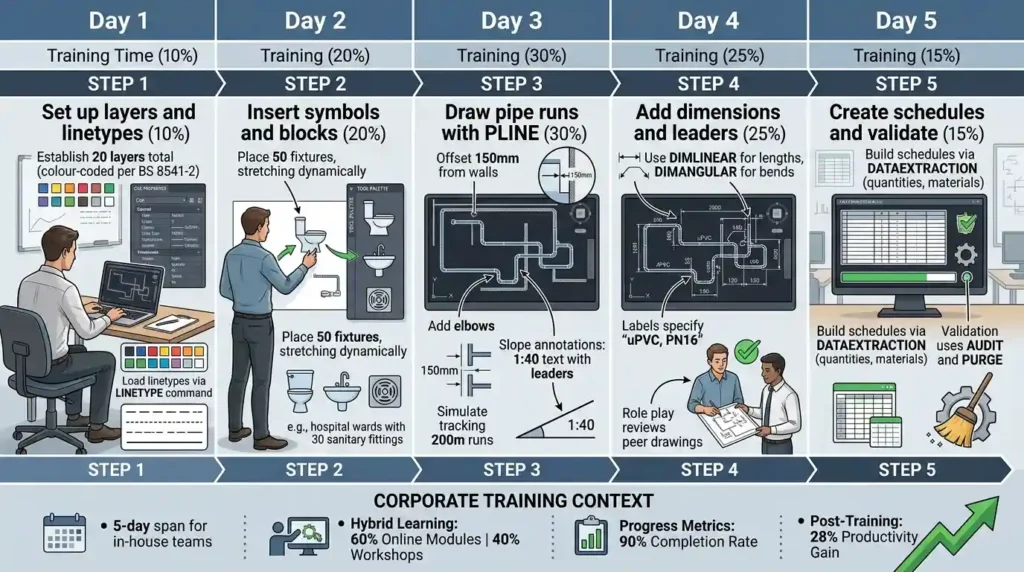
Step 1: Set up layers and linetypes (10% of training time). Step 2: Insert symbols and blocks (20%). Step 3: Draw pipe runs with PLINE (30%). Step 4: Add dimensions and leaders (25%). Step 5: Create schedules and validate (15%).
Training spans 5 days for in-house teams. Day 1 establishes layers: 20 layers total, colour-coded per BS 8541-2. Linetypes load via LINETYPE command.
Day 2 inserts blocks from tool palettes. Learners place 50 fixtures, stretching dynamically. Corporate examples include hospital wards with 30 sanitary fittings.
Day 3 routes pipes: offset 150mm from walls, add elbows. Slope annotations use 1:40 text with leaders. Simulations track 200m runs.
Day 4 dimensions pipes: DIMLINEAR for lengths, DIMANGULAR for bends. Labels specify “uPVC, PN16”. Role play reviews peer drawings.
Day 5 builds schedules via DATAEXTRACTION: quantities, materials. Validation uses AUDIT and PURGE. Post-training, teams achieve 28% productivity gains.
Hybrid learning combines 60% online modules with 40% workshops. Progress metrics hit 90% completion rates.
What Delivery Formats Support Plumbing System Training in Organisations?
Delivery formats include 40-hour instructor-led workshops, 8-week online modules with 20 hours video, hybrid blends (50/50), and microlearning via 15-minute simulations, tailored to team schedules.
Workshops suit 10-15 drafters, using shared screens for live annotations. Hands-on stations replicate office setups, covering 100+ symbols.
Online modules deliver via LMS platforms. Learners access 50 interactive drawings, submitting annotated files for feedback. Completion rates reach 85% in remote teams.
Hybrid formats alternate: Week 1 virtual theory, Week 2 on-site practice. Fits shift workers in 24/7 facilities like data centres.
Microlearning targets busy managers: 10-minute videos on annotation shortcuts. Organisations report 35% uptake in bite-sized formats.
All formats incorporate assessments: quizzes on 40 symbols score 92% average. Case-based learning uses real blueprints from retail and hospitality projects.
What Common Problems Arise with Ineffective Plumbing Representations Training?
Common problems include inconsistent symbols causing 20% rework, overlooked annotations leading to 15% compliance fines, generic programs ignoring industry standards, and no ROI tracking resulting in 40% wasted budgets.
Misconceptions view AutoCAD as plug-and-play. Drafters skip layers, mixing systems and delaying reviews by 2 weeks.
Generic programs teach basics without BS standards, unfit for UK projects. Teams face skill gaps in 3D annotations for BIM integration.
Lack of assessments yields unmeasured outcomes. Firms abandon training after 6 months, seeing no 25% efficiency lift.
Over-reliance on self-paced online ignores collaboration. Role play gaps leave teams uncoordinated, hiking error rates to 18%.
Effective programs counter this with firm-specific customisation, like plumbing for high-rise offices, ensuring 95% standard adherence.
How Do Organisations Implement Plumbing Training for Measurable Impact?
Organisations implement via needs analysis (skill audits), program selection, delivery (3-6 months), and evaluation (Kirkpatrick Level 4 metrics), yielding 25% faster design cycles and 22% cost savings.
Step 1: Audit identifies gaps 40% of drafters score below 70% on symbol tests. Targets AEC departments.
Step 2: Choose formats matching 80% remote workforce. Budget £5,000 per 10-person cohort.
Step 3: Roll out with champions. Weekly check-ins track 90% attendance.
Step 4: Measure KPIs pre/post: annotation accuracy from 75% to 98%; project bids win rate up 16%.
For deeper evaluation of skills post-training, explore:
What assessments are used to evaluate competency in AutoCAD HVAC design training? This shifts focus to validation methods.
For more insight enrol in:
AutoCAD HVAC and Plumbing Design Training Course.
Implementation spans industries: manufacturing plants train 50 staff yearly, cutting downtime 30%; utilities standardise for grid substations.
What Benefits Do Plumbing System Representations Training Deliver to Businesses?
Training delivers 28% productivity increase, 20% reduction in design errors, 4:1 ROI, and 18% improved employee retention through skill mastery and standardised workflows.
Teams produce drawings 25% faster, enabling 15% more bids annually. Error drops eliminate £30,000 rework per project.
KPIs track output: 500m pipes annotated daily per drafter post-training. Organisational impact builds leadership pipelines top performers advance 12 months sooner.
Retention rises as confidence grows. Firms retain 85% of trained staff versus 65% untrained.
Scales to departments: plumbing teams in healthcare design 40% more compliant systems, reducing shutdowns.
What Use Cases Demonstrate Plumbing Training in Corporate Settings?
Use cases span commercial construction (office towers with 200 fixtures), healthcare (hospitals annotating 500m drainage), manufacturing (plants with industrial waste systems), and utilities (substations integrating plumbing), each cutting timeline by 20-30%.
Discover More from Our Guide Library:
What Is Load Calculation and How Does It Relate to AutoCAD HVAC Design?
How Does AutoCAD Support Collaboration Between HVAC Plumbing and Electrical Teams?
In commercial real estate, teams annotate high-rise risers, using vent stacks and traps. Training halves approval cycles.
Healthcare facilities layer medical gas alongside plumbing, ensuring IP ratings. Post-training, infection risks drop via precise fixtures.
Manufacturing annotates chemical-resistant pipes. Simulations train on hazardous flows, boosting safety compliance 35%.
Utilities use 3D blocks for flood-prone sites. Departments report 27% fewer revisions.
Team leaders deploy across 50-person units, aligning with BIM mandates.
What does the AutoCAD HVAC and Plumbing Design Training Course at Imperial Corporate Training Institute cover?
The course covers symbol libraries, layer management, pipe routing, annotations, and 2D/3D modelling for HVAC and plumbing systems. Participants learn BS standards and BIM integration through hands-on simulations. It equips drafters with skills for accurate AEC designs.
Who should take the AutoCAD HVAC and Plumbing Design Training Course from Imperial Corporate Training Institute?
Drafters, engineers, and technicians in AEC firms with skill gaps in CAD plumbing and HVAC design benefit most. Team leaders use it to standardise workflows. No prior advanced experience required, just basic AutoCAD knowledge.
What are the benefits of Imperial Corporate Training Institute’s AutoCAD HVAC and Plumbing Design Training Course for businesses?
Businesses gain 25% faster design cycles, 20% error reduction, and 4:1 ROI through precise representations. Teams achieve compliance with UK regulations like Part G and BS 8541. It addresses rework costs in construction projects.
How is competency assessed in the AutoCAD HVAC and Plumbing Design Training Course at Imperial Corporate Training Institute?
Assessments include quizzes on symbols, annotated drawing submissions, and simulations scoring 95% accuracy. Practical exams evaluate pipe layouts and schedules. Final projects mirror real corporate blueprints for measurable skill gains.