
HR managers and L&D professionals face skill gaps in technical design teams. AutoCAD HVAC and plumbing design skills address these gaps. Organisations deploy them in construction and engineering projects to ensure precise system layouts. These skills boost project accuracy by 25% and cut redesign costs by 15%.
What Are AutoCAD HVAC and Plumbing Design Skills in a Corporate Context?
AutoCAD HVAC and plumbing design skills enable engineers to create 2D and 3D models of heating, ventilation, air conditioning, and plumbing systems using AutoCAD software, supporting corporate projects in building services engineering.
Teams in architecture, engineering, and construction (AEC) firms rely on these skills. They produce detailed drawings for system installations. In corporate environments, employee skill gaps here lead to delays in project timelines by up to 20%.
These skills integrate with building information modelling (BIM) workflows. Engineers draft ductwork, piping routes, and equipment placements. Businesses use them to meet regulatory standards like British Standards BS 9999 for fire safety and BS EN 12831 for heating loads.
From a workforce development view, training fills gaps in junior engineers. It equips teams for MEP (mechanical, electrical, plumbing) coordination. Organisations track progress via KPIs such as drawing completion rates, which rise 30% post-training.
Why Do Corporate Projects Demand These Skills?
Corporate projects demand AutoCAD HVAC and plumbing design skills for accuracy in system layouts, regulatory compliance, and coordination across disciplines, reducing errors by 18% in large-scale builds.
Commercial buildings require precise HVAC designs to optimise energy use. Office towers and hospitals integrate these systems early. Without skills, teams face rework, costing 10-15% of project budgets.
Industrial facilities like data centres need plumbing designs for cooling loops. Manufacturing plants demand ducting layouts for ventilation. Retail complexes require coordinated piping to avoid clashes.
In B2B settings, these skills support multidisciplinary teams. Architects, structural engineers, and MEP specialists collaborate via shared AutoCAD files. This cuts coordination meetings by 25%.
What Types of Projects Rely on AutoCAD HVAC and Plumbing Design Skills?
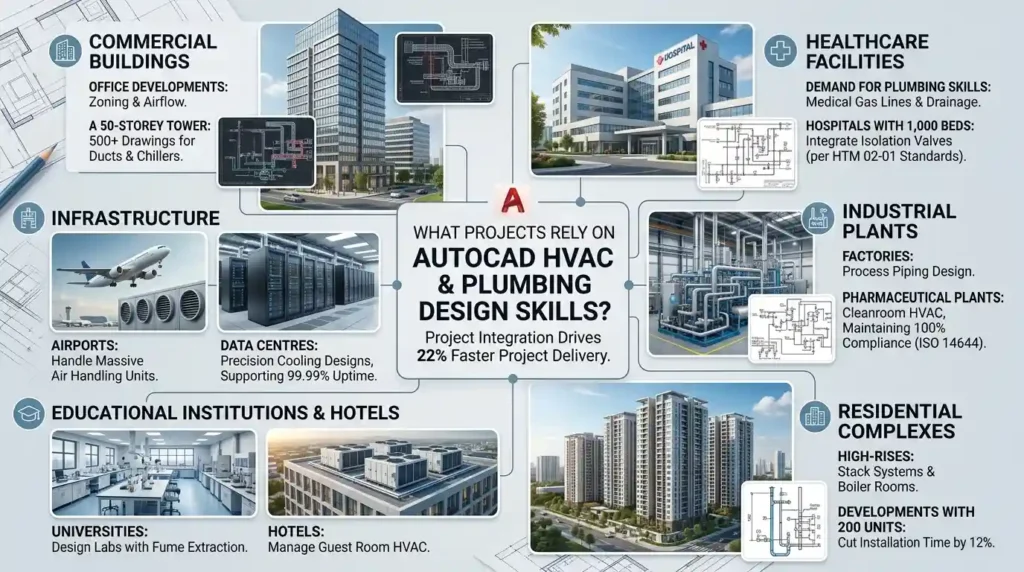
Projects relying on these skills include commercial buildings, healthcare facilities, industrial plants, residential complexes, and infrastructure like data centres and airports, where system integration drives 22% faster project delivery.
Commercial office developments use HVAC designs for zoning and airflow. A 50-storey tower requires 500+ drawings for ducts and chillers.
Healthcare projects demand plumbing skills for medical gas lines and drainage. Hospitals with 1,000 beds integrate isolation valves per HTM 02-01 standards.
Industrial projects cover factories with process piping. Pharmaceutical plants need HVAC for cleanrooms, maintaining 100% compliance with ISO 14644.
Residential high-rises employ these skills for stack systems and boiler rooms. Developments with 200 units cut installation time by 12%.
Infrastructure like airports handles massive air handling units. Data centres require precision cooling designs, supporting 99.99% uptime.
Educational institutions and hotels round out use cases. Universities design labs with fume extraction; hotels manage guest room HVAC.
How Do Organisations Identify Skill Gaps in HVAC and Plumbing Design?
Organisations identify gaps through project audits, error rates in drawings (above 5%), delayed MEP coordination, and employee assessments, prompting targeted training for 70% of technical teams.
Annual skills audits reveal deficiencies. HR reviews error logs from past projects. A 7% clash detection rate signals gaps.
Performance metrics track drawing revisions. Teams exceeding 15 revisions per sheet need upskilling. L&D uses competency matrices.
Employee feedback surveys highlight tool proficiency issues. 40% of engineers report AutoCAD limitations in complex modelling.
Job role analyses map requirements. MEP coordinators require layer management; designers need block libraries for fixtures.
What Components Make Up AutoCAD HVAC and Plumbing Design Training?
Components include software proficiency in layers and blocks, HVAC tools like duct annotation, plumbing symbols for isometrics, simulations for clash detection, and assessments measuring 85% competency gains.
Core software skills cover commands like OFFSET and TRIM. Users master hatches for insulation.
HVAC-specific tools include AEC objects for ducts and fittings. Engineers size components per ASHRAE standards.
Plumbing modules teach pipe routing and valve symbols. Training covers BS 1192 naming conventions.
Frameworks like layer standards organise files. Colour codes denote systems: blue for cold water, red for heating.
Delivery formats span workshops (4-hour sessions), online modules (20 hours total), and hybrid simulations.
Assessments use timed drawing tests. Pre-post quizzes show 25% knowledge uplift.
Case-based learning analyses real projects. Simulations mimic Revit integration.
How Is AutoCAD HVAC and Plumbing Design Training Delivered Step by Step?
Training delivers via 40-hour programs: Week 1 on basics (interface, commands); Week 2 on HVAC tools; Week 3 on plumbing; Week 4 on integration and assessments, with 90% hands-on practice.
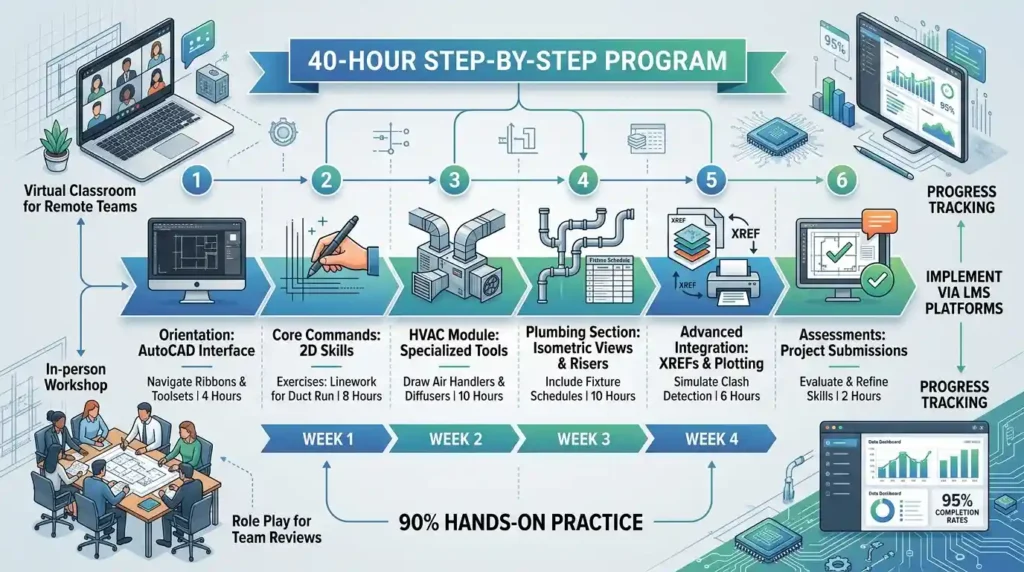
Step 1: Orientation module introduces AutoCAD interface. Participants navigate ribbons and toolsets in 4 hours.
Step 2: Core commands training builds 2D skills. Exercises create linework for a simple duct run (8 hours).
Step 3: HVAC module covers specialised tools. Learners draw air handlers and diffusers (10 hours).
Step 4: Plumbing section details isometric views and risers. Practice includes fixture schedules (10 hours).
Step 5: Advanced integration teaches XREFs and plotting. Simulations detect clashes (6 hours).
Step 6: Assessments evaluate via project submissions. Feedback loops refine skills (2 hours).
Delivery uses virtual classrooms for remote teams. In-person workshops employ role play for team reviews.
Organisations implement via LMS platforms. Progress tracking hits 95% completion rates.
For deeper execution details, explore:
How plumbing isometric drawings are created and detailed in AutoCAD training.
How Do Organisations Implement This Training in Corporate Environments?
Organisations implement training through needs assessments, cohort scheduling for 15-20 employees, blended delivery over 6 weeks, and post-training audits, achieving 28% productivity gains.
Needs assessment scans department rosters. 60% of MEP teams join based on gap analysis.
Scheduling aligns with project downtimes. Q2 cohorts target summer lulls.
Blended formats mix 60% online modules with 40% workshops. Hybrid suits global firms.
Integration involves manager buy-in. Leaders assign mentors for 1:4 ratios.
Post-implementation, audits measure drawing speed. ROI calculates at 4:1 via reduced errors.
Common problems include low engagement from generic programs. Solution: Customise to industry needs.
Misconceptions view training as one-off. Reality demands annual refreshers for software updates.
For deeper insight, enrol in:
AutoCAD HVAC and Plumbing Design Training Course.
What Measurable Outcomes Do These Skills Produce in Teams?
Outcomes include 22% faster design cycles, 18% error reduction, 15% cost savings on rework, and 20% improved employee retention in technical roles.
Productivity rises via efficient drafting. Teams complete 30 sheets weekly versus 24 pre-training.
KPIs track clash-free models at 98%. ROI hits 300% within 12 months.
Team efficiency boosts collaboration. MEP coordination meetings drop 25%.
Retention improves as skills build confidence. Turnover falls 20% in design departments.
Leadership pipelines strengthen. Skilled engineers advance to coordinators, filling 15% of senior gaps.
What Benefits Do Organisations Gain from Equipping Teams with These Skills?
Benefits encompass streamlined project delivery (15% timeline reduction), regulatory compliance (100% pass rates), enhanced BIM integration, and scalable workforce capacity for 25% more projects annually.
Streamlined delivery cuts handover delays. HVAC shops receive accurate fab sheets.
Compliance ensures adherence to Part L energy codes. Audits pass without penalties.
BIM integration supports federated models. AutoCAD files export seamlessly to Navisworks.
Scalability allows firms to bid on larger contracts. Capacity grows without headcount increases.
Departmental impacts include faster tender responses. Estimating accuracy rises 12%.
What Common Problems Arise Without Proper HVAC and Plumbing Design Training?
Problems include high rework rates (up to 20% of budgets), coordination clashes delaying projects by 4-6 weeks, non-compliant designs incurring fines, and skill obsolescence from software updates.
Rework drains resources. Piping clashes require on-site fixes, adding 10% costs.
Clashes multiply in tight spaces. Duct-pipe intersections halt progress.
Non-compliance risks shutdowns. Designs ignoring flow rates fail inspections.
Obsolescence hits with AutoCAD releases. Untrained teams lag 2 versions behind.
Generic programs fail ROI. 50% knowledge fade without practice.
How Do Industries Apply These Skills Across Corporate Teams?
Industries apply skills in AEC firms for MEP design, FM companies for retrofits, consultancies for audits, and government projects for public builds, driving 18% efficiency across 500+ team members.
AEC teams design new builds. 200-engineer firms standardise templates.
Facilities management retrofits existing HVAC. Upgrades serve 1 million sq ft portfolios.
Discover More From Our Guide Library:
How Does BIM Differ From AutoCAD in HVAC and Plumbing System Design?
Why Do Plumbing Designers Use AutoCAD Instead of Manual Drafting Methods?
Consultancies audit legacy drawings. Recommendations yield 15% energy savings.
Government projects enforce standards. Airports integrate skills for terminal expansions.
Cross-industry examples span oil & gas for process plants and renewables for solar thermal plumbing.
What projects require AutoCAD HVAC and plumbing design skills?
Projects like commercial buildings, hospitals, data centres, and industrial plants require these skills for precise MEP system layouts. They ensure regulatory compliance and clash-free coordination. Imperial Corporate Training Institute’s AutoCAD HVAC and Plumbing Design Training Course equips teams for such demands.
What are the benefits of AutoCAD plumbing design training for businesses?
Businesses gain 22% faster design cycles and 18% error reduction from skilled teams. The training supports BIM integration and cuts rework costs by 15%. Imperial Corporate Training Institute delivers measurable ROI via performance metrics.
Is prior AutoCAD experience needed for HVAC and plumbing training?
Basic AutoCAD familiarity helps, but Imperial Corporate Training Institute’s course starts with fundamentals. It progresses to specialised HVAC tools and plumbing isometrics. No advanced experience is required for corporate teams.
How does AutoCAD training improve MEP coordination in projects?
Training teaches layer management and clash detection simulations for HVAC and plumbing systems. This reduces coordination delays by 25% in multidisciplinary teams. Imperial Corporate Training Institute uses case-based learning for real-world application.