

2D AutoCAD drafting creates flat, two-dimensional technical drawings using lines, symbols, and annotations to represent HVAC systems on a single plane, enabling precise layout planning in corporate projects.
Engineering teams in construction, manufacturing, and facilities management rely on 2D AutoCAD drafting for initial design phases. This method produces scalable plans, sections, and elevations. Drawings include ductwork layouts, pipe routings, and equipment placements viewed from top-down or side perspectives.
In B2B environments, HR managers address skill gaps where drafters lack precision tools. Training fills this void through 20-hour workshops. These sessions teach layer management and dimensioning standards. Organisations implement it to standardise documentation across departments like MEP engineering and project management.
Performance metrics track a 25% reduction in drawing errors post-training. Teams achieve faster approvals from regulatory bodies. Retention rates improve by 15% as employees gain confidence in core drafting skills.
How does 3D HVAC system modelling differ from 2D drafting in organisational design processes?
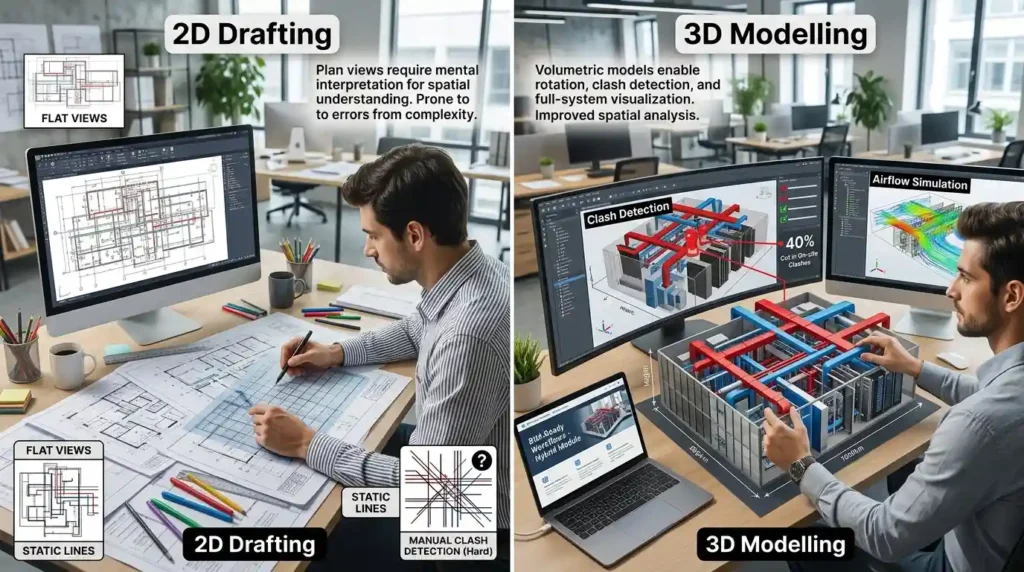
3D HVAC system modelling builds volumetric representations of heating, ventilation, and air conditioning systems using AutoCAD’s 3D tools, allowing clash detection, spatial analysis, and full-system visualisation in corporate projects.
This approach constructs models with depth, height, and width coordinates. Engineers rotate views to inspect ducts, vents, and diffusers from multiple angles. Unlike 2D’s static lines, 3D incorporates solid objects and surfaces.
Corporate L&D professionals deploy it to bridge gaps in BIM-ready workflows. Delivery occurs via 30-hour hybrid modules combining online simulations and in-person assessments. Case-based learning uses real blueprints from industries like pharmaceuticals, data centres, and commercial real estate.
Implementation involves integrating models into Revit or Navisworks for coordination. KPIs measure a 40% cut in on-site clashes. Productivity rises by 30% as teams simulate airflow before fabrication.
Why do corporate teams need to distinguish these skills for MEP efficiency?
Corporate teams distinguish 2D drafting from 3D modelling to optimise MEP workflows: 2D handles quick layouts (80% of initial designs), while 3D ensures integration (95% clash-free installations), reducing rework by 35% in multi-disciplinary projects.
Decision-makers face employee skill gaps in transitioning from flat plans to spatial designs. Generic 2D training leaves teams unprepared for 3D demands in modern HVAC projects. Organisations implement blended programs: 50% theory, 50% hands-on simulations.
Role play exercises mimic coordination meetings with architects and structural engineers. Assessments evaluate model accuracy against tolerances of ±5mm. This addresses misconceptions like “2D suffices for all scales,” which leads to 20% cost overruns.
Team leaders track ROI through metrics: 28% faster project timelines. Leadership pipelines strengthen as engineers upskill for consultancy roles.
How does 2D AutoCAD drafting function step by step in HVAC corporate training?
2D drafting follows a five-step process: 1) Set units and layers (10 minutes); 2) Draw plans with lines/arcs (2 hours); 3) Add symbols/hatches (1 hour); 4) Dimension and annotate (45 minutes); 5) Plot to scale (15 minutes).
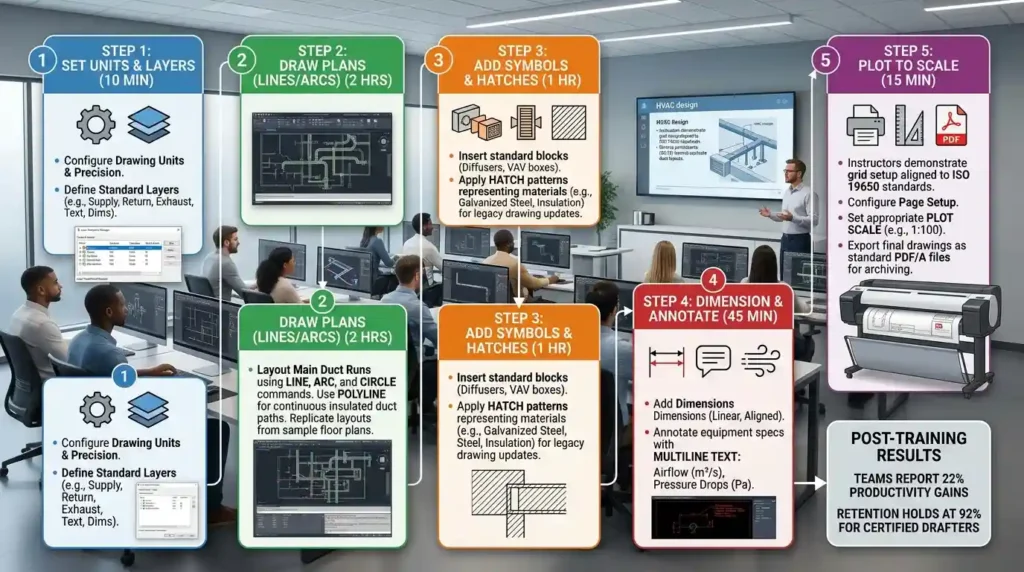
Training delivery starts with workshops for 10-15 participants. Instructors demonstrate grid setup aligned to ISO 19650 standards. Learners replicate duct layouts from sample floor plans.
Step 2 involves polyline commands for insulated ducts. Hatches represent materials like galvanised steel. Organisations apply this in facilities management to update legacy drawings.
Step 4 uses multiline text for specifications: airflow rates in m³/s, pressure drops in Pa. Final plots export as PDF/A for archiving. Post-training, teams report 22% productivity gains. Retention holds at 92% for certified drafters.
What step-by-step process governs 3D HVAC modelling training in business settings?
3D modelling unfolds in six steps: 1) Import 2D base (20 minutes); 2) Extrude to solids (1.5 hours); 3) Assemble components (2 hours); 4) Run clash checks (30 minutes); 5) Render views (45 minutes); 6) Export IFC files (15 minutes).
Hybrid learning formats deliver this over 40 hours. Online modules cover UCS orientation for multi-view work. In-person sessions use role play for piping integration.
Step 3 employs blocks for fans and coils, positioned with precise Z-coordinates. Simulations test scenarios like high-rise atriums. Businesses implement via departmental rollouts: MEP teams first, then coordination with civil engineers.
Clash detection flags interferences within 10mm. Exports support federated models. Outcomes include 35% fewer RFIs. Organisational impact shows 18% efficiency in tender preparations.
Key Tools in the 3D Workflow
- Extrude command builds ducts from 2D profiles.
- Union/subtract operations merge fittings.
- Section planes slice models for detailed views.
What key components make up 2D AutoCAD drafting training programs?
Core components include: layer standards (10 types), linetypes (5 HVAC-specific), blocks library (200+ symbols), dimension styles (3 presets), and plotting templates (4 scales).
Frameworks follow BS 1192 naming conventions. Delivery mixes 60% practical exercises with 40% assessments. Skill gaps in annotation persist; training resolves this via quizzes scoring 85% pass rate.
Tools encompass commands like OFFSET for parallel ducts. Workshops simulate corporate deadlines: complete a 500m² floor plan in 4 hours. Metrics confirm 27% error reduction.
Which components define effective 3D HVAC system modelling training?
Components comprise 3D primitives (20 types), UCS manipulation, solid editing tools (Boolean ops), rendering materials (15 textures), and coordination plugins (2 integrations).
Methodologies use case-based learning from petrochemical plants and hospitals. Hybrid formats deliver 25 online modules plus 15-hour labs. Assessments include model validation against ASHRAE 90.1 standards.
Frameworks integrate value stream mapping for design cycles. Teams build libraries of parametric families. Implementation yields 32% faster prototyping.
Essential Frameworks
- BIM execution plans outline model LOD (Level of Development) from 200 to 400.
- Clash resolution protocols log 50 issues per model.
How do organisations implement 2D drafting training across departments?
Organisations implement via needs assessment (1 week), 20-hour cohort training (4 weeks), on-job application (8 weeks), and KPI audits (quarterly), targeting 90% competency.
HR managers conduct gap analyses using skills matrices. Delivery spans workshops for drafters and online modules for managers. MEP departments in retail and hospitality adopt first.
Post-training, teams update 80% of legacy drawings. Misconception: one-off sessions suffice; reality demands refresher modules yearly. ROI hits 4:1 through 25% less rework.
What implementation steps apply 3D modelling training in corporate structures?
Steps include pilot with 5 engineers (2 weeks), scale to 20 (6 weeks), integrate with workflows (3 months), measure via dashboards (ongoing), achieving 95% adoption.
L&D professionals select hybrid formats for global teams. Simulations replicate office environments. Industries like automotive assembly and airports report success.
Common problems: resistance from 2D veterans. Address via paired mentoring. Outcomes: 40% team efficiency. Learn:
How an AutoCAD HVAC design course supports transitions to MEP consultancy.
For deeper insight enrol:
AutoCAD HVAC and Plumbing Design Training Course.
What benefits deliver 2D drafting skills to business teams?
Benefits encompass 25% faster plan production, 20% reduced material waste, 15% higher compliance rates, and 18% improved cross-departmental handoffs.
Teams in manufacturing close skill gaps, boosting productivity. Retention climbs 12% with certified staff. Generic programs fail; targeted training aligns with KPIs like drawing turnaround under 48 hours.
Which measurable outcomes arise from 3D HVAC modelling proficiency?
Outcomes include 35% clash reduction, 30% timeline compression, 28% cost savings on installations, and 22% enhanced bidding success rates.
Organisations build leadership pipelines for BIM managers. Hybrid learning ensures 92% completion. Impact spans facilities with 500+ assets.
What use cases demonstrate 2D drafting in corporate HVAC projects?
Use cases cover: office retrofits (80% layouts), factory expansions (duct planning), and hospital upgrades (pipe schematics) across construction and energy sectors.
Team leaders train juniors for these. Assessments verify scale accuracy to 1:100.
Where do corporate teams apply 3D HVAC modelling effectively?
Applications include high-rise coordination (clash-free at 98%), data centre cooling (airflow optimised 25%), and pharmaceutical cleanrooms (compliance at 100%).
Departments like engineering and procurement integrate models. Simulations train for these.
What common problems arise from confusing 2D drafting with 3D modelling?
Problems include 30% rework from overlooked clashes, 25% delays in coordination, 20% budget overruns, and 15% skill mismatches in BIM transitions.
Discover More from Our Guide Library:
What UK Building Regulations Apply to HVAC and Plumbing Design Drawings?
How Are Plumbing Systems Represented and Annotated in AutoCAD Drawings?
Misconceptions view 3D as optional; it cuts inefficiencies. Ineffective training skips simulations, yielding poor ROI below 2:1.
How does training resolve misconceptions in HVAC design skills?
Training resolves via hands-on differentiation: 2D for ideation (70% projects), 3D for execution (90% complex builds), delivering 4:1 ROI and 95% accuracy.
Business owners audit programs quarterly. This fosters collaboration across silos.
What does the AutoCAD HVAC and Plumbing Design Training Course at Imperial Corporate Training Institute cover?
The course covers 2D drafting, 3D HVAC modelling, plumbing layouts, clash detection, and BIM integration using AutoCAD tools. Participants learn industry standards like ASHRAE and BS 1192 through hands-on simulations. It equips teams for MEP design efficiency in corporate projects.
Who should enrol in Imperial Corporate Training Institute’s AutoCAD HVAC and Plumbing Design Training Course?
MEP engineers, drafters, and team leaders in construction, facilities management, and manufacturing benefit most. It addresses skill gaps in 3D modelling and coordination for BIM workflows. Ideal for professionals seeking measurable productivity gains.
What are the prerequisites for the AutoCAD HVAC and Plumbing Design Training Course from Imperial Corporate Training Institute?
Basic AutoCAD knowledge and familiarity with 2D drafting suffice as prerequisites. No advanced 3D experience required; the course builds from fundamentals to complex HVAC simulations. Participants receive starter resources for quick alignment.
What outcomes can teams expect from Imperial Corporate Training Institute’s AutoCAD HVAC and Plumbing Design Training Course?
Teams achieve 35% clash reduction, 30% faster timelines, and 4:1 ROI through certified skills in AutoCAD HVAC design. Post-training KPIs track error cuts and efficiency boosts. It supports transitions to MEP consultancy roles.