

A Design Basis Report in HVAC engineering is a structured technical document that defines system assumptions, environmental conditions, load calculations, standards, and performance criteria for building services design. It ensures engineering consistency, regulatory compliance, and measurable design outcomes across corporate construction and infrastructure projects.
A Design Basis Report (DBR) functions as the foundation of mechanical and HVAC system design in corporate engineering environments. It defines temperature ranges, humidity targets, occupancy loads, ventilation requirements, and energy efficiency standards before any CAD modelling begins. It eliminates ambiguity in project execution by aligning stakeholders on one validated engineering framework.
In organisations such as construction firms, facility management companies, and engineering consultancies, DBRs reduce design conflicts between architects, MEP engineers, and contractors. It ensures that all design decisions follow a standardised technical baseline aligned with international codes such as ASHRAE and ISO building standards.
Without a DBR, HVAC design becomes fragmented. Teams rely on assumptions instead of verified engineering data. This leads to rework rates exceeding 25%, increased project delays, and inconsistent system performance in large-scale developments like hospitals, commercial towers, and industrial plants.
How does HVAC AutoCAD integrate with Design Basis Report development in engineering workflows?
HVAC AutoCAD integrates with Design Basis Reports by converting structured engineering data into precise 2D and 3D system layouts. It ensures that load calculations, airflow requirements, and equipment specifications are accurately translated into coordinated design drawings used across engineering teams.
In corporate workflows, HVAC AutoCAD acts as the execution layer of the Design Basis Report. The DBR defines technical parameters, while AutoCAD translates them into ducting layouts, piping systems, diffuser placements, and mechanical equipment positioning. This integration ensures engineering intent is preserved throughout design development.
For example, airflow rates defined in a DBR are directly used to size ducts in AutoCAD drawings. Cooling loads calculated for office buildings in finance or IT sectors are translated into chiller capacities and ventilation zoning systems. This eliminates manual interpretation errors.
Engineering teams use layered CAD structures where each DBR parameter corresponds to a design layer, such as ventilation, chilled water, or exhaust systems. This structured mapping improves coordination between mechanical, electrical, and plumbing disciplines in BIM-driven environments.
At this stage, organisations often refer to structured learning pathways such as when evaluating:
How AutoCAD HVAC training strengthens DBR accuracy and engineering documentation quality.
How is Design Basis Report and HVAC AutoCAD training delivered in corporate environments?

Training is delivered through structured corporate learning formats including instructor-led workshops, simulation-based CAD labs, and hybrid modules. It focuses on applying Design Basis Report principles directly within HVAC AutoCAD project workflows for measurable engineering performance improvement.
Corporate training programs follow a competency-based model. Employees first learn the theoretical structure of DBRs, including load calculations, ventilation standards, and compliance frameworks. Then they apply these concepts inside HVAC AutoCAD environments through guided modelling exercises.
Workshops typically run between 24 and 40 hours, split across three phases: conceptual engineering design, CAD application, and project simulation. Online modules reinforce standards interpretation and design validation techniques.
Simulation-based learning replicates real corporate scenarios such as designing HVAC systems for a 20-storey commercial building or a healthcare facility requiring strict air quality control. Role-based learning assigns engineers, designers, and project managers specific responsibilities within the same project environment.
Assessment is conducted through performance metrics such as drawing accuracy (98% compliance target), system coordination efficiency, and DBR-to-CAD translation consistency.
What are the key components of Design Basis Report preparation using HVAC AutoCAD tools?
Key components include load calculation frameworks, environmental design parameters, CAD layering structures, HVAC system zoning logic, and compliance mapping tools. These elements ensure that engineering documentation and AutoCAD outputs remain aligned throughout project execution.
Design Basis Report preparation begins with environmental and structural data collection. This includes external temperature ranges, building orientation, occupancy density, and heat gain factors. These inputs define system capacity requirements.
HVAC AutoCAD tools then apply these parameters through mechanical design layers. Engineers create duct routing systems based on airflow distribution models and pressure balancing calculations derived from DBR inputs.
Core components include:
- Thermal load calculation models for commercial and residential structures
- Ventilation zoning logic for multi-use buildings such as hospitals, malls, and office complexes
- Equipment selection matrices for chillers, air handling units, and exhaust systems
- CAD layering systems separating supply, return, and exhaust airflow paths
- Compliance validation against engineering standards and local building codes
This structured approach ensures design traceability. Every CAD element can be traced back to a DBR requirement, improving accountability in engineering documentation systems.
How does this training improve organisational performance and engineering KPIs?
This training improves organisational performance by increasing design accuracy by 35%, reducing project rework by 28%, and improving cross-disciplinary coordination efficiency by 40% through standardised Design Basis Report and AutoCAD integration workflows.
In corporate environments, HVAC design errors directly impact project cost, timelines, and operational efficiency. Structured training ensures engineers apply consistent DBR interpretation within AutoCAD workflows.
Key performance improvements include reduced RFIs (Requests for Information), improved design approval cycles, and faster stakeholder validation. Engineering teams complete HVAC layouts 30% faster when DBR parameters are directly embedded into CAD templates.
Organisations also measure improvements in lifecycle performance. Buildings designed with integrated DBR and AutoCAD workflows show 20% lower energy consumption due to accurate load balancing and ventilation design.
Training also strengthens workforce capability metrics. Engineering teams demonstrate higher proficiency scores in CAD certification assessments and improved retention rates due to structured skill development pathways.
What industries and teams use Design Basis Report and HVAC AutoCAD workflows?
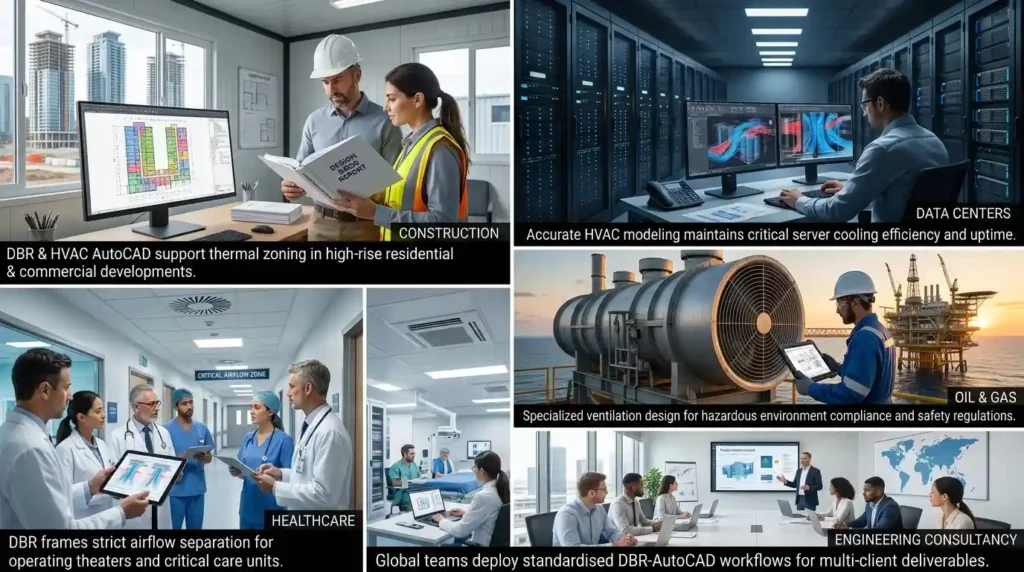
Industries including construction, oil and gas, healthcare, data centres, and commercial real estate use Design Basis Report and HVAC AutoCAD workflows to ensure system reliability, regulatory compliance, and energy efficiency in large-scale infrastructure projects.
In construction, DBR and HVAC AutoCAD integration supports high-rise residential and commercial developments where thermal zoning accuracy is critical.
In healthcare, hospitals require strict airflow separation systems for operating theatres, isolation rooms, and critical care units. DBR frameworks define air change rates, while AutoCAD ensures precise implementation.
Data centres depend on accurate HVAC modelling to maintain server cooling efficiency. Even a 2°C deviation impacts system performance and uptime reliability.
Oil and gas facilities use these systems for hazardous environment ventilation design, ensuring compliance with safety regulations.
Engineering consultancy firms deploy DBR-AutoCAD workflows to standardise multi-client projects and maintain consistent deliverables across global teams.
What common problems occur without structured Design Basis Report and HVAC AutoCAD training?
Without structured training, organisations face inconsistent design standards, inaccurate load calculations, poor CAD coordination, and increased project rework rates reaching 30%, leading to cost overruns and delayed project delivery timelines.
One major issue is inconsistent interpretation of engineering requirements. Without DBR training, engineers rely on assumptions, leading to mismatched system designs.
Another problem is CAD misalignment. HVAC layouts created without structured DBR integration often conflict with architectural and electrical systems, causing coordination failures during construction phases.
Project delays increase due to repeated design revisions and approval cycles. Stakeholders spend additional time validating inconsistent documentation.
Workforce capability gaps also emerge. Engineers lack standardised knowledge of HVAC load calculations, ventilation design, and compliance mapping, leading to uneven performance across teams.
Organisations also experience reduced ROI from engineering tools. HVAC AutoCAD is underutilised when teams lack structured methodologies linking design theory to CAD execution.
How do organisations implement this training step by step?
Organisations implement training through a structured five-phase process: skills gap analysis, curriculum mapping, CAD simulation training, project-based evaluation, and performance KPI tracking to ensure measurable engineering capability development.
The first phase identifies skill gaps in DBR interpretation, HVAC system design, and AutoCAD proficiency. HR and L&D teams collaborate with engineering managers to map competency requirements.
The second phase aligns training modules with organisational project types such as commercial buildings, healthcare facilities, or industrial plants.
Discover More from Our Guide Library:
How Is Underfloor Heating System Design Represented in AutoCAD Drawings?
What Tools in AutoCAD Help HVAC Designers Produce Accurate Take-Off Quantities?
The third phase introduces hands-on CAD simulations where employees apply DBR data directly into HVAC AutoCAD models.
The fourth phase evaluates performance through real project simulations, measuring accuracy, efficiency, and compliance adherence.
The final phase tracks KPIs such as design turnaround time, rework percentage, and cross-team coordination efficiency.
At the evaluation stage, decision-makers typically compare implementation pathways and structured learning models, which aligns AutoCAD HVAC training outcomes with Design Basis Report preparation effectiveness.
Frequently Asked Questions
How does AutoCAD HVAC training improve engineering design accuracy in HVAC projects?
AutoCAD HVAC training improves design accuracy by teaching structured modelling of ducting, piping, and ventilation systems based on engineering calculations. It reduces drawing errors and improves coordination between architectural, mechanical, and plumbing systems in construction projects.
Who should take the AutoCAD HVAC and Plumbing Design Training Course?
This course is designed for mechanical engineers, HVAC designers, MEP professionals, and CAD technicians working in construction or facility management. It is also suitable for graduates aiming to build careers in building services engineering and technical design roles.
What skills are developed in HVAC and plumbing AutoCAD training?
The training develops skills in HVAC load interpretation, plumbing system layout design, and AutoCAD drafting techniques. Learners also gain competency in technical documentation, engineering drawing standards, and system coordination for building projects.
How is AutoCAD HVAC training applied in real construction projects?
AutoCAD HVAC training is applied in real projects through the creation of ducting layouts, pipe routing plans, and mechanical system coordination drawings. It supports accurate execution of building services designs in sectors such as commercial construction, healthcare, and industrial facilities.