

AutoCAD HVAC training teaches duct sizing and system layout by combining drafting precision with HVAC design logic. It turns theory into a repeatable workflow, so learners read loads, select duct routes, size branches, and produce coordinated drawings that support installation, compliance, and handover.
What does AutoCAD HVAC training cover first?
AutoCAD HVAC training begins with drawing standards, HVAC symbols, and the logic of building services coordination. It teaches learners to translate design intent into accurate plans, sections, and schematics that support sizing, routing, clash avoidance, and professional documentation for real project teams.
The first stage is not duct sizing itself. It is spatial literacy. Learners understand layers, line weights, blocks, annotations, and scale control. These basics matter because HVAC design fails when dimensions, symbols, and notes do not match across drawings.
At this stage, the training also builds familiarity with system components. That foundation is useful for anyone reading guide on:
The basic components of an HVAC system engineers need to know.
That earlier awareness step helps learners understand how supply, return, exhaust, fans, terminals, and controls fit together before they begin technical drafting.
The practical value for employers is clear. A designer who understands drawing conventions reduces rework, lowers coordination errors, and improves submission quality. In project environments, that means fewer revision cycles between MEP consultants, architects, and contractors.
How does the training teach duct sizing?
The training teaches duct sizing by linking airflow demand, velocity limits, pressure loss, and branch balancing to actual drawings. Learners calculate duct dimensions from design data, then convert those calculations into coordinated routes that maintain performance, noise control, and installability.
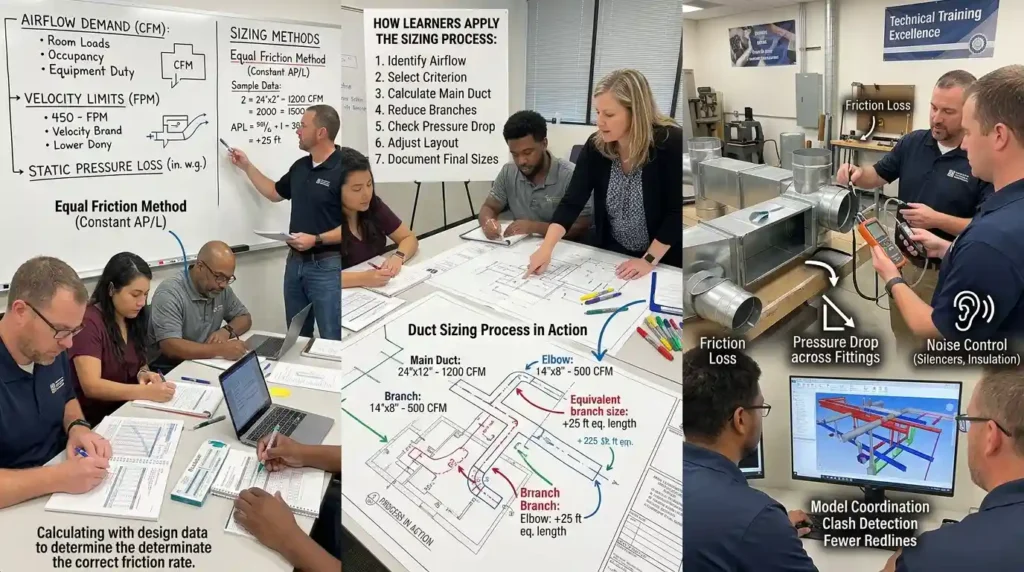
Duct sizing starts with airflow. The trainer introduces the relationship between room loads, air changes, occupancy, equipment duty, and the airflow volume each zone requires. Once the airflow requirement is fixed, the learner selects a sizing method and applies it consistently.
The main sizing approaches include the equal friction method, the static regain method, and velocity-based sizing. In practice, most training programmes focus on the equal friction method first because it gives a clear design process and supports early-stage layouts. The logic is simple. Keep pressure drop per unit length within a target range, size the main duct for total airflow, and reduce branch sizes as air volume decreases.
A good course also explains why duct size is not just a mathematical output. Duct shape, bend radius, fitting type, and run length all change real performance. A design that looks correct on paper still fails if it creates excessive pressure loss or noise. Training therefore connects numbers with installation constraints.
How learners apply the sizing process
The workflow usually follows these steps:
- Identify the airflow requirement for each zone or terminal.
- Select a sizing criterion such as friction rate or maximum velocity.
- Calculate the main duct dimensions from total airflow.
- Reduce branch sizes as airflow splits.
- Check pressure drop across fittings, dampers, and long runs.
- Adjust the layout if the route creates excessive resistance.
- Document the final sizes on the drawing set.
This sequence matters because it mirrors real design work. It also supports learning transfer, which HR teams value when they evaluate technical training. A programme delivers stronger ROI when staff can apply a process immediately instead of memorising isolated formulas.
Training providers often measure effectiveness through assessment scores, task completion rates, and first-pass drawing acceptance. In a workplace setting, practical impact shows up in fewer redlines, quicker model revisions, and improved coordination with site teams.
How does AutoCAD support system layout?
AutoCAD supports system layout by turning airflow decisions into spatially coordinated drawings. Learners place ducts, terminals, risers, shafts, and equipment in relation to structure and architecture, then refine the route to balance performance, accessibility, and constructability.
System layout is where HVAC design becomes multidisciplinary. The learner must respect ceiling depth, beam positions, fire compartments, access zones, and service corridors. AutoCAD helps visualise those constraints in plan and section, so the designer does not treat ductwork as an isolated layer.
The layout process usually starts with equipment placement. Air handling units, fans, diffusers, and terminal devices set the structure of the system. From there, the learner traces the main supply route, return path, and exhaust line. Each route reflects both airflow logic and building geometry.
A strong training programme teaches layout rules that reduce downstream problems:
- Keep main ducts as direct as possible.
- Avoid unnecessary offsets and sharp direction changes.
- Maintain access around dampers, filters, and control devices.
- Coordinate with structural members and ceiling services.
- Separate supply and return routes where contamination or short-circuiting matters.
- Preserve space for insulation, maintenance, and future replacement.
This is where B2B value becomes visible. A designer who lays out ducts properly helps the contractor install faster and helps the facility team maintain the system more easily. Those outcomes support measurable business goals such as reduced change orders, lower site delays, and improved asset reliability.
Training also builds awareness of coordination workflows. In many organisations, HVAC teams work alongside electrical, plumbing, and architectural stakeholders. AutoCAD drafting gives a common communication layer. When the layout is clear, review cycles shorten and decision-making improves.
Which learning approach builds the skill fastest?
The fastest learning approach combines instructor-led demonstration, guided practice, and project-based assessment. Learners absorb the logic of sizing and layout more effectively when they complete real drawing tasks, review corrections, and repeat the workflow on multiple HVAC scenarios.
Theory alone does not create drafting competence. AutoCAD HVAC training works best when it uses a skills pipeline. First, the learner observes the method. Then they reproduce it with support. Finally, they complete the task independently under realistic project conditions.
This approach outperforms passive learning because it supports both conceptual understanding and procedural memory. The learner does not just know what duct sizing means. They know how to do it, how to check it, and how to revise the drawing when the route changes.
Common delivery models
- Live classroom training, which supports real-time correction and discussion.
- Online instructor-led training, which suits distributed teams and remote learners.
- Blended learning, which combines recorded theory with live drafting exercises.
- Workplace-based training, which uses live company projects and internal standards.
For HR teams, the choice depends on workforce need. If the objective is standardisation across a design department, blended delivery works well because it balances reach and consistency. If the objective is rapid capability building for a live project team, instructor-led training with project files provides faster transfer.
Training effectiveness is usually measured through completion rate, assessment performance, drafting accuracy, and time-to-independence. In technical departments, managers also track reduction in review comments and turnaround time for revised drawings.
What business outcomes does this training support?

This training supports business outcomes by improving design accuracy, reducing rework, and speeding up coordination between design and delivery teams. It also strengthens workforce capability, which helps employers’ close skill gaps in BIM-adjacent drafting, MEP coordination, and technical documentation.
The business case starts with cost avoidance. HVAC drafting errors create expensive consequences. A wrong duct route can conflict with beams, overload ceiling space, or force redesign after procurement begins. Every late change adds time and labour cost.
A capable drafter or design technician reduces those risks. They produce cleaner deliverables, flag coordination issues earlier, and prepare drawings that contractors can trust. That improves project flow.
The training also supports talent development. Many firms face a skill gap between general AutoCAD users and people who understand HVAC system logic. Closing that gap improves internal mobility and reduces reliance on external consultants for routine drafting tasks.
Outcomes organisations track
- First-pass drawing approval rate.
- Number of coordination clashes per project.
- Revision cycles before issue for construction.
- Time taken to complete HVAC layouts.
- Rate of compliance with internal drawing standards.
- Post-training task performance in live projects.
These indicators help HR and operations teams justify training spend. A course that improves output speed by even 15% or reduces drawing revisions by a similar margin creates measurable productivity value. In high-volume project environments, that improvement compounds across multiple deliverables.
Another advantage is standardisation. When a team learns the same sizing logic and layout conventions, project handover becomes easier. New staff settle faster. Senior staff spend less time correcting basic mistakes. Managers gain more predictable quality across jobs.
How should learners evaluate the right course?
Learners should evaluate the right course by checking whether it teaches sizing logic, layout practice, file handling, and project application in one workflow. The best option aligns with current role needs, organisational standards, and the level of drafting responsibility expected after training.
Not every AutoCAD course delivers HVAC capability. Some programmes teach generic drafting only. Others cover HVAC theory without giving enough drawing practice. A strong option integrates both so the learner can move from calculation to layout without losing context.
Decision criteria
- Does the course teach actual duct sizing methods, not just AutoCAD commands.
- Does it use HVAC case studies and system layouts.
- Does it include exercises on plans, sections, and schematics.
- Does it cover coordination with architecture and structure.
- Does it support workplace application, not only certification completion.
- Does it suit the learner’s current level, from junior drafter to design support staff.
A useful way to evaluate the course is to ask whether it solves a real work problem. If the issue is inaccurate layouts, then the training must address routing and coordination. If the issue is inconsistent sizing, then the course must teach calculation logic and application.
This is where a structured programme such as the AutoCAD HVAC and Plumbing Design Training Course becomes relevant for decision-making. The course type matters because learners who need practical project output need more than software navigation. They need a training structure that links design intent, drafting execution, and technical checking.
For deeper knowledge explore:
How Do I Enrol in Imperial’s AutoCAD HVAC and Plumbing Design Course in London?
For organisations, that distinction matters during procurement. A course should be judged by capability gain, not just attendance. If the learner returns with better drawings, fewer errors, and stronger technical judgement, the investment has direct operational value.
Where does this training fit in project teams?
This training fits best in design support, MEP coordination, technical drafting, and early-career engineering roles. It gives teams a shared method for converting HVAC requirements into usable layouts, which improves collaboration across consultants, contractors, and internal stakeholders.
In project teams, the trained person often sits between concept design and construction documentation. They help transform rough engineering direction into clean drawings. That role supports senior engineers by handling detail work while preserving technical accuracy.
The training also helps organisations create stronger internal pipelines. Junior staff learn a repeatable method. Mid-level staff improve speed and consistency. Managers gain a more resilient drafting function that does not depend entirely on one expert.
Discover More from Our Guide Library:
How Does AutoCAD HVAC Training Improve Your Drafting Speed and Accuracy?
What Topics Are Covered in an AutoCAD HVAC and Plumbing Design Training Course?
For HR leaders, this makes the training strategically useful. It strengthens workforce capability in a high-demand technical area. It also creates a measurable development path for employees who work in building services, CAD production, or design coordination.
In practice, the value appears when a team must produce coordinated duct layouts under time pressure. A person trained in both AutoCAD and HVAC logic handles the task with less supervision. That reduces bottlenecks and supports delivery quality across the project lifecycle.
What is covered in the AutoCAD HVAC and Plumbing Design Training Course?
The AutoCAD HVAC and Plumbing Design Training Course from Imperial Corporate Training Institute covers duct and pipe layout, sizing principles, layering, and drawing standards for building services. Learners work on practical HVAC and plumbing drawings that reflect real project conditions and coordination needs.
Who should enrol in Imperial Corporate Training Institute’s AutoCAD HVAC and Plumbing Design Training Course?
The course suits junior mechanical engineers, HVAC technicians, CAD drafters, and building services designers who need to produce accurate HVAC and plumbing layouts. It is also useful for professionals moving from general AutoCAD use into MEP design workflows.
What skills will I gain from the AutoCAD HVAC and Plumbing Design Training Course?
Learners gain skills in HVAC duct and plumbing pipe routing, basic sizing logic, clash-aware layout, and preparing coordinated drawings for construction and approvals. The course also reinforces drawing standards, layering strategies, and documentation suitable for professional building services projects.
Can the AutoCAD HVAC and Plumbing Design Training Course support corporate or HR training objectives?
Yes, Imperial Corporate Training Institute designs the AutoCAD HVAC and Plumbing Design Training Course so HR and L&D teams can address skill gaps in MEP drafting and coordination. Organisations use it to standardise drawing quality, reduce design rework, and improve project documentation consistency.