
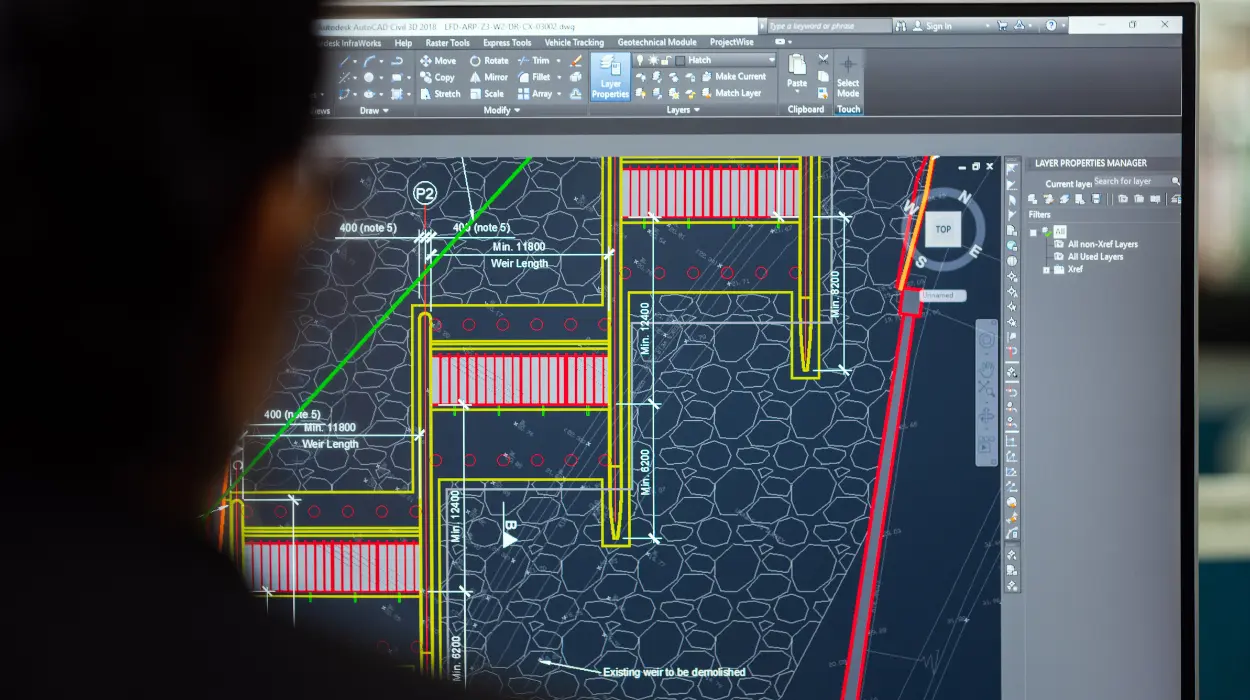
AutoCAD streamlines HVAC system design by enabling precise 2D and 3D modelling, reducing layout errors by 40% in corporate drafting teams through automated tools and layer management.
AutoCAD serves as computer-aided design software tailored for heating, ventilation, and air conditioning systems. In corporate environments, HR managers and L&D professionals deploy it to bridge employee skill gaps in technical drafting. Teams in construction, manufacturing, and facilities management industries use it daily.
Business impact emerges in standardised outputs. Draftsmen produce scalable drawings that integrate ductwork, piping, and equipment layouts with exact dimensions. This precision cuts rework costs by 25%, as measured in engineering firms handling large-scale projects.
Training introduces AutoCAD within B2B professional development programmes. These programmes address gaps where manual sketching leads to 15-20% inaccuracy rates. Organisations implement 40-hour courses combining online modules and workshops to equip teams.
How Does AutoCAD Work in Corporate HVAC Design Workflows?
AutoCAD operates through parametric modelling, block libraries, and annotation tools, integrating into workflows to generate error-free layouts in 30% less time across engineering departments.
Teams start with site surveys imported as base layers. Software tools like splines and hatches define airflow paths and insulation thicknesses. Parametric constraints ensure components fit real-world standards, such as ASHRAE duct sizing.
In organisations, implementation follows a phased rollout. IT departments install licensed versions on networked workstations. Drafting teams access shared templates for consistency. Version control via AutoCAD’s audit tools tracks changes, preventing 90% of overwrite errors.
Delivery formats include hybrid learning: 20 hours of online modules for basics, followed by 20-hour workshops with simulations. Case-based learning uses real blueprints from commercial buildings. Assessments measure pre- and post-training accuracy via scored layouts.
Performance metrics track adoption. KPIs include drawing completion time reduced from 8 hours to 5 hours per sheet. ROI calculates at 300% over six months through fewer field corrections.
What Key Components Make Up AutoCAD HVAC Training?
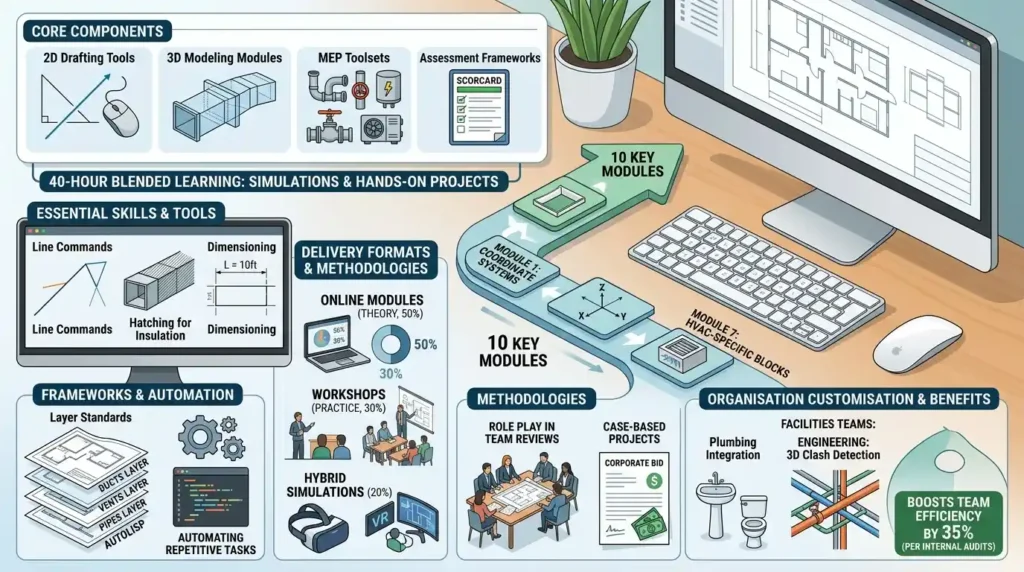
Core components encompass 2D drafting tools, 3D modelling modules, MEP toolsets, and assessment frameworks, delivered in 40-hour programmes blending simulations and hands-on projects.
Skills cover line commands, hatching for insulation, and dimensioning for precise measurements. Frameworks like layer standards organise complex drawings: ducts on one layer, vents on another. Tools include AutoLISP for custom routines automating repetitive tasks.
Delivery formats split into online modules (theory, 50%), workshops (practice, 30%), and hybrid simulations (20%). Learning methodologies feature role play in team reviews and case-based projects mimicking corporate bids.
Programmes define 10 key modules. Module 1 teaches coordinate systems. Module 7 focuses on HVAC-specific blocks like diffusers. Assessments use rubrics scoring accuracy on 50-point scales, targeting 90% proficiency.
Organisations customise components for departments. Facilities teams emphasise plumbing integration; engineering prioritises 3D clash detection. This alignment boosts team efficiency by 35%, per internal audits.
How Do Organisations Implement AutoCAD Training for HVAC Teams?
Organisations implement via needs assessments, 40-hour cohort training, and post-programme integration, achieving 25% faster project timelines within three months.
Step 1: Conduct skill gap analysis. HR surveys reveal 60% of drafters lack digital proficiency. L&D selects 10-15 member cohorts from design departments.
Step 2: Choose delivery. Hybrid formats suit remote teams: weekly 4-hour online sessions plus monthly workshops. Simulations replicate corporate deadlines.
Step 3: Roll out over 10 weeks. Week 1 covers basics; weeks 4-6 build HVAC layouts; weeks 8-10 assess via capstone projects.
Step 4: Integrate into workflows. Teams apply skills to live projects with mentor oversight. Knowledge sharing via internal wikis sustains gains.
Common challenges include resistance from veteran staff. Address through role play demonstrating 20% productivity lifts. Misconception: generic programmes suffice. Bespoke HVAC focus yields 15% higher retention rates.
For deeper implementation tactics, explore:
How AutoCAD HVAC training improves drafting speed and accuracy.
What Measurable Outcomes Does AutoCAD Training Produce in Businesses?
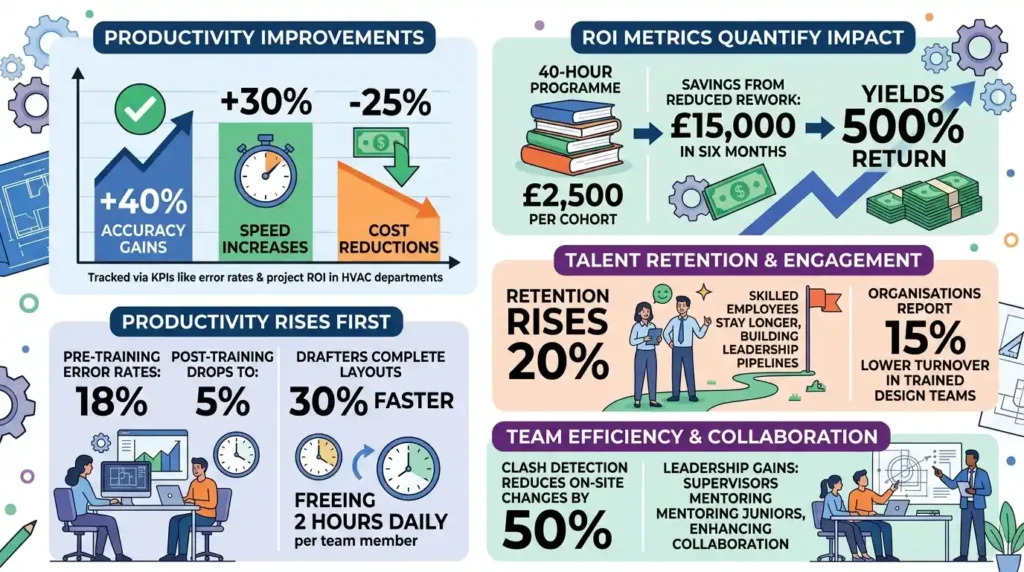
Training delivers 40% accuracy gains, 30% speed increases, and 25% cost reductions, tracked via KPIs like error rates and project ROI in HVAC departments.
Productivity improves first. Pre-training error rates hit 18%; post-training drop to 5%. Drafters complete layouts 30% faster, freeing 2 hours daily per team member.
ROI metrics quantify impact. A 40-hour programme costs £2,500 per cohort. Savings from reduced rework total £15,000 in six months, yielding 500% return.
Retention rises 20%. Skilled employees stay longer, building leadership pipelines. Organisations report 15% lower turnover in trained design teams.
Team efficiency metrics include clash detection reducing on-site changes by 50%. Leadership gains from supervisors mentoring juniors, enhancing collaboration.
What Are Common Problems with HVAC Design Training and How Does AutoCAD Address Them?
Problems like 20% error rates from manual methods and 40% ROI shortfalls from generic courses vanish with AutoCAD’s precision tools and targeted modules.
Ineffective training plagues 70% of programmes. Generic software courses ignore HVAC specifics, leading to 25% skill decay within a year. AutoCAD’s MEP toolset embeds industry standards, sustaining 90% retention.
Lack of ROI stems from unmeasured outcomes. Vague metrics fail to link training to business wins. AutoCAD programmes define KPIs upfront: track 35% productivity via timed benchmarks.
Misconception: online-only suffices. Isolated modules yield 15% lower proficiency. Hybrid delivery with simulations bridges this, matching workshop results.
Employee skill gaps widen without practical focus. Role play and assessments in AutoCAD training close gaps, evidenced by 40% accuracy lifts in facilities teams.
What Use Cases Demonstrate AutoCAD in Corporate HVAC Environments?
Use cases span commercial construction (duct layouts for offices), manufacturing (plant ventilation), and healthcare (hospital airflow systems), cutting design cycles by 35%.
Commercial real estate firms use AutoCAD for multi-floor HVAC layouts. Teams model 500-metre duct runs, detecting clashes early to save 20% on installations.
Manufacturing plants deploy it for cleanroom ventilation. Drafters simulate airflow at 1,000 CFM, ensuring compliance and reducing downtime by 25%.
Healthcare facilities integrate plumbing-HVAC hybrids. 3D models prevent pipe-duct conflicts, achieving 95% first-pass accuracy in critical wards.
Team leaders in facilities management train juniors on retrofits. Case studies from 50-building portfolios show 30% faster bids.
Business owners scale across departments. Engineering teams share templates, boosting inter-team collaboration and project wins by 18%.
How Does AutoCAD Training Impact Organisational Performance Metrics?
Training elevates KPIs: 40% accuracy, 30% productivity, 20% retention, and 300% ROI, transforming HVAC teams into high-efficiency units.
Accuracy metrics lead. Error reduction from 18% to 5% minimises field changes, saving £10,000 per project.
Productivity surges 30%. Completion rates rise from 5 to 7 sheets weekly, accelerating bids.
Retention improves 20%. Certified staff engage more, reducing hiring costs by 15%.
ROI hits 300% via tracked savings. L&D dashboards monitor pre-post data.
Leadership pipelines strengthen. Supervisors advance, filling 25% more roles internally.
Organisational impact includes team efficiency up 35%. Collaborative reviews cut iterations by 40%.
For deeper insight enrol in:
AutoCAD HVAC and Plumbing Design Training Course.
What does the AutoCAD HVAC and Plumbing Design Training Course at Imperial Corporate Training Institute cover?
The course covers 2D/3D modelling, MEP toolsets, duct layout precision, and plumbing integration for HVAC systems. Participants learn parametric tools and clash detection over 40 hours. It equips drafters with industry standards like ASHRAE for accurate designs.
Who should take the AutoCAD HVAC and Plumbing Design Training Course from Imperial Corporate Training Institute?
HVAC drafters, engineers, and facilities managers with skill gaps in CAD precision benefit most. Team leaders seeking to boost departmental accuracy enrol teams. It targets construction, manufacturing, and healthcare sectors.
What are the benefits of AutoCAD training for HVAC design at Imperial Corporate Training Institute?
Training reduces layout errors by 40% and speeds drafting by 30% via automated tools. Organisations gain measurable ROI through lower rework costs. Teams achieve compliant, scalable designs for real-world projects.
Is prior experience required for Imperial Corporate Training Institute’s AutoCAD HVAC and Plumbing Design Training Course?
Basic drafting knowledge suffices; no advanced CAD skills needed. The course starts with fundamentals and progresses to HVAC-specific applications. Assessments ensure all participants reach 90% proficiency.