

AutoCAD training gives HVAC and plumbing teams a shared technical language for producing accurate drawings, reducing coordination errors, and improving project delivery. It turns manual drafting into a standardised digital process, which helps organisations control cost, shorten design cycles, and improve compliance across construction projects.
In corporate environments, building services design depends on accuracy, speed, and consistency. HVAC and plumbing engineers work with floor plans, section views, schematics, isometrics, and coordinated layouts. AutoCAD supports these tasks by converting engineering intent into clear digital documents that can be reviewed, revised, measured, and shared across teams.
For HR managers and L&D professionals, this matters because technical skill gaps directly affect delivery performance. When engineers lack AutoCAD proficiency, design revisions increase, coordination breaks down, and site errors rise. That creates delays, rework, and avoidable cost. In construction-led sectors such as real estate, facilities management, manufacturing, healthcare, and commercial fit-out, those inefficiencies affect project margins and client confidence.
AutoCAD also supports standardisation. A trained team follows the same layer structure, line weights, symbols, templates, and annotation rules. That consistency strengthens quality control and reduces dependency on a few senior staff members.
For deeper insight enrol:
AutoCAD HVAC and Plumbing Design Training Course.
How does AutoCAD work in a corporate design environment?
AutoCAD works as a structured drafting system where engineers create, edit, annotate, and coordinate technical drawings using standard commands, templates, and layers. In organisations, it supports collaboration, version control, and design review, so multiple stakeholders can work from the same accurate project information.

The workflow usually starts with an input requirement. That requirement comes from a site survey, architectural layout, client brief, or engineering specification. The engineer then creates a drawing file, sets units, applies a template, and builds the design using commands for lines, polylines, offsets, trims, blocks, dimensions, and hatches.
In an organisational setting, AutoCAD is rarely used in isolation. It sits inside a larger workflow that includes design review, internal approval, interdisciplinary coordination, and document issue management. Engineers work with architects, structural teams, electrical designers, project managers, and site supervisors. Each group relies on drawing accuracy to avoid clashes and sequencing errors.
A typical corporate workflow includes 5 stages:
- Requirement capture from the client or project team.
- Drafting and layout development in AutoCAD.
- Internal technical review and correction.
- Coordination with other disciplines and issue control.
- Final drawing release for construction or submission.
This process improves when training includes practical simulation. A workshop that uses live project scenarios, such as a chilled water layout or a plumbing riser diagram, builds real capability faster than theory-only teaching. Online modules help with command recognition and self-paced practice. Hybrid learning combines both and suits organisations that need flexibility across multiple locations.
What does an AutoCAD HVAC and plumbing training course include?
A strong AutoCAD HVAC and plumbing training course covers drawing setup, command use, layer management, symbols, annotations, layout creation, and discipline-specific drafting standards. It also teaches how to produce accurate mechanical and plumbing documents that align with construction workflows and engineering review requirements.
The content of the course must connect directly to the work engineers perform. Generic CAD teaching creates weak transfer into the workplace. HVAC and plumbing design training focuses on the documents and decisions used in real projects.
Core components usually include:
- Interface and workspace navigation.
- File setup, units, limits, and drawing standards.
- Basic and advanced drawing commands.
- Layer creation and layer control.
- Object snaps, tracking, and precision tools.
- Blocks, symbols, and reusable components.
- Text, dimensions, leaders, and annotations.
- Paper space, model space, and layouts.
- Plotting, scaling, and PDF output.
- HVAC drafting conventions, including duct routes, equipment placement, and schematic notation.
- Plumbing drafting conventions, including pipe routes, fixtures, drainage, and riser representation.
- Coordination practices for multidisciplinary project teams.
Training also includes assessments. These assessments measure whether learners can complete tasks such as producing a section detail, placing mechanical symbols correctly, or preparing a scaled layout for issue. In business terms, assessment checks competence, not attendance.
A well-designed course uses case-based learning, simulations, and task-based exercises. For example, learners can work on a commercial office floor plan and draft the HVAC supply layout and plumbing fixture plan from the same source drawing. This method reflects workplace reality and strengthens decision-making under project constraints.
For more information explore:
What Topics Are Covered in an AutoCAD HVAC and Plumbing Design Training Course?
How is AutoCAD training delivered step by step inside organisations?
AutoCAD training is delivered through a needs analysis, skills mapping, structured instruction, guided practice, assessment, and post-training performance review. Organisations use this sequence to close technical skill gaps, improve standardisation, and measure whether the training changes real engineering output.
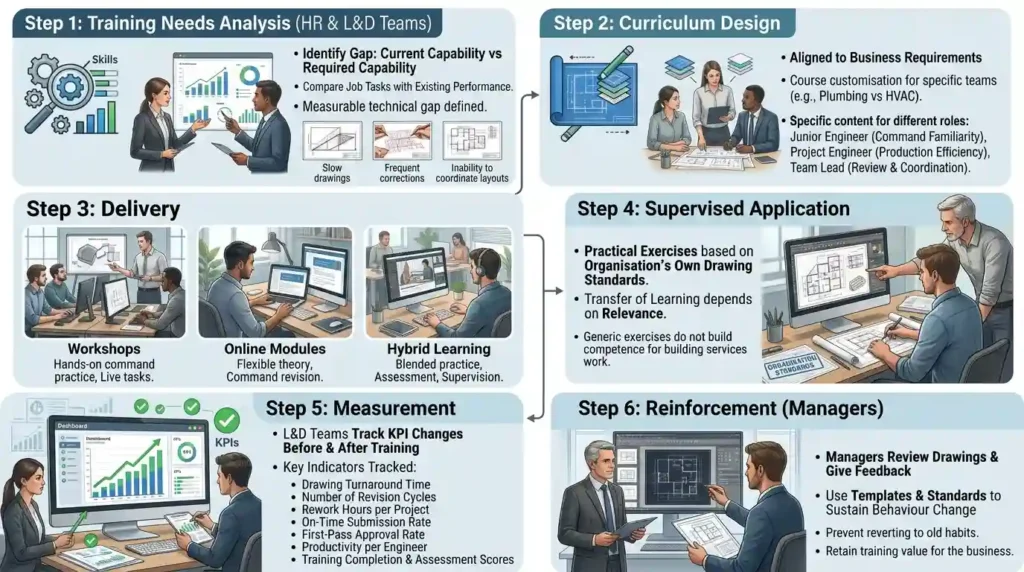
The first step is training needs analysis. HR and L&D teams identify the gap between current capability and required capability. They compare job tasks with existing performance. If engineers produce drawings slowly, make frequent corrections, or cannot prepare coordinated layouts, the gap is technical and measurable.
The second step is curriculum design. The course is aligned to business requirements. A plumbing team needs different depth than an HVAC design team, even though both use the same platform. A junior engineer needs command familiarity. A project engineer needs production efficiency. A team lead needs review and coordination capability.
The third step is delivery. Organisations use 3 common formats:
- Workshops for hands-on command practice and live tasks.
- Online modules for flexible theory and command revision.
- Hybrid learning for blended practice, assessment, and supervision.
The fourth step is supervised application. Learners complete practical exercises based on the organisation’s own drawing standards. This stage matters because transfer of learning depends on relevance. A generic exercise in simple geometry does not build competence for building services work.
The fifth step is measurement. L&D teams track KPI changes before and after training. Useful indicators include:
- Drawing turnaround time.
- Number of revision cycles.
- Number of coordination errors.
- Rework hours per project.
- On-time submission rate.
- First-pass approval rate.
- Productivity per engineer.
- Training completion and assessment scores.
The final step is reinforcement. Managers review drawings, give feedback, and use templates and standards to sustain behaviour change. Without reinforcement, engineers revert to old habits and the business loses training value.
Which skills and tools matter most for workplace performance?
The most important skills are precision drafting, layer discipline, annotation control, layout preparation, and coordination awareness. The most useful tools are AutoCAD commands, blocks, templates, standards, and plotting functions that help engineers produce clear, consistent, and construction-ready documents.
Technical skill alone does not create workplace impact. Engineers also need process discipline. They must understand how their drawings influence procurement, construction sequencing, installation quality, and commissioning.
Important skills include:
- Drawing accuracy, so dimensions match the design intent.
- Layer discipline, so teams can isolate systems and manage visibility.
- Symbol consistency, so drawings remain readable across departments.
- Annotation clarity, so site teams interpret information correctly.
- Scale management, so output matches submission and construction requirements.
- Version control awareness, so outdated drawings do not enter circulation.
- Cross-discipline coordination, so HVAC and plumbing layouts align with structure and architecture.
Important tools and features include:
- Templates for standardised drawing creation.
- Blocks for repeatable symbols and components.
- Xrefs for external drawing coordination.
- Layout tabs for plotting and sheet production.
- Dimension styles for consistency.
- Plot styles for output quality.
- Dynamic blocks for flexible component placement.
These tools support repeatability. Repeatability reduces variability. In corporate training, reduced variability means better quality assurance and easier handover between engineers. That directly supports productivity and team resilience.
What benefits does AutoCAD training create for organisations and teams?
AutoCAD training improves design accuracy, speeds up drafting, reduces rework, strengthens collaboration, and supports more reliable project delivery. At organisational level, it improves productivity, protects margins, supports retention, and builds a stronger internal capability for technical roles.
The first benefit is lower rework. Rework costs time, labour, and credibility. If a drawing contains incorrect routing or poor annotation, the issue moves to the construction stage and becomes much more expensive. A trained team prevents many of those errors before issue.
The second benefit is faster delivery. Engineers who understand commands, shortcuts, layer systems, and templates complete work more efficiently. In practical business terms, that shortens design cycles and improves response time to client changes.
The third benefit is better collaboration. AutoCAD-trained teams work in a common format. That improves communication across architecture, MEP, project management, and site teams. It also reduces the risk of conflicting drawings.
The fourth benefit is stronger retention. Employees value structured professional development when it supports their job performance. Training linked to actual work increases role confidence and reduces frustration caused by repeated errors or slow progress.
The fifth benefit is a healthier leadership pipeline. When junior engineers gain strong CAD capability, senior staff spend less time correcting basic errors and more time on review, coordination, and technical judgement. That frees senior capacity and improves succession depth.
A measurable corporate outcome example is straightforward: if a design team reduces revision cycles from 4 to 2 per project and cuts drawing preparation time by 20%, the organisation gains delivery speed, lower labour waste, and more predictable project execution.
Where is AutoCAD used in corporate teams and industries?
AutoCAD is used by HVAC teams, plumbing departments, MEP consultants, contractors, and facilities teams that need accurate technical drawings for design, installation, maintenance, and compliance. It supports project work across industries like construction, healthcare, manufacturing, hospitality, and commercial property.
The most common corporate use cases include:
- HVAC design teams preparing duct layouts, equipment plans, and schematic diagrams.
- Plumbing teams drafting water supply, drainage, and fixture layouts.
- MEP consultants coordinating building services across multiple disciplines.
- Contractors converting design documents into installation-ready drawings.
- Facilities teams managing plant room layouts, system modifications, and maintenance records.
Industry examples include:
- Healthcare, where accurate services coordination supports infection control, resilience, and operating continuity.
- Hospitality, where layouts must support guest comfort, space efficiency, and rapid fit-out delivery.
- Manufacturing, where utility routing and service access affect uptime and production flow.
- Commercial property, where building services changes affect tenancy fit-outs and lifecycle cost.
- Education, where infrastructure drawings support phased upgrades and asset management.
For business owners and department heads, the value sits in capability transfer. When staff can produce and interpret AutoCAD drawings correctly, the organisation improves delivery quality and reduces dependence on external correction.
What are the common problems with weak training programmes?
Weak AutoCAD training produces command recall without job competence, generic exercises without workplace relevance, and poor measurement without business evidence. The result is low transfer, repeated errors, slow drafting, and no clear return on training investment.
The most common misconception is that software familiarity equals professional capability. It does not. An engineer who knows 10 commands still fails if they cannot build a clean layout, control layers, or coordinate a services plan.
Another problem is theory-heavy delivery. If the course explains menus but never asks learners to draft a plumbing schematic or HVAC layout, the learning stays abstract. Workplace competence requires task practice.
A third problem is absence of metrics. Organisations often report attendance, but attendance does not show performance change. Training evaluation must track output quality, speed, and consistency. Useful frameworks include pre-training baseline, post-training assessment, and 60-day workplace review.
A fourth problem is no management reinforcement. If team leaders do not enforce standards, staff return to old habits. Training then becomes an event rather than a capability system.
A final problem is generic content. A civil drafting course does not meet the same needs as an HVAC and plumbing design course. Role-specific learning is the only way to close actual skill gaps.
How should organisations evaluate training outcomes?
Organisations evaluate AutoCAD training by comparing pre- and post-training performance on speed, accuracy, quality, and coordination. The goal is to link learning activity to measurable business outcomes such as reduced rework, improved productivity, and stronger project delivery reliability.
A practical evaluation model uses 4 levels:
- Reaction, which checks relevance and clarity.
- Learning, which measures knowledge and skill acquisition.
- Behaviour, which checks workplace application.
- Results, which measures business impact.
Typical KPIs include:
- 15% to 30% reduction in drafting time.
- 20% to 40% reduction in drawing revisions.
- 10% to 25% improvement in on-time delivery.
- Higher first-pass approval rates.
- Lower coordination errors and site clarifications.
These figures depend on starting capability, role complexity, and training quality. They give decision-makers a realistic basis for measuring value instead of relying on impressions.
In organisations with strong learning cultures, AutoCAD training becomes part of workforce development, not just software instruction. It supports operational excellence, process discipline, and project consistency.
What is an AutoCAD HVAC and plumbing design training course?
An AutoCAD HVAC and plumbing design training course teaches engineers and design staff how to create accurate mechanical and plumbing drawings using AutoCAD. At Imperial Corporate Training Institute, the focus is on practical drafting skills, layout preparation, annotation, and coordination for real workplace projects.
Who should take AutoCAD HVAC and plumbing design training?
This training suits HVAC engineers, plumbing designers, CAD technicians, MEP professionals, and project staff involved in building services drawings. It also supports teams that need stronger technical drafting skills, better design accuracy, and improved coordination across construction projects.
What topics are covered in AutoCAD HVAC and plumbing design training?
Typical topics include AutoCAD interface basics, drawing commands, layers, blocks, dimensions, plotting, and discipline-specific drafting for HVAC and plumbing systems. Imperial Corporate Training Institute also covers practical exercises that reflect workplace tasks such as duct layouts, pipe routing, and schematic preparation.
How does AutoCAD training improve team performance?
AutoCAD training improves drafting speed, reduces drawing errors, and helps teams produce standardised technical documents. It also supports better collaboration between engineering, design, and project teams by improving drawing clarity and consistency.