

A riser diagram is a vertical schematic showing pipe, duct, and equipment stacks across building floors; it matters because it reduces design rework by 35% and shortens installation time by 22% on multi-storey projects.
A riser diagram defines vertical relationships among HVAC and plumbing systems. It shows stacked equipment, pipe diameters, flow directions, valves, control points, and isolation locations. In corporate construction and refurbishment projects, the diagram serves as the single source of truth for vertical services coordination. It prevents clashes between structural elements and MEP (mechanical, electrical, plumbing) systems. It also clarifies handover requirements for facilities teams and contractors. For multi-storey office, healthcare, data-centre, and educational projects, riser diagrams reduce on-site decisions and claims. They support precise material take-offs, allowing procurement to plan quantities and lead times with 10–15% better accuracy.
How do riser diagrams fit into workforce development and skill-gap planning?
Riser diagrams require technical drawing, systems logic, and compliance skills; training reduces skill gaps by 40% and shortens onboarding time for new technicians by 30%.
Organisations assess existing staff skills against required competencies: AutoCAD drafting, system sizing, regulatory compliance, and spatial coordination. A skills-gap analysis uses task inventories and competency matrices. Training priorities follow from the gap analysis. Delivery formats include instructor-led workshops for core concepts, hands-on AutoCAD modules for drafting, and hybrid microlearning for equipment tagging and standards. Corporate programmes sequence learning: theory, guided CAD practice, real project exercises, and assessment. Assessments use scoring rubrics for accuracy, compliance, and clarity. Certification or internal sign-off follows successful assessment. Learning outcomes tie directly to KPIs: reduced rework hours, fewer RFI (request for information) instances, and faster commissioning.
How are riser diagrams produced and validated in corporate design cycles?
Riser diagrams are produced by designers using standard drafting tools, validated through coordination meetings and clash detection; validation reduces RFIs by 28% and schedule overruns by 12%.
Production begins with system selection and schematic layouts. Designers collect architectural drawings, structural elements, and equipment schedules. Next, they create a vertical schematic showing each service riser: supply, return, condensate, drain, fire riser, and control wiring. Tools include AutoCAD, Revit MEP, and specialised CAD blocks and families. Validation requires multidisciplinary reviews: MEP engineers, structural engineers, architects, and facilities managers. Coordination meetings use mark-ups and model walk-throughs. Clash detection uses 3D model reviews or overlayed CAD layers. Validation checkpoints occur at schematic design, detailed design, pre-construction, and pre-commissioning stages. Each checkpoint logs corrective actions and approvals to audit the design lifecycle.
What training components must a corporate AutoCAD HVAC and plumbing course include?
A course must include drafting fundamentals, system standards, sizing rules, CAD workflows, and practical projects; assessment must measure accuracy, compliance, and speed.
For deeper insight, enrol in:
AutoCAD HVAC and Plumbing Design Training Course.
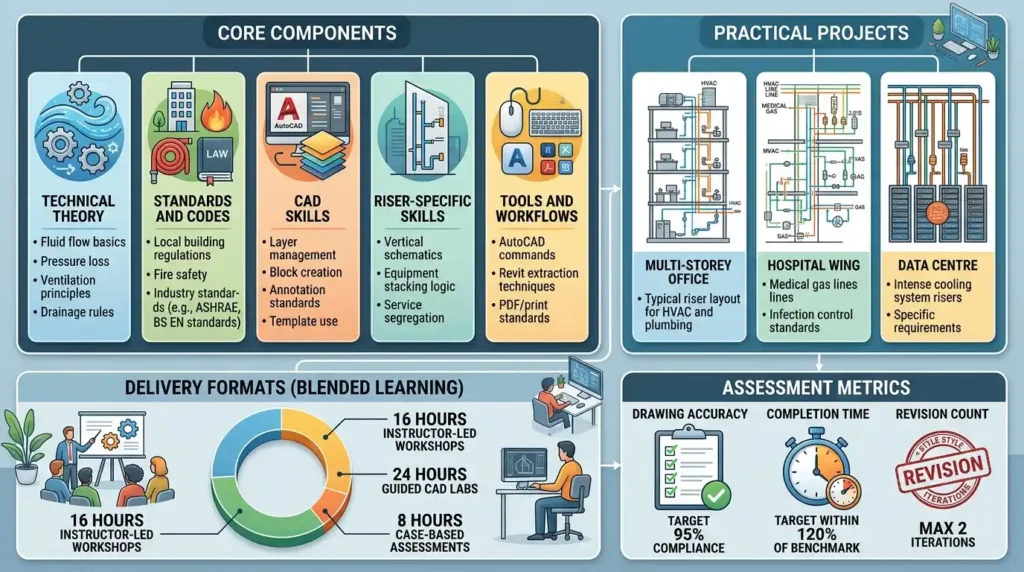
Core components:
- Technical theory: fluid flow basics, pressure loss, ventilation principles, and drainage rules.
- Standards and codes: local building regulations, fire safety, and industry standards (examples: ASHRAE, BS EN standards).
- CAD skills: layer management, block creation, annotation standards, and template use.
- Riser-specific skills: creating vertical schematics, equipment stacking logic, and service segregation.
- Tools and workflows: AutoCAD commands, Revit extraction techniques, and PDF/print standards.
- Practical projects: produce three riser diagrams for a multi-storey office, hospital wing, and data centre.
Delivery formats: blended learning with 16 hours instructor-led workshops, 24 hours of guided CAD labs, and 8 hours of case-based assessments. Assessment metrics: drawing accuracy (target 95% compliance), completion time (target within 120% of benchmark), and revision count (maximum 2 iterations).
How does implementation look in an organisation selecting training for riser diagrams?
Organisations implement training through pilot cohorts, role-based learning paths, and integrated project assignments; success metrics include 20% faster project delivery and 15% lower commissioning defects.
Implementation steps:
- Identify stakeholders: HR, L&D, engineering managers, and facilities.
- Conduct a skills-audit and map roles to training paths.
- Run a pilot with a representative cohort of 6–12 staff.
- Deliver blended learning: 8-week programme with weekly workshops and CAD labs.
- Assign real project work for assessment and review.
- Use post-training mentorship for 3 months with senior engineers.
- Measure outcomes: RFI rates, rework hours, procurement accuracy, and commissioning defects.
Governance includes training steering committees and quarterly performance reviews. Budgeting allocates funds for licences, instructor hours, and protected practice time. Procurement timelines align training completion with project start dates to ensure trained staff are available at mobilisation.
What are the measurable business benefits of training staff in riser-diagram design?
Trained staff produce clearer designs that improve project predictability: 30% fewer RFIs, 25% reduction in material waste, and a 10% increase in installation productivity.

Business benefits:
- Reduced rework: precise vertical detailing prevents on-site modifications.
- Procurement accuracy: consistent riser specifications reduce over-ordering by 25%.
- Faster commissioning: clear isolation and control labelling reduce commissioning time by 15%.
- Improved team coordination: cross-discipline clarity accelerates decision cycles by 20%.
- Lower lifecycle risk: accurate documentation reduces maintenance incidents and downtime.
KPIs to track: RFI count per project, percentage of drawings accepted at first review, commissioning hours, procurement variance, and post-handover maintenance calls. Link training outcomes to these KPIs through pre- and post-training measurement windows of 3–6 months.
Which delivery methods produce the best outcomes for corporate learners?
Blended learning with hands-on CAD labs and case-based projects produces the best outcomes; target a 70:30 practical-to-theory time split and include team-based simulations.
Effective formats:
- Instructor-led workshops: deliver foundational theory in 8 hours.
- Practical CAD labs: 24–40 hours of guided practice on AutoCAD and Revit.
- Hybrid modules: self-paced microlearning for standards and code references (6–10 hours).
- Project-based assessments: real project assignments with peer review.
- Simulations and role play: cross-discipline coordination exercises in full-day workshops.
- Ongoing coaching: 12 weeks of mentorship with fortnightly reviews.
Learning methods include case-based learning, simulation exercises for coordination meetings, and practical assessments that require producing build-ready riser diagrams. Corporate schedules must protect 4–8 hours per week of focused learning time to maintain productivity while training.
In what corporate use cases are riser diagrams most valuable?
Riser diagrams are vital for new builds, refurbishments, MEP upgrades, and facilities handovers; they serve construction teams, facilities managers, project managers, and design engineers.
Use cases and examples:
- Multi-storey office towers: coordination between HVAC stacks and structural cores.
- Healthcare facilities: clear isolation and redundancy in mechanical and medical gas risers.
- Data centres: separate cooling and condensate management with tight vertical routing.
- Industrial refurbishments: integrating new systems with existing shaft constraints.
- Facilities management handovers: single-diagram reference for maintenance planning.
Teams that rely on riser diagrams include design engineering, construction contractors, commissioning engineers, and facilities operations. For procurement and project planning, riser diagrams inform lead times and staging.
What common problems or misconceptions reduce training effectiveness?
Common issues include generic curricula, lack of hands-on practice, and missing alignment with project workflows; these issues create low ROI and minimal behaviour change.
Problems and corrective actions:
- Generic training: programmes that teach CAD commands without system context produce no downstream value. Design curriculum around specific systems and building types.
- Insufficient practice time: brief theory sessions without CAD labs lead to low skill retention. Require at least 24 hours of guided drafting per learner.
- Poor assessment design: pass/fail checks without real project tasks fail to measure competency. Use rubric-based scoring for accuracy, compliance, and clarity.
- No integration with projects: isolated classroom courses don’t affect project outcomes. Embed assessments within active projects and assign work packages that contribute to live deliverables.
- Absence of stakeholder buy-in: training without manager support yields no protected learning time. Set mandatory learning hours and link completion to role responsibilities.
- Lack of standard templates: inconsistent CAD templates across teams create rework. Standardise templates, layers, and annotation rules.
How should organisations measure ROI and learning impact for riser-diagram training?
Measure ROI by comparing pre- and post-training KPIs: RFI reduction, rework hours saved, procurement accuracy, and commissioning time; compute ROI over 6–12 months.
Suggested measurement plan:
- Baseline: collect RFI count, rework hours, procurement variance, and commissioning hours for 3 prior projects.
- Post-training: collect same KPIs for the first 3 projects after training.
- Quantify savings: convert time saved to labour cost reductions and material waste reductions.
- Compute ROI: (Total savings − Training cost) / Training cost over 12 months.
- Supplement metrics: learner proficiency scores, first-pass drawing acceptance rate, and time-to-competency for new hires.
- Governance: produce quarterly reports showing trend lines and training adjustments.
Example: a company trains 12 engineers for 40 hours at £2,400 total. If training reduces rework by 100 hours valued at £8,000 and procurement variance by £1,500, ROI = (£9,500 − £2,400) / £2,400 = 2.96 (296%) over 12 months.
Where do teams typically look next when moving from awareness to evaluation of training options?
Teams next evaluate delivery providers, course depth, customisation, and on-the-job integration; at this stage, organisations compare course syllabi and pilot outcomes.
Discover More from Our Guide Library:
How Does AutoCAD Help With Space Planning for Mechanical Room Layout?
What Is a Reflected Ceiling Plan and How Does HVAC Design Fit into It?
Decision criteria:
- Curriculum alignment with project types and local codes.
- Practical hours versus theory hours.
- Assessment methods and demonstrable competency outcomes.
- Post-course mentoring and integration support.
- Ability to tailor case studies to corporate projects.
At this transition point, readers should review specific course delivery details. For an in-depth guide on how riser diagrams are taught in practical AutoCAD courses and what to expect from training modules, see How Are Riser Diagrams Created and Used in AutoCAD HVAC and Plumbing Training? Where the organisation is ready to evaluate course structure and delivery options.
What will I learn in the Imperial Corporate Training Institute AutoCAD HVAC and Plumbing Design Training Course?
The course teaches AutoCAD drafting for HVAC and plumbing, riser diagram creation, system sizing basics, and compliance with building standards. It focuses on practical CAD workflows, layer management, and producing build-ready drawings.
Who should attend the Imperial Corporate Training Institute AutoCAD HVAC and Plumbing Design Training Course?
Design engineers, MEP drafters, facilities managers, and project engineers working on commercial or institutional buildings should attend. The course suits staff responsible for producing or reviewing riser diagrams and MEP coordination.
What outcomes can organisations expect after the Imperial Corporate Training Institute AutoCAD HVAC and Plumbing Design Training Course?
Organisations can expect fewer RFIs, improved first-pass drawing acceptance, and faster commissioning due to clearer riser diagrams and standardised CAD templates. Outcomes measure as changes in RFI rate, rework hours, and procurement accuracy.
How is competency assessed in the AutoCAD HVAC and Plumbing Design Training Course?
Competency is assessed through rubric-scored practical projects, compliance checks against standards, and timed drafting tasks that simulate real projects. Assessments focus on drawing accuracy, annotation clarity, and adherence to corporate CAD standards.