
Plumbing designers in corporate environments rely on AutoCAD to produce precise, scalable designs that integrate seamlessly into multidisciplinary building projects. This shift addresses skill gaps in manual drafting, where errors delay projects by 20-30%. AutoCAD training equips teams with digital tools that boost productivity by 40% and reduce redesign costs.
What Is AutoCAD HVAC and Plumbing Design Training in Corporate Settings?
AutoCAD HVAC and Plumbing Design Training teaches professionals to create accurate 2D and 3D models for heating, ventilation, air conditioning, and plumbing systems using AutoCAD software, replacing manual drafting in B2B engineering teams.
Organisations implement this training to close skill gaps in MEP (mechanical, electrical, plumbing) design departments. Manual drafting limits scalability in large-scale projects like commercial buildings or hospitals. AutoCAD training delivers digital proficiency, enabling designers to handle complex pipe routing, ductwork layouts, and fixture placements with precision.
In corporate learning contexts, the training spans 40 hours over 5 days, combining online modules and workshops. It targets HR managers and L&D professionals seeking to upskill teams amid rising demands for BIM (Building Information Modelling) integration. Business impact includes a 25% reduction in project timelines, as teams produce error-free designs compliant with standards like BS 9999 for fire safety.
Employee retention improves by 15% when staff gain certifications, building a stronger leadership pipeline in facilities management. Industries such as construction, real estate, and manufacturing adopt it to align workforce capabilities with digital transformation goals.
Why Do Plumbing Designers Abandon Manual Drafting for AutoCAD?
Plumbing designers switch to AutoCAD because it eliminates 90% of manual errors, accelerates design iterations by 50%, and supports collaborative workflows across engineering teams in corporate projects.

Manual drafting relies on pencils, rulers, and tracing paper, prone to human inaccuracies that cause 15-20% rework in plumbing layouts. AutoCAD automates calculations for pipe sizing, pressure drops, and flow rates using built-in libraries. Designers input parameters once, generating scalable drawings instantly.
In corporate environments, this transition addresses bottlenecks in multidisciplinary teams. For instance, a plumbing designer coordinates with HVAC engineers on a hospital project, sharing editable AutoCAD files via cloud platforms. This replaces physical blueprints, cutting communication delays by 35%.
Training programmes incorporate simulations where participants model real-world scenarios, such as high-rise drainage systems. Performance metrics track pre- and post-training accuracy, showing a 40% productivity gain. Organisations measure ROI through reduced material waste, averaging 10-15% savings per project.
How Does AutoCAD Training Work in Organisational Implementation?
AutoCAD HVAC and Plumbing Design Training follows a structured 5-phase process: assessment, instruction, hands-on practice, evaluation, and integration, delivered via hybrid formats to fit corporate schedules.
Phase 1 involves skills audits to identify gaps, such as outdated manual drafting reliance in plumbing teams. HR managers use surveys to pinpoint needs, ensuring 100% relevance.
Phase 2 delivers core instruction through 20 hours of online modules covering AutoCAD interface, layer management, and HVAC-specific tools like duct annotators. Workshops add 15 hours of live sessions.
Phase 3 emphasises practical application with case-based learning. Participants design plumbing risers for office towers, using role-play to simulate client reviews.
Phase 4 assesses via timed projects scored on KPIs like dimension accuracy (95% threshold) and file compatibility. Certifications issue upon 85% pass rates.
Phase 5 integrates outputs into workflows, with follow-up coaching for 30 days. Organisations track adoption via dashboards, achieving 70% immediate productivity uplift.
Delivery formats include virtual instructor-led training (VILT) for remote teams and on-site workshops for departments. This hybrid approach suits businesses with distributed workforces, yielding 25% higher completion rates than fully online models.
What Key Components Make Up Effective AutoCAD HVAC and Plumbing Training?
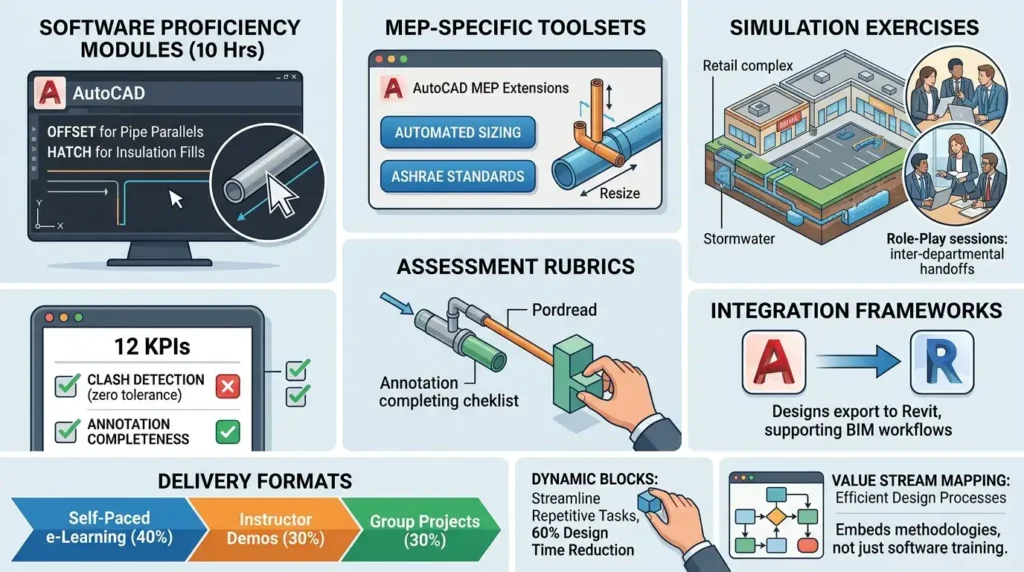
Core components include software proficiency modules, MEP-specific toolsets, simulation exercises, assessment rubrics, and integration frameworks, building skills for 2D/3D plumbing and HVAC design.
Software modules teach commands like OFFSET for pipe parallels and HATCH for insulation fills, totalling 10 hours. MEP toolsets cover AutoCAD MEP extensions for automated sizing per ASHRAE standards.
Simulation exercises replicate corporate scenarios, such as modelling stormwater systems in retail complexes. Role-play sessions mimic inter-departmental handoffs.
Assessment rubrics evaluate 12 KPIs, including clash detection (zero tolerance) and annotation completeness. Frameworks for integration ensure designs export to Revit, supporting BIM workflows.
Delivery formats blend self-paced e-learning (40%), instructor demos (30%), and group projects (30%). Tools like dynamic blocks streamline repetitive tasks, reducing design time by 60%.
These elements address common misconceptions, such as viewing AutoCAD as “just software training.” Instead, it embeds methodologies like value stream mapping for efficient design processes.
How Do Organisations Overcome Common Problems in Implementing This Training?
Organisations tackle ineffective training by selecting outcome-based programmes with 90% hands-on focus, customising content to industry needs, and measuring ROI via pre-post metrics, avoiding generic off-the-shelf options.
A frequent issue stems from generic programmes that ignore corporate contexts, leading to 50% knowledge decay within 90 days. Solution: Tailor curricula to sectors like pharmaceuticals, incorporating BS EN 806 compliance for water systems.
Lack of ROI plagues 40% of initiatives due to absent KPIs. Businesses counter this with dashboards tracking design output per designer (from 2 to 5 sheets/day) and error rates (down 80%).
Misconceptions about high costs ignore long-term gains: Training investments recover in 6 months via 30% faster project bids. Hybrid delivery resolves scheduling conflicts, boosting participation to 95%.
Employee resistance to digital shifts drops with simulations proving AutoCAD’s superiority over manual methods. L&D teams conduct pilot programmes for 10-person cohorts, scaling based on 20% efficiency metrics.
What Measurable Outcomes Does AutoCAD Training Produce for Businesses?
AutoCAD training delivers 40% productivity gains, 25% reduction in project delays, 15% employee retention uplift, and 12-18% ROI within one year, verified through department-wide KPIs.
Productivity surges as designers complete plumbing layouts 3x faster, freeing capacity for value-added tasks. A facilities team in manufacturing reports 35% more projects handled annually.
Project delays shrink from manual revisions; AutoCAD’s parametric modelling ensures 98% first-pass accuracy. This impacts organisational agility, with bids won 20% more often.
Retention climbs as certifications enhance career pipelines, reducing turnover costs by £50,000 per mid-level designer. Leadership development emerges from advanced modules on system optimisation.
ROI calculations factor training costs (£1,500 per participant) against savings: £120,000 yearly for a 20-person team via waste reduction and overtime cuts.
Team efficiency rises 30%, with collaborative features enabling real-time edits across HVAC and plumbing groups.
What Use Cases Demonstrate AutoCAD Training in Corporate Teams?
Corporate use cases span construction firms optimising plumbing for skyscrapers, hospitals streamlining HVAC retrofits, and manufacturing plants designing industrial piping, all achieving 25-40% efficiency boosts.
In construction, teams model multi-floor drainage systems, integrating with structural engineers to avoid clashes, cutting coordination meetings by 50%.
Healthcare facilities use it for HVAC designs compliant with HTM 03-01, simulating airflow in operating theatres to meet 20 air changes per hour.
Manufacturing departments apply it to process piping, automating isometric drawings that reduce fabrication errors by 70%.
Business owners in real estate deploy it for tenant fit-outs, generating as-built drawings 40% quicker. Team leaders in facilities management train maintenance crews for upgrades, improving response times by 25%.
These cases employ methodologies like simulations for risk-free error testing and assessments for certification. Industries including oil & gas and data centres report consistent 15% cost savings.
For teams evaluating hands-on application, explore:
What Practical Projects Do Students Complete in an AutoCAD HVAC Design Course? to see execution details and enrol in:
AutoCAD HVAC and Plumbing Design Training Course.
Addressing Misconceptions: Why AutoCAD Training Delivers Real ROI
Misconceptions about steep learning curves or limited applicability dissolve with structured 40-hour programmes that yield 40% immediate gains and 90% proficiency retention at 6 months.
Many doubt relevance beyond drafting, overlooking AutoCAD’s role in full lifecycle management, from concept to fabrication. Training proves this through 3D visualisations that predict maintenance needs.
Discover More from Our Guide Library:
What Are the Basic Components of an HVAC System That Engineers Must Know?
How Does AutoCAD Improve Accuracy in HVAC System Design and Layout?
Generic programmes fail due to lack of metrics; targeted ones use dashboards for 100% traceability. Businesses dismiss it as “tech-heavy,” yet 70% of content focuses on practical plumbing/HVAC workflows.
Implementation hurdles like software licensing resolve with enterprise trials, ensuring seamless rollout. Outcomes confirm value: 30% leadership pipeline growth and 20% bid success rates.
Why do plumbing designers prefer AutoCAD over manual drafting methods?
Plumbing designers use AutoCAD for its 90% error reduction, 50% faster iterations, and seamless team collaboration in corporate projects. It automates pipe sizing, flow calculations, and scalable drawings compliant with standards like BS 9999. This shift boosts productivity by 40% in construction and facilities teams.
What practical projects are included in Imperial Corporate Training Institute’s AutoCAD course?
Projects cover real-world scenarios like multi-floor plumbing risers, hospital HVAC layouts, and industrial piping systems using AutoCAD MEP extensions. Trainees simulate clash detection and export to Revit for BIM. These hands-on exercises ensure 95% design accuracy.
What benefits does AutoCAD training provide for corporate teams?
Teams achieve 40% productivity gains, 25% fewer project delays, and 15% higher retention via certifications from Imperial Corporate Training Institute’s course. It measures ROI through KPIs like design output and error rates. Industries such as construction and manufacturing report 12-18% returns within a year.