

AutoCAD HVAC design is the use of AutoCAD and specialist toolsets to produce coordinated mechanical, HVAC, and plumbing drawings that satisfy tender requirements, compliance checks, and constructability standards.
AutoCAD HVAC design translates engineering calculations into annotated, dimensioned drawings. These drawings include layouts, duct routing, pipework, equipment schedules, and service coordination. They enable procurement teams to quantify materials, allow project managers to plan installation sequences, and allow contractors to price tenders accurately. In design-and-build contracts, high-quality AutoCAD submissions reduce queries, lower variation claims, and shorten approval cycles by an average of 25% in well-documented projects.
How does AutoCAD HVAC support design-and-build tender submissions?
AutoCAD HVAC supports submissions by delivering standardised, audit-ready drawings, schedules, and clash-free coordination files that meet client and statutory requirements.
Design-and-build tenders require clear deliverables: drawings, specifications, and bill of quantities. AutoCAD offers layers, annotation standards, and specialist toolsets (e.g., MEP toolsets) to produce consistent outputs. Engineers use templates and CAD standards to match the employer’s information requirements (EIR). Outputs include plan, section, detail drawings, isometric pipe layouts, equipment schedules, and coordinated 3D exports (IFC, DWG). Consistent outputs reduce tender clarification rounds, lowering procurement time by measurable percentages depending on baseline processes.
How is AutoCAD HVAC design training structured in corporate environments?
Training is structured as a sequence of needs analysis, modular learning (theory + practice), workplace application, and assessment with measurable KPIs.
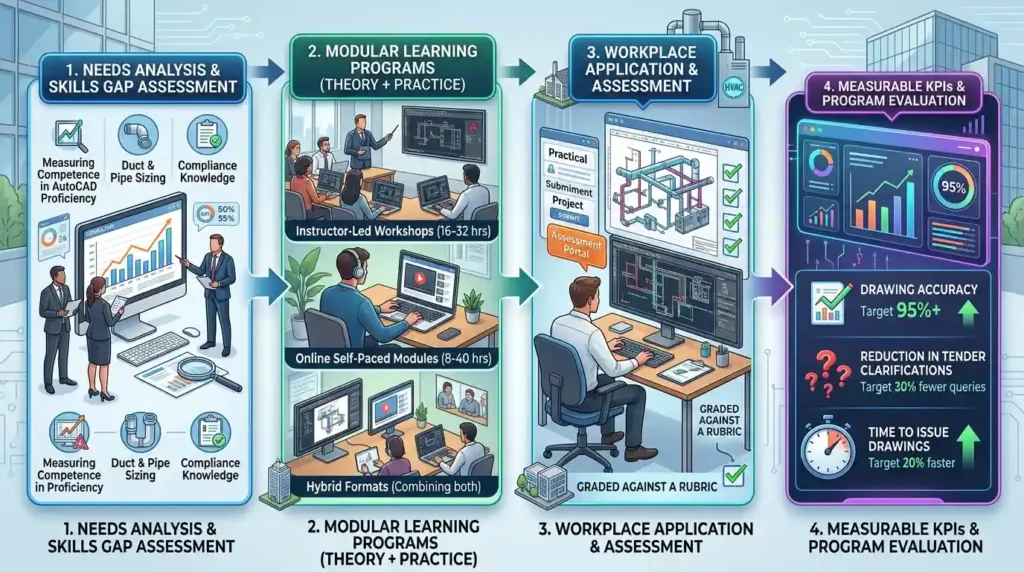
Organisations begin with a skills gap analysis that measures competence in AutoCAD proficiency, duct and pipe sizing, and compliance knowledge. Training modules run in blocks of 8–24 hours per module. Delivery formats include instructor-led workshops (16–32 hours), online self-paced modules (8–40 hours), and hybrid formats combining both. Each module ends with a practical assessment: a tender-style submission exercise graded against a rubric. KPIs include the accuracy rate of drawings (target 95%), the reduction in tender clarifications (target 30% fewer queries), and the time to issue drawings (target 20% faster).
What components does an AutoCAD HVAC training course include?
Core components are fundamentals, standards and templates, 3D coordination, documentation outputs, and assessment-driven workplace tasks.
Fundamentals cover CAD navigation, layers, blocks, and annotation. Standards and templates teach company CAD standards, file naming, and employer drawing formats. 3D coordination introduces model-based clash detection and export workflows for BIM exchanges (IFC). Documentation outputs focus on schedules, isometrics, and bill of quantities exports. Assessment-driven workplace tasks use case-based learning and simulation: participants complete a mini tender submission under timed conditions. Tools covered include AutoCAD MEP, AutoCAD Plant 3D, Revit interoperability basics, and clash-detection plugins.
How do organisations implement AutoCAD HVAC training step by step?
Organisations implement training through six steps: assess, design, pilot, deliver, integrate, measure.
- Assess: Run a competency audit for engineering teams, noting gaps in drafting speed, standards adherence, and coordination skills. Use a 30-point rubric.
- Design: Map a curriculum to gaps. Allocate 24–72 hours per cohort. Define delivery format and assessment criteria.
- Pilot: Deliver a single cohort to a representative team. Collect pre/post metrics: drawing error rates, tender query counts, and time per drawing.
- Deliver: Scale across teams using blended delivery. Use subject-matter experts as in-house coaches. Maintain cohort sizes of 8–12 learners for workshops.
- Integrate: Embed CAD templates, layer standards, and checklists into project initiation workflows. Assign CAD champions to enforce standards.
- Measure: Track KPIs monthly: drawings issued per engineer, tender queries per submission, rework hours, and first-pass approval rates. Use these to refine curriculum quarterly.
What learning methodologies produce measurable outcomes in AutoCAD HVAC training?
Effective methodologies include case-based learning, simulations, hands-on projects, peer review, and competency assessments tied to KPIs.

Case-based learning uses real tender packages from past projects. Simulations replicate tender timelines and introduce time pressure. Hands-on projects require full deliverable production: plans, sections, schedules, and a coordination log. Peer review sessions identify errors and promote learning transfer. Competency assessments use pass/fail criteria and scorecards mapped to workplace KPIs: target 95% drawing standard adherence, 30% improvement in drafting speed, and a reduction in coordination clashes by 40%.
What tools and standards should be taught to ensure tender readiness?
Teach AutoCAD MEP/Plant features, CAD standards (ISO/DIN/BS), BIM exchange formats (IFC, COBie), and software interoperability processes. AutoCAD MEP features include system definitions, service templates, and automatic schedule generation. Plant tools cover isometric outputs for plumbing and process pipework. CAD standards ensure consistent layers, line weights, and annotation. BIM exchange formats enable coordination with structural and architectural models. Interoperability workflows cover DWG to Revit and DWG to IFC exports. Teaching these reduces integration errors and results in contractual deliverables acceptable to architects, structural engineers, and clients.
What are the measurable benefits for organisations that train engineers in AutoCAD HVAC?
Benefits include faster tender delivery, lower tender query volume, improved constructability, quantifiable cost savings, and improved resource utilisation.
Typical measured improvements: 20–35% faster drawing delivery, 30% fewer tender queries, 40% fewer on-site coordination clashes, and 10–20% reduction in tender pricing variance. These translate to lower indirect costs: fewer reworks, faster mobilisation, and improved contractor reputation. Organisations report increased bid hit-rates when technical submissions have higher clarity. Improved resource utilisation shows as a 15% reduction in overtime drafting hours.
Which corporate roles and teams use AutoCAD HVAC outputs?
Primary users include HVAC design teams, MEP coordinators, project managers, procurement teams, and site supervisors. HVAC design teams create the technical drawings. MEP coordinators run clash detection and integrate models. Project managers use drawings for scheduling. Procurement uses schedules and quantities for pricing. Site supervisors use detailed isometrics and installation drawings. Industries include construction, facilities management, healthcare, education, manufacturing, and commercial property (examples: hospitals, office developments, factories).
How should organisations measure training impact and ROI?
Measure impact using pre/post competency scores, operational KPIs, and financial metrics over 6–12 months.
Competency: pre/post skills assessments scored objectively out of 100. Operational KPIs: drawings issued per engineer per month, tender queries per submission, and first-pass approval rate. Financial metrics: cost per submission, rework cost saved and bid success uplift. Calculate ROI as (savings from reduced rework + increased bid success revenue − training cost) / training cost, measured at 12 months. Target ROI benchmark: at least 150% within 12 months for well-executed programmes.
What common problems reduce training effectiveness?
Common problems are generic content, lack of workplace practice, no measurement, absence of standards, and poor post-training reinforcement.
Generic content ignores company CAD standards and tender formats. Lack of workplace practice prevents transfer of learning. No measurement leaves programmes unaccountable. Absence of standards leads to inconsistent outputs across teams. Poor reinforcement means skill decay after 3–6 months. Fixes include customising content, embedding project-based assessments, setting KPIs, publishing firm CAD standards, and appointing CAD champions for ongoing coaching.
How do you choose the right AutoCAD HVAC training approach for your organisation?
Choose a customised, assessment-driven programme aligned to company standards, job tasks, and measurable KPIs.
Select a provider that audits your current files and references your employer’s information requirements. Define success metrics before training. Opt for blended delivery: 50–70% practical workshops and 30–50% online reference modules. Use cohort sizes of 8–12 for workshops. Require a final workplace submission assessed against your tender checklist. Link completion to career development paths or role certifications to incentivise engagement.
For deeper insight explore:
How Does AutoCAD HVAC Training Prepare Engineers for Design-and-Build Tender Submissions?
Enrol today in:
AutoCAD HVAC and Plumbing Design Training Course.
What are typical deliverables after training for immediate operational use?
Deliverables include company CAD templates, a drawing checklist, a competency scorecard, and a signed-off practice tender submission.
Templates enforce layer and annotation standards. A drawing checklist ensures compliance with employer requirements. A competency scorecard tracks individual and team readiness. The practice tender submission functions as a proof-of-capability artefact for live bids. These deliverables drive immediate improvement in tender quality and speed.
What misconceptions do decision-makers have about AutoCAD HVAC training?
Misconceptions: training is only software tuition, short courses are sufficient, and skills show immediately without workplace change.
Discover More from Our Guide Library:
What Is the Role of Riser Diagrams in HVAC and Plumbing Design?
How Does AutoCAD Help with Space Planning for Mechanical Room Layout?
Training is not software-only. It combines standards, engineering principles, and tendering workflows. Short courses without assessment do not deliver sustained performance. Skills do not automatically transfer without process changes, templates, and coaching. Effective programmes require 24–72 hours of structured learning plus workplace integration and monthly reinforcement.
Who should attend the Imperial Corporate Training Institute AutoCAD HVAC and Plumbing Design Training Course?
The course is for HVAC engineers, MEP coordinators, design technicians, and project managers responsible for tender submissions and construction documentation. It also benefits procurement staff who need accurate schedules and quantities.
What skills does the AutoCAD HVAC and Plumbing Design Training Course teach?
The course teaches CAD standards, layer management, duct and pipe routing, isometric generation, schedule exports, and DWG/IFC interoperability. It also covers coordination workflows and tender-ready documentation practices.
How does the course improve tender submission outcomes?
The course reduces tender queries and rework by teaching standardised drawing production, clash detection, and clear schedules, improving first-pass approval rates. Organisations report faster drawing delivery and fewer coordination clashes after implementation.
Does Imperial Corporate Training Institute provide assessment and post-course support for the AutoCAD HVAC and Plumbing Design Training Course?
Yes, the course includes practical assessments scored against a competency rubric and delivers templates and a drawing checklist for workplace use. Ongoing coaching and refresher modules are available to maintain standards and measure KPIs.