

AutoCAD blocks and attributes standardise repetitive drawing elements, reduce drafting time by 30%–50%, improve drawing accuracy, and support structured data management across MEP projects. Organisations use them to maintain consistency, accelerate revisions, and improve coordination between engineering, procurement, and facility management teams.
Mechanical, Electrical, and Plumbing (MEP) projects involve thousands of repetitive components. These include HVAC diffusers, valves, dampers, pumps, lighting fixtures, pipe fittings, and equipment schedules. Manual drafting of these components increases design time and introduces inconsistencies across project files.
AutoCAD blocks solve this problem by converting repeated objects into reusable graphical components. A draughtsman inserts the block instead of redrawing the object every time. Attributes extend this functionality by attaching editable information to the block. This information includes equipment IDs, airflow rates, duct sizes, pressure classes, manufacturer references, and maintenance codes.
In corporate environments, standardisation directly affects operational efficiency. Engineering consultancies, construction firms, and facilities management teams rely on drawing consistency for procurement accuracy, clash detection, and maintenance planning. A standard HVAC symbol library reduces variation across teams working on projects in industries like healthcare, oil and gas, manufacturing, and commercial real estate.
Large organisations often manage more than 500 active AutoCAD blocks within a single MEP standards library. These libraries support multi-office collaboration and reduce onboarding time for new draughtsmen. Standard naming conventions also improve document control and revision tracking.
From a workforce development perspective, AutoCAD competency is no longer limited to drawing creation. Organisations require draughtsmen to understand data-driven drafting systems, BIM coordination processes, and structured documentation standards.
How do AutoCAD blocks function in MEP design projects?
AutoCAD blocks function as reusable drafting objects that store geometry, properties, and metadata within a single component. MEP teams use them to create scalable design systems, simplify revisions, and automate repetitive documentation tasks across HVAC and plumbing projects.
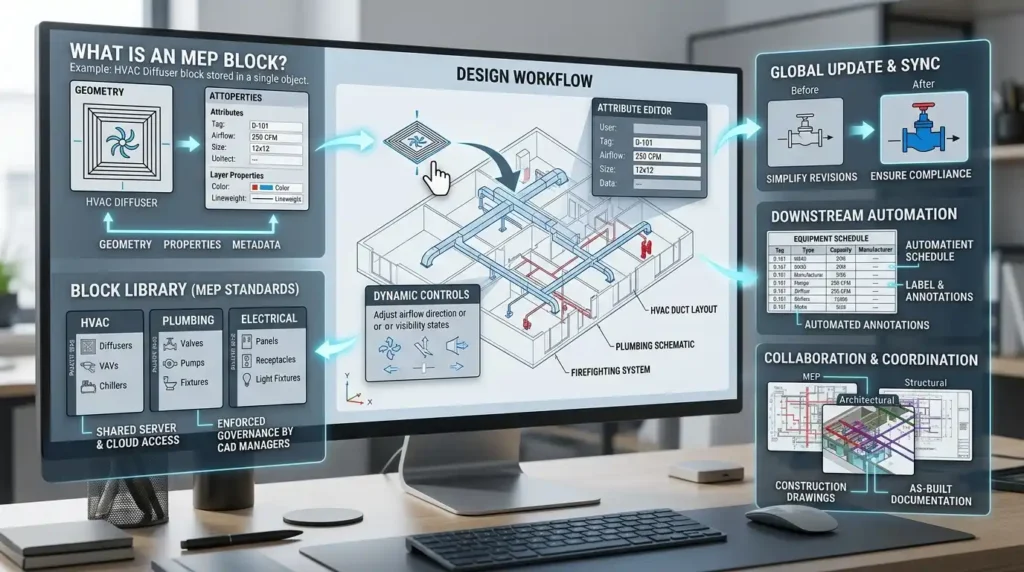
A block contains grouped drawing entities treated as one object. Instead of handling individual lines, circles, and annotations separately, the draughtsman manipulates a single unit.
For example, an HVAC diffuser block includes:
Geometry
The graphical representation of the diffuser, including dimensions and airflow direction symbols.
Layer Properties
Predefined colours, line weights, and plotting standards aligned with organisational CAD protocols.
Annotation Standards
Text styles, tags, and scaling configurations for documentation consistency.
Attribute Data
Embedded editable fields such as diffuser number, airflow capacity, and installation reference.
When a draughtsman inserts the block, AutoCAD preserves all settings automatically. This improves accuracy across large-scale projects containing hundreds of repeated components.
Blocks also support centralised updates. If an engineering company changes a standard valve symbol, the updated block automatically synchronises across drawings. This reduces manual correction work and ensures compliance with revised engineering standards.
In practical project environments, MEP draughtsmen use blocks during:
- HVAC duct layout design
- Plumbing schematic drafting
- Firefighting system documentation
- Equipment scheduling
- Construction coordination drawings
- As-built documentation
Corporate CAD managers typically enforce standard block libraries through shared servers or cloud-based document management systems. This governance structure improves collaboration between architects, structural engineers, and MEP teams.
How do attributes improve data management in AutoCAD MEP drawings?
Attributes convert graphical blocks into structured information assets by embedding editable metadata inside drawing objects. Organisations use attributes to automate schedules, improve equipment tracking, support BIM integration, and reduce manual documentation errors by up to 40%.
An attribute is a text field attached to a block. Unlike ordinary text, the attribute stores structured data that AutoCAD extracts into schedules and reports.
For example, a chilled water pump block includes attributes such as:
- Equipment ID
- Flow rate
- Motor power
- Voltage
- Manufacturer
- Maintenance zone
- Installation level
This structure transforms the drawing into a connected information system rather than a static graphic.
In commercial construction projects, attribute data supports procurement and commissioning activities. Quantity surveyors extract equipment lists directly from drawings. Facilities management teams later use the same data for maintenance planning and asset lifecycle management.
Attributes also support quality control. Standard attribute fields ensure every draughtsman follows the same documentation process. Missing data becomes easier to identify during design reviews.
Modern MEP organisations increasingly integrate AutoCAD outputs with BIM workflows. Attribute data acts as an intermediate layer between 2D drafting and digital asset management systems.
Training teams therefore focus on both drafting accuracy and data discipline. Draughtsmen learn how attribute consistency affects downstream operations such as procurement, commissioning, and facility maintenance.
How do organisations train MEP draughtsmen to use blocks and attributes efficiently?
Organisations train MEP draughtsmen through structured learning pathways that combine software instruction, CAD standards, simulation projects, and workflow-based assessments. Training focuses on productivity, documentation consistency, and cross-disciplinary coordination within real engineering environments.
Corporate AutoCAD training follows a layered progression model. Training programmes generally run between 20 and 60 instructional hours depending on workforce requirements and existing skill levels.
The training process typically includes:
Foundation Training
Participants learn AutoCAD interface navigation, coordinate systems, layers, annotation tools, and drawing setup procedures.
Block Creation and Management
Draughtsmen learn how to create reusable MEP blocks, assign insertion points, define scaling behaviour, and organise corporate symbol libraries.
Attribute Definition
Training covers attribute tags, prompts, default values, extraction workflows, and scheduling methods.
Dynamic Block Functionality
Participants learn how to create intelligent blocks with adjustable dimensions, visibility states, and stretch parameters.
Project-Based Simulation
Learners complete HVAC and plumbing drafting exercises that replicate real commercial projects.
Performance Assessment
Assessment methods include timed drafting exercises, CAD standard compliance reviews, and revision management tasks.
Training delivery formats vary according to organisational structure. Large enterprises often use blended learning models combining instructor-led workshops, virtual labs, and recorded modules. Engineering consultancies frequently use case-based learning aligned with live project workflows.
The transition from awareness to implementation often requires deeper understanding of dynamic drafting systems and structured workflows.
This is where readers typically explore:
How Are Blocks, Attributes and Dynamic Components Taught in AutoCAD HVAC Training?
For deeper insight, enrol in:
AutoCAD HVAC and Plumbing Design Training Course.
Training effectiveness is measured through operational KPIs such as:
- Drawing completion speed
- Revision reduction rates
- CAD standard compliance
- Coordination error frequency
- Rework hours
- Project delivery timelines
Many organisations report measurable productivity improvements within 90 days of structured AutoCAD workflow training implementation.
What are dynamic blocks and why are they important in HVAC drafting?
Dynamic blocks allow draughtsmen to modify size, orientation, visibility, and configuration within a single block definition. HVAC teams use them to reduce library duplication, simplify revisions, and improve drafting flexibility across complex building systems.
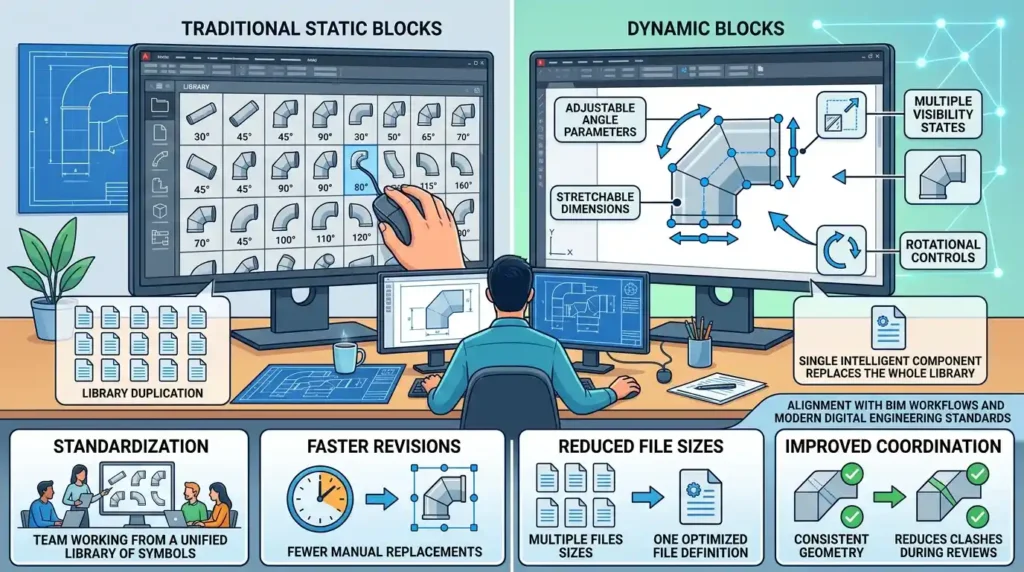
Traditional blocks remain static after insertion. Dynamic blocks introduce adjustable parameters and actions that adapt the block without creating multiple versions.
For example, a duct elbow dynamic block includes:
- Adjustable angle parameters
- Stretchable dimensions
- Multiple visibility states
- Rotational controls
- Connection alignment features
Instead of storing 20 separate elbow blocks, the draughtsman uses one intelligent component.
This capability significantly improves workflow efficiency in large commercial projects. Office towers, hospitals, and industrial facilities contain extensive HVAC layouts with constant dimensional variations. Dynamic blocks reduce drafting interruptions and minimise library management complexity.
From an organisational perspective, dynamic components support:
Standardisation
Teams work from unified intelligent libraries instead of fragmented symbol collections.
Faster Revisions
Design modifications require fewer manual replacements.
Reduced File Sizes
Single dynamic definitions replace multiple static variations.
Improved Coordination
Consistent geometry reduces clashes during multidisciplinary reviews.
Corporate training programmes increasingly prioritise dynamic drafting because engineering firms are transitioning towards integrated BIM workflows. Intelligent object behaviour aligns more closely with modern digital engineering standards.
What common problems affect AutoCAD block management in organisations?
Poor block management creates inconsistent documentation, duplicate libraries, revision conflicts, and inefficient drafting workflows. Organisations address these problems through CAD governance standards, structured training, and centralised library management systems.
Many companies accumulate disorganised CAD content over several years. Different teams create separate versions of identical components, resulting in inconsistent documentation standards.
Common operational problems include:
Duplicate Block Libraries
Different departments maintain conflicting symbol standards for the same equipment.
Incorrect Attribute Structures
Missing or inconsistent attribute tags prevent automated scheduling.
Uncontrolled Dynamic Parameters
Improper dynamic configurations create unstable drawing behaviour.
Non-Standard Naming Conventions
Inconsistent file names complicate library searches and document management.
Excessive File Sizes
Poorly optimised blocks increase project loading times and reduce system performance.
These issues affect project delivery timelines and coordination quality. In multidisciplinary environments, inconsistent drafting standards increase clashes between architectural, structural, and MEP systems.
Organisations solve these problems through governance frameworks that include:
- CAD standard manuals
- Centralised block repositories
- Approval procedures for new symbols
- Version control systems
- Periodic quality audits
- Role-specific competency training
Training departments also establish competency benchmarks for draughtsmen. Standard assessment criteria improve workforce consistency across offices and project teams.
How do AutoCAD blocks support collaboration between departments?
AutoCAD blocks improve interdisciplinary collaboration by creating standardised visual and data-driven communication systems between engineering, procurement, operations, and facilities management teams. Structured CAD workflows reduce coordination conflicts and improve project transparency across departments.
MEP projects involve multiple stakeholders working simultaneously. HVAC engineers, plumbing designers, electrical consultants, procurement specialists, and construction managers all depend on coordinated technical information.
Blocks create consistency across these interactions.
For example, a standard air handling unit block includes graphical symbols, airflow data, equipment references, and maintenance access clearances. Every department interprets the same information from a shared drafting standard.
This consistency improves:
Procurement Coordination
Equipment schedules extract directly from attribute data.
Construction Planning
Site teams interpret installation layouts more accurately.
Facility Management
Maintenance teams access structured asset information after project completion.
Quality Assurance
Review teams identify documentation inconsistencies more efficiently.
Large organisations frequently integrate AutoCAD workflows into enterprise systems such as BIM platforms, asset management databases, and document control software.
This integration requires draughtsmen to understand not only drawing production but also information management principles. Corporate training therefore combines technical drafting with workflow awareness and cross-functional communication practices.
What measurable outcomes do organisations achieve from structured AutoCAD HVAC training?
Structured AutoCAD HVAC training improves drafting productivity, reduces documentation errors, accelerates project delivery, and strengthens workforce standardisation. Organisations measure outcomes using KPIs related to efficiency, coordination quality, and operational consistency across engineering teams.
Training outcomes become measurable when organisations align learning objectives with operational performance indicators.
Common organisational improvements include:
Faster Drawing Production
Teams complete repetitive drafting tasks 30%–50% faster using standard block libraries.
Reduced Rework
Consistent attribute structures reduce documentation corrections during design reviews.
Improved Coordination Accuracy
Standardised symbols reduce clashes during multidisciplinary project coordination.
Better Knowledge Retention
Simulation-based learning improves long-term workflow adoption compared with lecture-only training.
Stronger Workforce Scalability
Standard workflows simplify onboarding for new draughtsmen across multiple office locations.
Discover More from Our Guide Library:
What Is a P&ID and How Is It Different from an HVAC Layout Drawing?
How Is Hot Water and Heating System Design Created in AutoCAD Drawings?
Industries like healthcare, manufacturing, aviation, and commercial real estate particularly benefit from structured MEP drafting standards because of their high compliance and coordination requirements.
Modern workforce development strategies increasingly prioritise practical software competency linked directly to operational outcomes. AutoCAD training therefore functions as both a technical skills initiative and a business process improvement strategy.
Who should attend an AutoCAD HVAC and Plumbing Design Training Course?
The AutoCAD HVAC and Plumbing Design Training Course is suitable for MEP draughtsmen, HVAC technicians, mechanical engineers, site supervisors, and facilities management teams. Organisations also use this training to improve CAD drafting standards and technical coordination across engineering departments.
How does AutoCAD HVAC training improve workplace productivity?
AutoCAD HVAC training improves drawing accuracy, reduces repetitive drafting work, and standardises MEP documentation processes. Imperial Corporate Training Institute focuses on practical AutoCAD workflows that help teams complete HVAC and plumbing layouts faster while reducing revision errors.
Are AutoCAD blocks and dynamic components taught in HVAC drafting training?
Yes, the AutoCAD HVAC and Plumbing Design Training Course includes training on AutoCAD blocks, attributes, and dynamic components. Learners use these tools to create reusable HVAC symbols, automate schedules, and improve drafting efficiency in large building projects.
What industries use AutoCAD HVAC and plumbing design skills?
Industries like construction, oil and gas, healthcare, manufacturing, hospitality, and commercial real estate use AutoCAD HVAC and plumbing design skills for MEP project delivery. Imperial Corporate Training Institute aligns training with real workplace requirements found in engineering consultancies and building services companies.