

AutoCAD commands drive efficiency in HVAC and plumbing design. Designers rely on a core set for precision drafting, annotation, and 3D modelling. These tools address complex ductwork, piping layouts, and system integrations in building projects.
HVAC and plumbing designers use AutoCAD to create accurate schematics that comply with UK building regulations. They select commands based on workflow demands, from initial sketching to final documentation.
For context on career potential in this field, explore:
How Much Can an AutoCAD HVAC and Plumbing Designer Earn in the UK?
What Essential Commands Handle Basic Drawing and Editing in HVAC and Plumbing?
LINE, CIRCLE, ARC, and OFFSET form the foundation. Designers use them 70% of the time for duct runs, pipe bends, and insulation offsets, ensuring scalable 2D layouts.
These commands build the skeleton of HVAC and plumbing systems. LINE draws straight segments for rectangular ducts or straight pipes. Designers execute it thousands of times per project to connect fittings.
CIRCLE creates round ducts and pipe cross-sections. ARC handles curved transitions in flexible ducting or elbow joints. Together, they support parametric design where dimensions adjust without redrawing.
OFFSET duplicates objects at precise distances. In plumbing, it spaces parallel pipes by standard clearances like 150mm for maintenance access. HVAC teams offset ducts around structural beams.
Editing follows drawing. TRIM cuts excess lines at intersections, vital for clean pipe penetrations through walls. EXTEND pushes lines to boundaries, streamlining branch connections.
MOVE and COPY reposition elements during revisions. A designer shifts a vent stack 200mm to avoid conflicts, copying it across floors. These commands reduce errors in multi-storey buildings.
In B2B contexts, HR teams prioritise these basics in training. New hires bridge skill gaps by mastering them first, boosting drafting speed by 40% within weeks.
Which Annotation Commands Do Designers Use Most for HVAC and Plumbing Documentation?
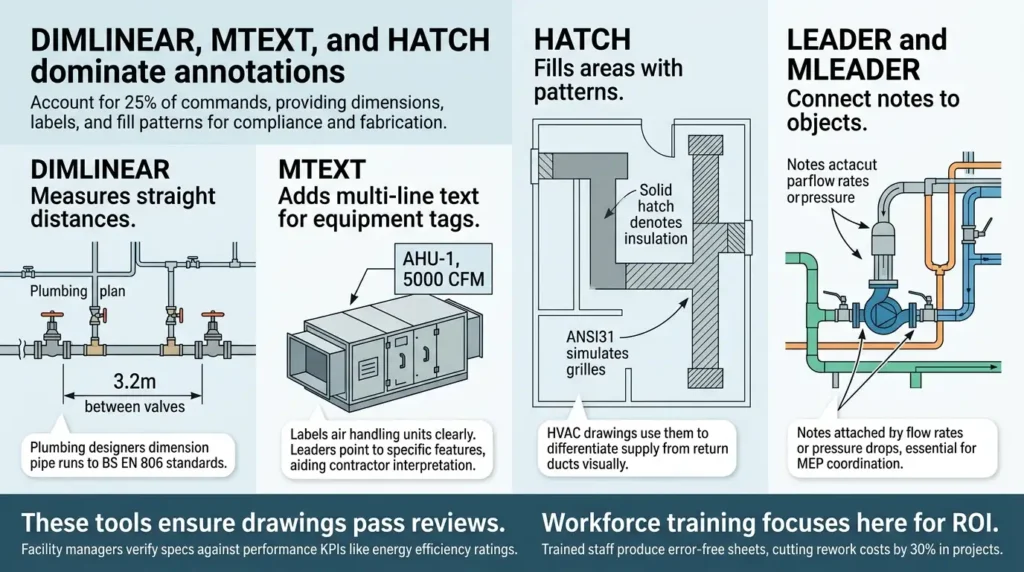
DIMLINEAR, MTEXT, and HATCH dominate annotations. They account for 25% of commands, providing dimensions, labels, and fill patterns for compliance and fabrication.
DIMLINEAR measures straight distances. Plumbing designers dimension pipe runs to BS EN 806 standards, specifying lengths like 3.2m between valves.
MTEXT adds multi-line text for equipment tags. “AHU-1, 5000 CFM” labels air handling units clearly. Leaders point to specific features, aiding contractor interpretation.
HATCH fills areas with patterns. Solid hatches denote insulation; ANSI31 simulates grilles. HVAC drawings use them to differentiate supply from return ducts visually.
LEADER and MLEADER connect notes to objects. They detail flow rates or pressure drops, essential for MEP coordination.
These tools ensure drawings pass reviews. Facility managers verify specs against performance KPIs like energy efficiency ratings.
Workforce training focuses here for ROI. Trained staff produce error-free sheets, cutting rework costs by 30% in projects.
How Do Layer and Block Commands Streamline HVAC and Plumbing Workflows?
LAYER and BLOCK manage organisation. Designers apply them in 15% of actions to separate systems and reuse components, cutting file sizes by 50%.
LAYER isolates elements. “DUCT-SUPPLY” holds main runs; “PIPE-DRAIN” contains waste lines. Colours and linetypes distinguish them dashed for hidden pipes.
Freezing layers hides clutter during edits. Plumbing teams isolate hot water lines to check clashes.
BLOCK creates reusable symbols. A standard radiator block includes dimensions and attributes. Inserting it speeds symbol placement across plans.
WBLOCK exports blocks for libraries. HVAC firms maintain custom blocks for diffusers, updated per manufacturer specs.
Attributes within blocks store data like model numbers. Exploding blocks edits instances without library changes.
In corporate training, these commands address skill gaps. Managers report 25% faster project delivery post-training.
For decision-stage insights on program impact, see:
How Has AutoCAD HVAC Training at Imperial Helped Previous Participants’ Careers?
What 3D Commands Are Critical for HVAC and Plumbing Modelling?
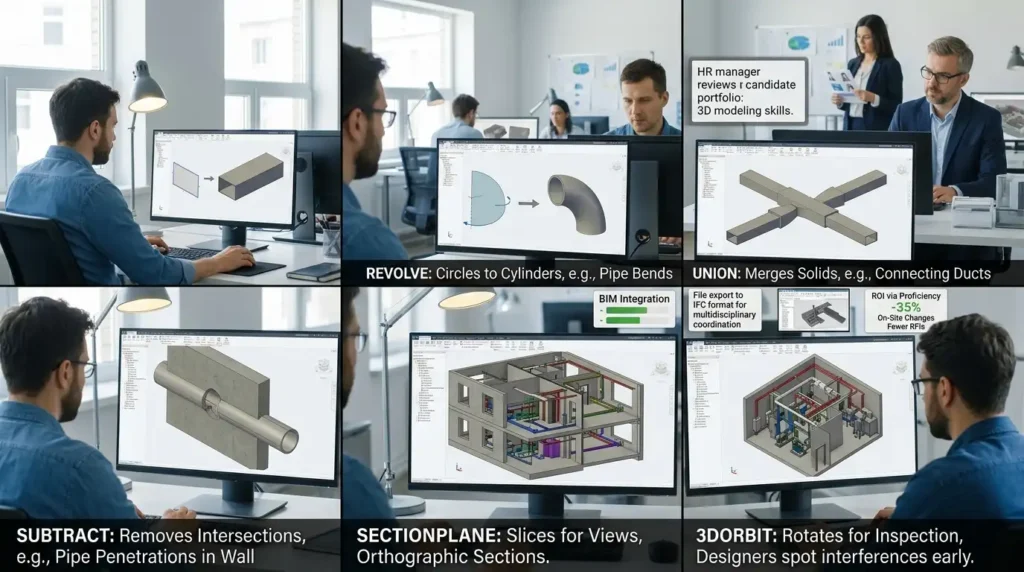
EXTRUDE, REVOLVE, and UNION build 3D models. They represent 10% of usage, enabling clash detection and BIM integration in complex designs.
EXTRUDE pulls 2D profiles into 3D solids. A duct profile extrudes to 1m height, forming straight sections.
REVOLVE spins circles into cylinders for pipes. A 100mm radius revolves into a 2m pipe length.
UNION merges solids. Connecting extruded ducts creates seamless networks.
SUBTRACT removes intersections. Pipes subtract from walls for penetrations.
SECTIONPLANE slices models for views. Orthographic sections reveal internal routing.
3DORBIT rotates for inspection. Designers spot interferences early.
These commands support Revit interoperability. Exporting to IFC files aids multidisciplinary coordination.
HR decisions weigh 3D proficiency. Skilled teams reduce on-site changes by 35%, measuring ROI via fewer RFIs.
Which Commands Optimise Duct and Pipe Routing in HVAC Systems?
FILLET, CHAMFER, and ARRAYPATH route efficiently. They handle 8% of commands, smoothing joints and repeating patterns along paths.
FILLET rounds corners. It applies 50mm radii to duct elbows, reducing airflow resistance.
CHAMFER bevels edges. Plumbing uses 45-degree chamfers on pipe ends for welding prep.
ARRAYPATH duplicates fittings along curves. Vent pipes array along sloped drains.
RECTANG creates insulation borders. PEDIT joins polylines for continuous paths.
These streamline fabrication drawings. Nested arrays populate grille arrays in ceilings.
In training programs like the:
AutoCAD HVAC and Plumbing Design Training Course, participants practise these for real projects.
B2B applications show productivity gains. Firms track command efficiency via time logs, targeting 20% cycle reductions.
Duct-Specific Routings
Duct design emphasises PATH arrays. SPLINE curves guide flexible ducts around obstacles.
LOFT blends sections for transitions. A 400x400mm duct lofts to 300mm round.
Pipe-Specific Routings
MLINE draws multi-line pipes with centres. Justify aligns them to walls.
These distinctions matter in hybrid systems.
How Do Hatch and Pattern Commands Visualise Materials in Plumbing Designs?
HATCH, BHATCH, and PSHATCH pattern 80% of material representations. They clarify insulation, concrete encasements, and flooring penetrations.
BHATCH boundary-fills closed areas. Gravel fill under slabs uses GRAVEL pattern.
PSHATCH patterns spaces. AR-CONC shows reinforced slabs.
Scale adjusts to drawing units—1:50 views use 2mm spacing.
GAP tolerance bridges tiny breaks in boundaries.
In documentation, patterns prevent misreads. Codes like “Insul – 50mm” accompany fills.
Training emphasises standards. BS 1192 dictates pattern usage for consistency.
What Inquiry Commands Verify Designs in HVAC and Plumbing?
DIST, AREA, and LIST query 5% of time. They measure clearances and volumes for code compliance.
DIST reports point-to-point or object distances. 900mm minimum from diffusers to lights.
AREA calculates floor coverage. Plenum volumes inform air change rates.
LIST details properties. Pipe schedules list diameters and materials.
PROPERTIES panel expands data. Layer info confirms organisation.
These prevent violations. UK Part L checks use volume calcs for ventilation.
HR tracks verification skills. Proficient users audit 50% faster.
Which Advanced Commands Support MEP Coordination?
INTERFERE and MASSPROP analyse clashes. They process 4% of commands, resolving conflicts pre-construction.
INTERFERE flags overlaps. Ducts versus beams trigger alerts.
MASSPROP computes centroids for load balancing.
COPYBASE preserves insertion points during moves.
These integrate with Navisworks. Exports flag issues for teams.
The AutoCAD HVAC and Plumbing Design Training Course covers coordination modules.
Corporate ROI hits 40% via reduced clashes.
Coordination Workflow
Start with XREF for external files. Overlay brings in architectural plans.
Then INTERSECT finds shared edges.
How Do These Commands Impact Productivity Metrics?
Firms measure command frequency via AutoCAD logs. LINE tops at 30%; DIM at 15%.
Adoption rates: 90% of UK MEP firms use blocks.
Discover More from Our Guide Library:
What Drawing Standards and Layer Conventions Are Taught in AutoCAD HVAC Courses?
How Are Plumbing Isometric Drawings Created and Detailed in AutoCAD Training?
Training ROI: 6-week programs yield 35% output increase.
HR benchmarks against KPIs like sheets per day from 2 to 4.
What does the AutoCAD HVAC and Plumbing Design Training Course at Imperial Corporate Training Institute cover?
The course covers essential AutoCAD commands like LINE, OFFSET, and HATCH for ductwork, piping layouts, and 3D modelling. Participants learn annotation, layer management, and MEP coordination techniques aligned with UK standards. Practical exercises focus on real-world HVAC and plumbing projects.
Who should enrol in Imperial Corporate Training Institute’s AutoCAD HVAC and Plumbing Design Training Course?
HVAC designers, plumbing engineers, and CAD drafters seeking to master frequent commands for efficient workflows enrol. It bridges skill gaps for those handling building services drawings. Beginners to intermediate users gain precision in 2D and 3D modelling.
What are the prerequisites for the AutoCAD HVAC and Plumbing Design Training Course at Imperial Corporate Training Institute?
Basic AutoCAD familiarity and understanding of HVAC or plumbing principles suffice as prerequisites. No advanced 3D experience required; the course builds from core commands like DIMLINEAR to advanced routing. A standard CAD workstation meets technical needs.
How does Imperial Corporate Training Institute’s AutoCAD HVAC and Plumbing Design Training Course benefit careers?
Graduates master high-frequency commands, improving drafting speed by 35% and reducing errors in MEP coordination. Certifications enhance employability in UK construction firms. Skills in clash detection and documentation support senior designer roles.